Need help?
Do you have a question about the Intellian V110 and is the answer not in the manual?
Introduction to the Intellian v110 marine VSAT communication system.
Diagram and explanation of the basic satellite communication system setup.
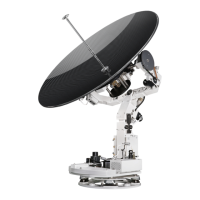
Details the Antenna Unit and Antenna Control Unit (ACU) components.
Lists the items included in the installation kit for the antenna.
Lists the necessary tools for the physical installation of the antenna.
Guidelines for selecting an optimal antenna installation location.
Steps for unpacking, preparing, and mounting the antenna.
Guidance on routing and securing system cables, including RF and power.
Details on making proper RF cable connections on the power switch box.
Information on ACU physical dimensions and suitable installation locations.
Instructions for mounting the ACU using rack or table brackets.
Procedure for connecting the ship's gyrocompass to the ACU.
Pinout details for ACU Synchro/SBS and Control connectors.
Overview of ACU operational modes: Normal and Setup.
Guides through initial setup of satellite, GPS, and system parameters.
Explanation of ACU front panel soft keys and their operational uses.
Steps for system startup and monitoring antenna status.
Procedures for manual search, skew angle, and search parameters.
How to perform and interpret antenna diagnostic tests.
Instructions for loading, editing, and adding satellite information.
Configuration of LNB local frequency, location, and modem port.
Introduction to the GUI software for antenna setup and monitoring.
Steps for setting up serial or network communication.
Explanation of the PC Controller's main menu and controller functions.
How to set up GPS, heading, and track satellite information using the PC.
Configuring tracking parameters, block zones, and performing diagnosis.
Details of the product's limited warranty terms and conditions.
General information including approvals, dimensions, and weight.
Technical performance data for the antenna system.
 General
| Type | VSAT Antenna |
|---|---|
| Antenna Diameter | 1.1 m |
| Frequency Band | Ku-Band |
| Polarization | Linear |
| Reflector Material | Aluminum |
| Operating Temperature | -25°C to +55°C |
| Wind Survival | 100 knots |
| Tx Frequency | 13.75 ~ 14.5 GHz |
| Rx Frequency | 10.7-12.75 GHz |
| Stabilization | 3-axis |
| Compatibility | Various satellite services |


 To Next Page