TruVision 11/31 Series IP Camera Configuration Manual 33
To set up motion detection as normal mode:
1. Click Configuration > Events > Motion Detection.
2. Check the Enable Motion Detection box. Check Enable Dynamic Analysis
for Motion if you want to see where has motion real-time.
Note: Select Disable for rules in local configuration menu if you don’t want the
detected objected displayed with the rectangles.
3. Select Normal mode from the drop down menu.
4. Click Draw Area. Click and drag the mouse on the live video image to draw
an area sensitive to motion detection.
Note: You can draw up to eight motion detection areas on the same image.
5. Click Stop Drawing to finish drawing. Click Clear All to delete all areas
marked and restart drawing.
6. Move the Sensitivity slider to set the sensitivity of the detection. All areas will
have the same sensitivity level.
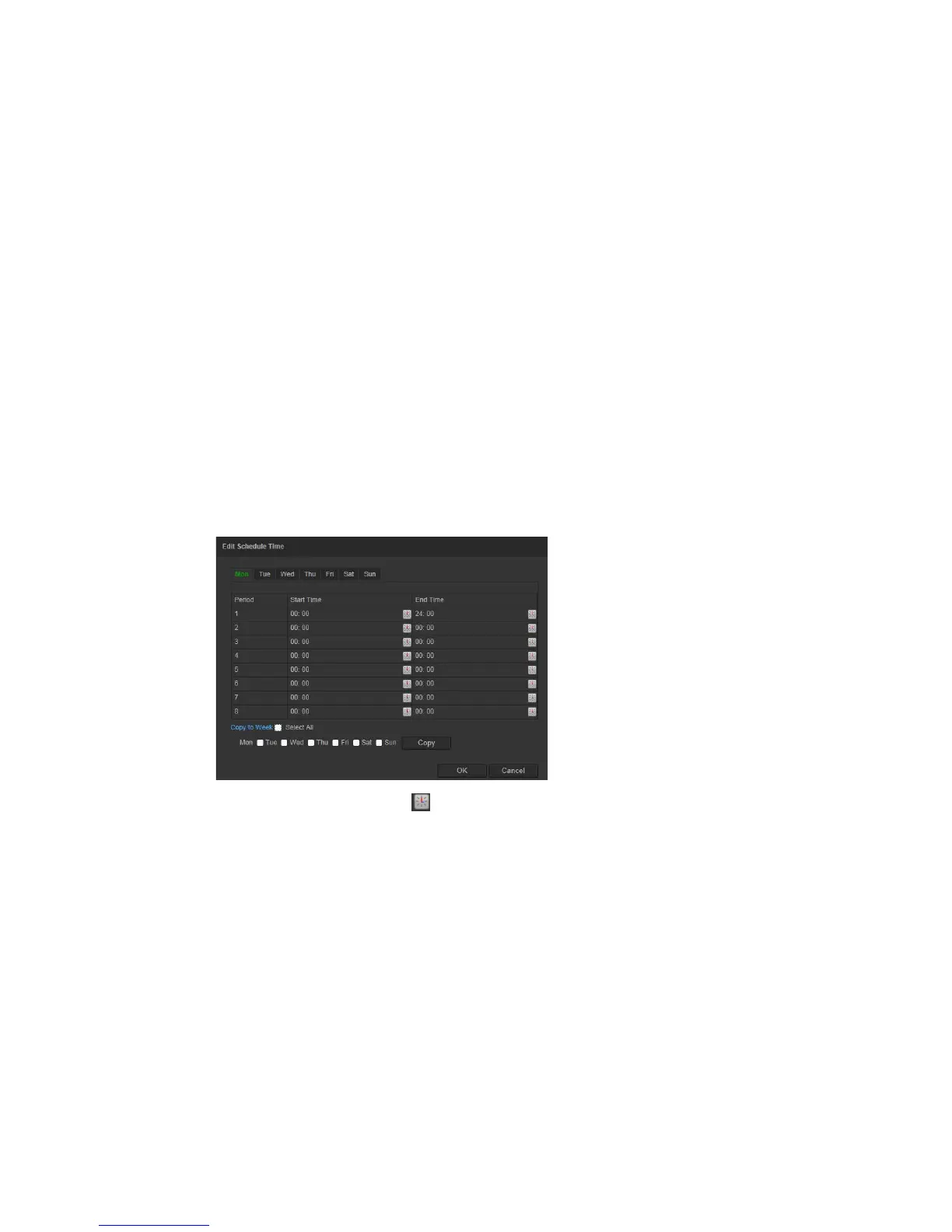
7. Click Edit to edit the arming schedule. See the picture below for the editing
interface of the arming schedule.
8. Choose the day and click to set the detailed time period. You can copy the
schedule to other days.
9. Click OK to save changes.
10. Specify the linkage method when an event occurs. Check one or more
response methods for the system when a motion detection alarm is triggered.




 To Next Page