Chapter 3 — Configuring the Printer
80 PF2i and PF4i Mid-Range Printer User’s Manual
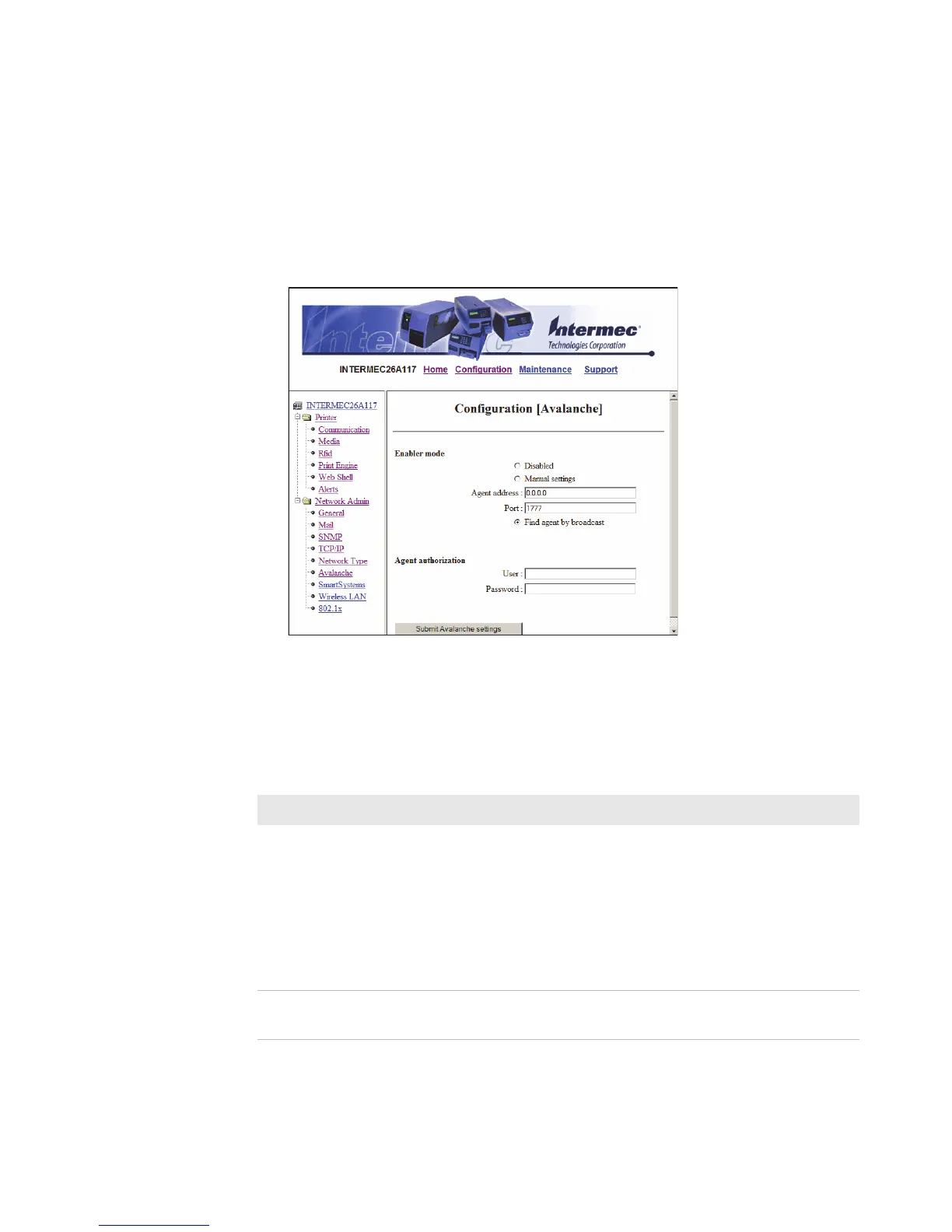
Configuring Avalanche Settings
Use the Avalanche page to view and change Wavelink Avalanche
settings.
To configure Avalanche settings
1 Click Network Admin > Avalanche.
2 View or update your settings.
3 Click Submit Avalanche settings.
Use the following table to understand the Avalanche settings.
Understanding the Avalanche Settings
Setting Description
Enabler Mode Click one of the option buttons:
• Disabled: Disables Avalanche.
• Manual settings: Enables Avalanche. You need to
enter the Agent address and Port in the text fields.
• Find agent by broadcast: Enables Avalanche and
the network connection broadcasts to find the
agent.
Agent
authorization
Enter your user name and password in the entry fields.



 To Next Page