39
Getting Started Interwrite
TM
Board
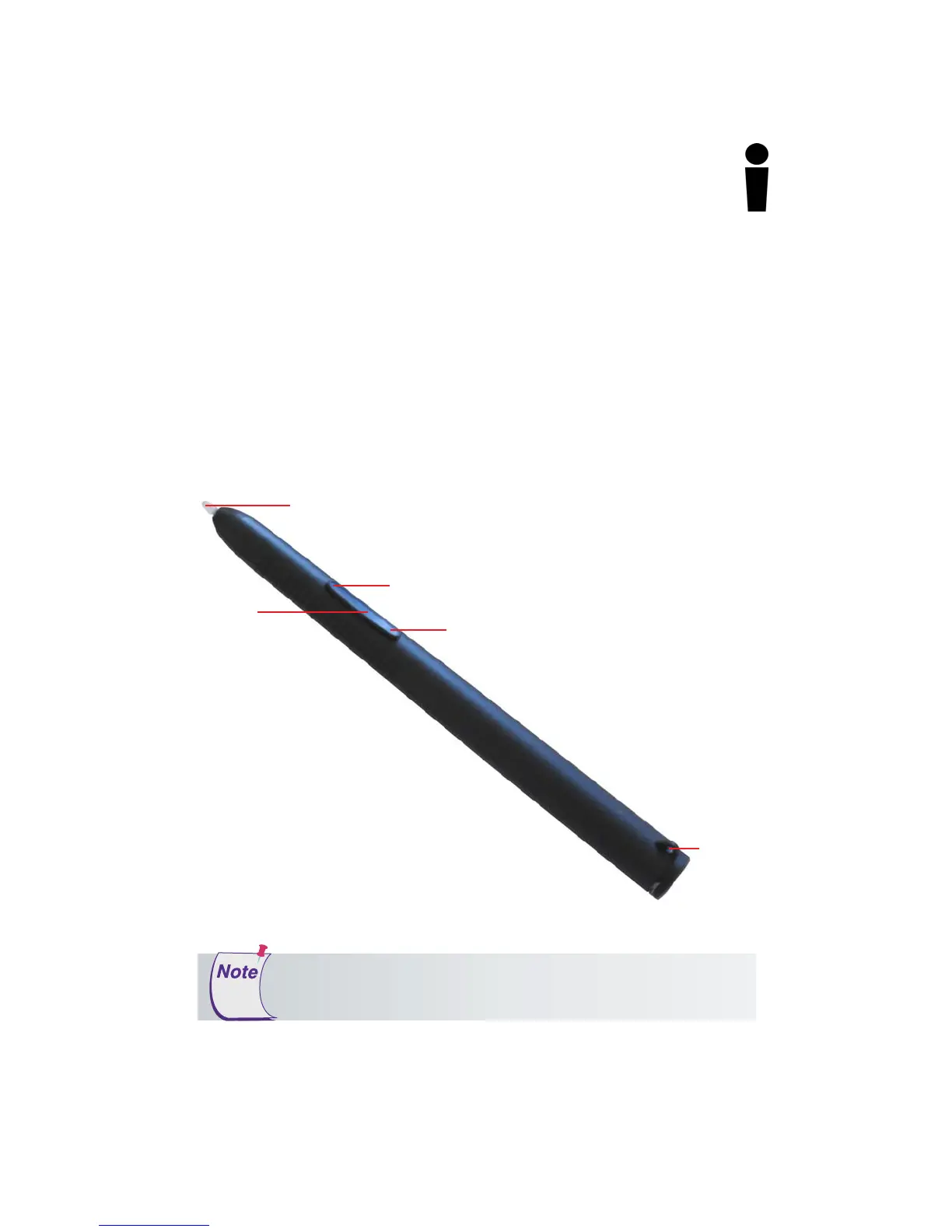
Using the Rechargeable Interactive Pen
The rechargeable Interactive Pen is used to write and draw in Interactive
Mode and functions as a mouse. It requires no assembly. You can attach a
tether to the Pen, if desired. We recommend placing the rechargeable Interac-
tive Pen in one of the Pen Slots on the Pen Charging Station when it is not
being used. The photo below identifies the parts of the rechargeable Interac-
tive Pen and describes their function.
The Pen Tip is used to apply virtual ink to the page in the Annotation Window.
To use the Pen Tip as an eraser on-the-fly, without selecting the Eraser tool,
hold down the left mouse button and touch the pen to the Interwrite Board’s
surface. On the Mac, with the Pen Tip on the board’s surface, press the left
button and hold it while erasing.
Tether
Loop
Pen Tip – Up or Down
Same as Left Mouse Button on Windows and Mac
Rocker
Button
Left – Double-Click Mouse Button with Pen Up
Windows and Mac
Right – Right Mouse Button (Windows)
Ctrl-Click (Mac)
The rechargeable Interactive Pen goes into
Sleep Mode
after about
two minutes of inactivity to conserve power. Stash the Pen in a slot
in the Pen Charging Station when it is not being used.



 To Next Page