45
Getting Started Interwrite
TM
Board
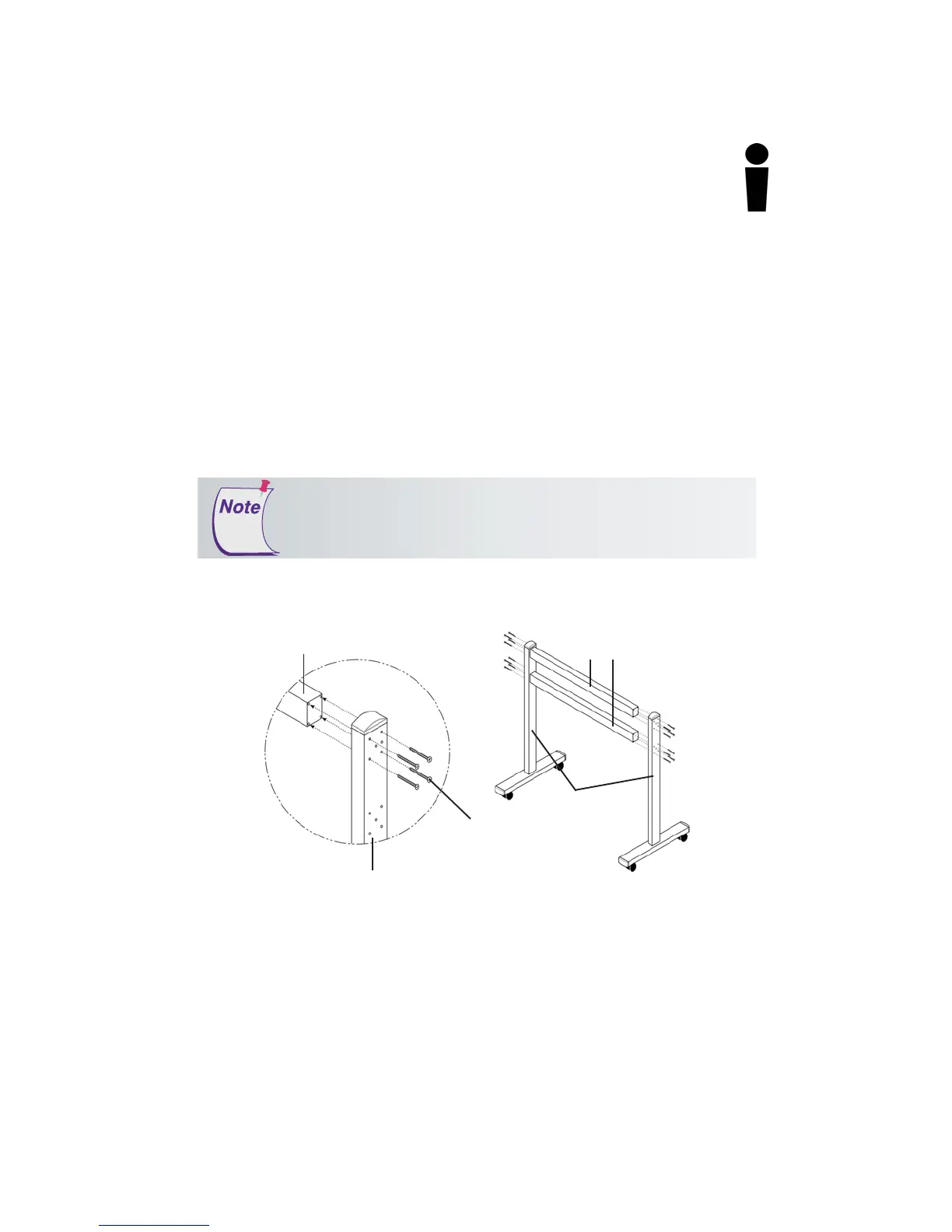
5 Attach both Crossbars to one Leg assembly using 8 of the
supplied flat head screws – 4 screws for each Crossbar. The
screws will slide through the 4 outermost holes in each group of
holes on the Leg assembly. Attach the other Leg assembly to the
Crossbars in the same way.
Assembling the Legs
1 Using four of the supplied flat head screws, attach a Foot to the bottom
end—the end without the Crossbar Holes—of one of the Legs.
2 Place a Lockwasher over the Caster screw and screw the Caster into the
hole on the underside of the Foot – one at each end. Tighten with the
wrench.
3 If they are not already in place, insert three End Caps (two on each end
of the Foot and one at the top of the Leg).
4 Repeat Steps 1 through 3 for the other Foot and Leg.
Attaching the Crossbars to the Leg Assemblies
Crossbar
Crossbars
Leg Assembly
Leg Assembly
(The side with more than 8 holes
faces
away
from the crossbar.)
1/4-20x2”
flat head screw
(use 4 per Crossbar end)
Examine the assembled Floor Stand Legs. One side of each Leg
assembly has 8 holes (2 groups of 4), and the other side has more
than 8 holes. In this step, the sides with just the 8 holes must face
inward
toward
the Crossbars.



 To Next Page