Section 2: Initialization and Configuration
2.3.1 Administrative
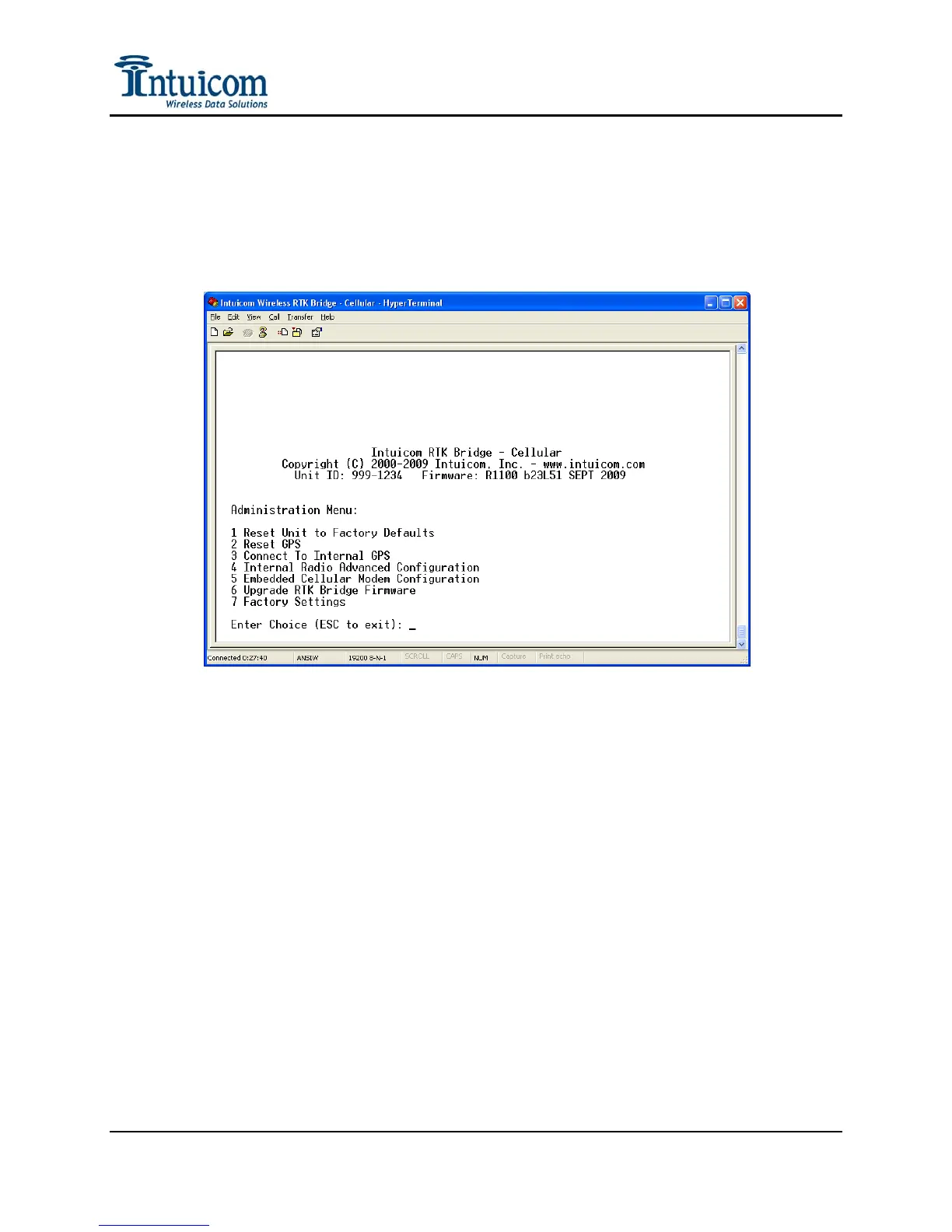
Main Menu Option 3 – the Administration Menu – provides options for unit maintenance
and advanced wireless configuration. For most applications it is not necessary to utilize
the Administrative configuration parameters.
Reset Unit to Factory Defaults - Select this option to reset all configuration parameters
including the internal wireless data radio and GPS back to the factory default settings.
Reset GPS - Select this option to force the GPS to clear its ephemeris and almanac and
perform a cold start / sky search. Select this option if the GPS is experiencing issues, or
is taking a considerable time to track in otherwise good conditions (good antenna, good
sky view).
Connect to Internal GPS – This option allows one to be directly connected to the real-
time output of the embedded GPS receiver. This is helpful to determine if the GPS
receiver is tracking – for example when testing different GPS antennas or antenna
locations.
Internal Radio Advanced Configuration - Select this option for access to Advanced
Wireless configuration. The Advanced wireless configuration allows the internal
wireless data radio to be fine tuned for compatibility with a range of Intuicom Wireless
Data Transceiver products, and for specific wireless configuration to address a location
specific condition (like lowering the transmit power, or avoiding in-band interference).
Revision 1.4 22 © 2009 Intuicom, Inc.


 To Next Page