Section 3: Operation
3.3 Front Panel LEDs
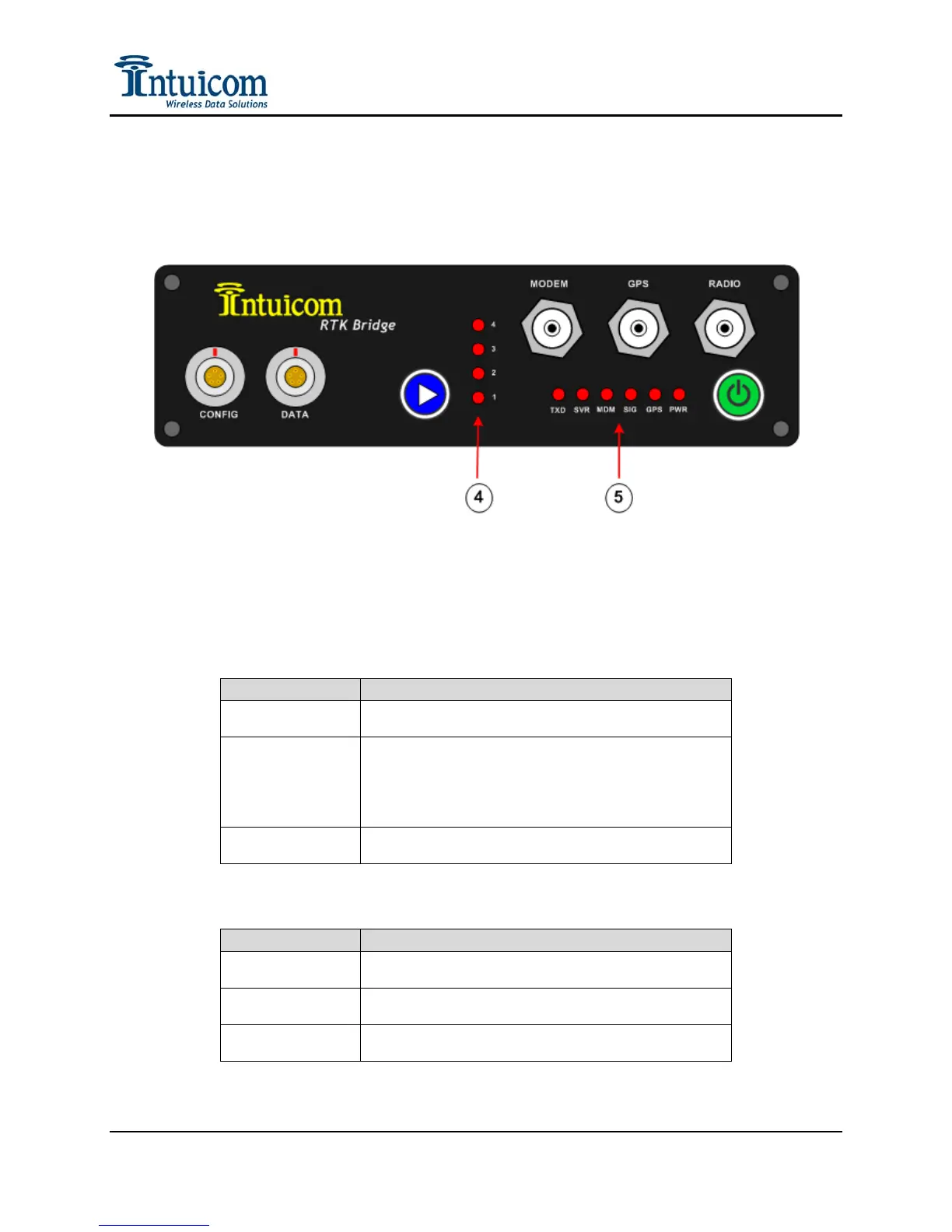
There are eleven red LEDs visible on the front panel (5) and (4).
Figure 3-4: RTK Bridge - Cellular Front Panel
PWR – When illuminated indicates that the unit is powered and has been turned on.
GPS:
LED DESCRIPTION
Solid Red
Internal GPS is selected for use in the current Profile
and is tracking
Flashing Red
Internal GPS is selected for use in the current Profile,
and the GPS is not tracking or Data Port is selected to
receive GGA messages from an external GPS and either
these messages are not being received, or the external
GPS is not tracking.
Off
Either a Static position has been selected or the sending
of a GPS position to the server is disabled.
SIG:
LED DESCRIPTION
Solid Red
Indicates a strong cellular signal as sampled during the
power-up/boot-up stage
Flashing Red
Indicates a marginal cellular signal – communication
may or may not be possible.
Off
Indicates a very weak or absent cellular signal – it is
very unlikely communications will be possible.
Revision 1.4 28 © 2009 Intuicom, Inc.


 To Next Page