EasyManua.ls Logo

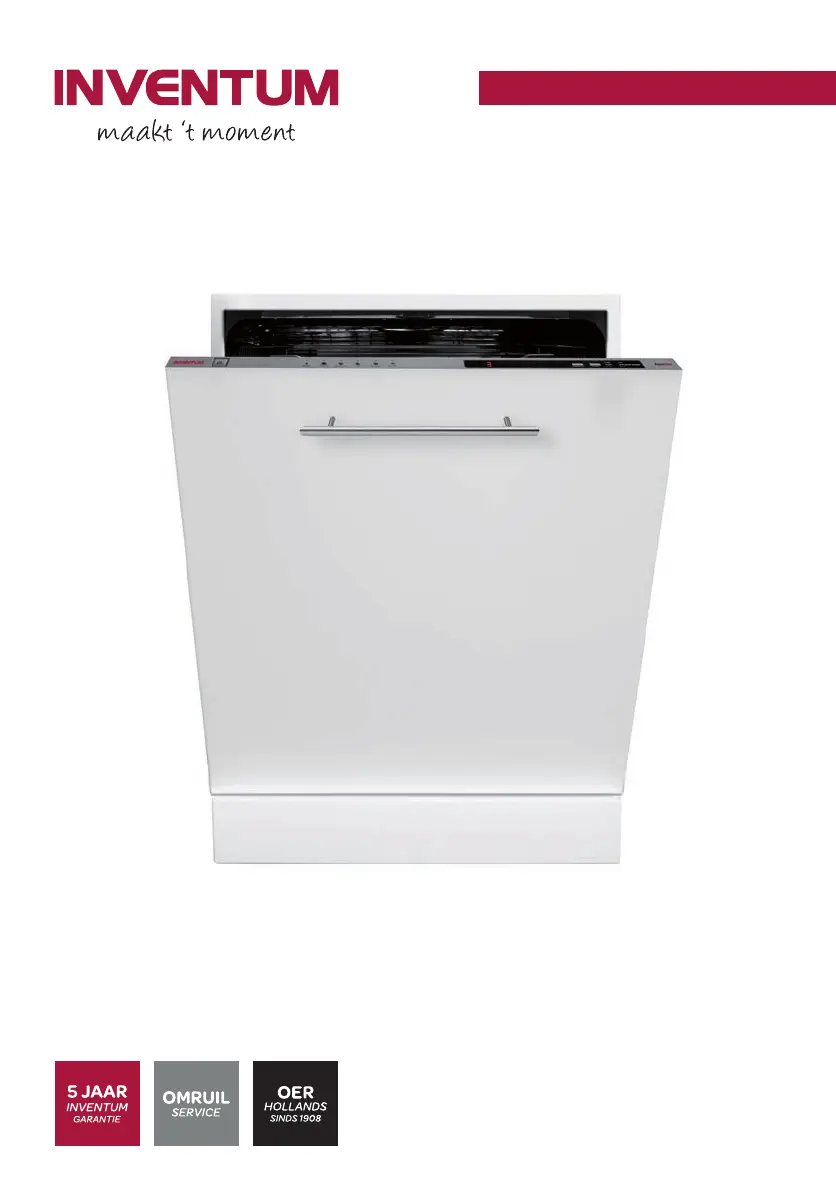
inventum IVW6008A - User Manual

inventum IVW6008A
92 pages
Go to English
Print Icon
To Next Page IconTo Next Page
Loading...
inbouw vaatwasser
BUILT
-
INN DISHWASHER
•
GESCHIRRSPÜLMASCHINE
•
LAVE
-
VAISELLE
IVW6008A
• gebruiksaanwijzing
• instruction manual
• Gebrauchsanleitung
• mode d'emploi
IVW6008A-instructions-1019.indd 1 25-10-2019 10:14:11

Table of Contents

Other manuals for inventum IVW6008A

Questions and Answers

  • E
    Erika MccallSep 12, 2025
    How to solve waste water discharge issues in inventum IVW6008A Dishwasher?
    • J
      Johnathan ReyesSep 12, 2025
      If your Inventum Dishwasher isn't discharging waste water: - Check for clogs in the water discharge hose. - Inspect the filters for blockages. - Turn off the dishwasher, reset the program, and then check the filters and discharge hose. Restart the dishwasher. If the problem continues, contact Inventum's service department.
  • T
    Thomas HoltSep 12, 2025
    Why does my Inventum Dishwasher make noise during a wash cycle?
    • L
      Lisa RodriguezSep 12, 2025
      Noise during a wash cycle in your Inventum Dishwasher can be due to: - Improper loading of the dishwasher. - A spray arm hitting the dishes.
  • T
    Tammy WalshSep 12, 2025
    Why won't the dishes dry in my inventum IVW6008A?
    • A
      Amanda FlynnSep 12, 2025
      Dishes may not dry in your Inventum Dishwasher if: - A program without a drying cycle was selected. - The rinse aid dosage is too low. - The dishes are unloaded too quickly after the cycle.
  • B
    Barbara KellySep 9, 2025
    Why does my inventum IVW6008A stop during a wash cycle?
    • V
      Victoria CollinsSep 9, 2025
      Your Inventum Dishwasher might halt mid-cycle due to: - A power failure. - A water supply issue. - The program being paused.
  • J
    Julie WilsonSep 8, 2025
    What does error code F1 mean on my Inventum Dishwasher?
    • J
      Joshua MasonSep 9, 2025
      Error code F1 on your Inventum Dishwasher indicates that the safety for water overflow is activated. Disconnect the mains plug and close the water tap.
  • S
    Sean JohnsonSep 7, 2025
    What does error code F3 mean on my inventum IVW6008A?
    • N
      Natalie ClineSep 8, 2025
      Error code F3 on your Inventum Dishwasher indicates that the water supply does not stop. Close the water tap.
  • D
    debraperezAug 23, 2025
    Why won't my inventum IVW6008A program start?
    • B
      Brandon StevensonAug 23, 2025
      If your Inventum Dishwasher program isn't starting, there might be several reasons. Ensure the mains plug is correctly connected, check the fuse box, and open the water tap to ensure there's a water supply. Also, make sure the dishwasher door is fully closed and that the appliance is switched on. Check the water inlet hose and filters, and ensure that they are not clogged. Connect the mains plug. Do a check on the fuse box. Open the water tap. Close the door. Start the appliance. Make sure that the water inlet hose and the filters are not clogged.
  • A
    Anne ShermanSep 5, 2025
    What does error code F5 mean on my inventum IVW6008A?
    • K
      Kristin FinleySep 6, 2025
      Error code F5 on your Inventum Dishwasher indicates there is insufficient water supply. Make sure that the water tap is fully open and that the water supply is not blocked. Close the water tap, remove the water inlet hose and clean the filter of the hose.
  • X
    xkellySep 5, 2025
    Why is a function indicator on and the display flickering on my inventum IVW6008A?
    • M
      Maria VelezSep 5, 2025
      If a function indicator is on and the display is flickering on your Inventum Dishwasher, the door may be open. Close the door.
  • R
    Rebecca KentSep 3, 2025
    What to do if the ready indicator stays on after my Inventum Dishwasher finishes?
    • J
      Jeffrey WiseSep 4, 2025
      If the ready indicator on your Inventum Dishwasher remains on after a program finishes, the on/off button may be pushed. Release the on/off button.

Summary

Safety and Installation Instructions

Delivery

Check for damage during transport and dispose of packing materials safely.

Installation

Appliance must be installed by authorized service; ensure correct electrical connections.

Positioning the Appliance

Choose a suitable location near water tap/drain, avoiding freezing temperatures.

Connecting to Water Tap and Drainage

Ensure plumbing suitability, use supplied hose, connect to tap, and check for leaks.

Electrical Connection

Connect to an earthed socket, ensure correct voltage, and use appropriate fuse.

In Daily Use

Intended for household use; keep away from children and teach them safe handling.

Product Fiche

Technical Specifications

Detailed technical data including dimensions, power, voltage, and hose lengths.

Appliance Description

Control Panel Overview

Explanation of buttons, indicator lights, and their functions on the control panel.

Before First Use

Instructions for initial setup, including filling salt and rinse aid reservoirs.

Filling the Salt Reservoir

Step-by-step guide for filling the salt reservoir to ensure optimal washing results.

Setting Salt Consumption

How to adjust salt usage based on local water hardness for best performance.

Filling with Rinse Aid and Setting Consumption

Guide on filling rinse aid and adjusting its dosage for streak-free drying.

Dishwasher Detergents

Information on using appropriate detergents, amounts, and placement in the reservoir.

Loading the Dishwasher

Adjusting the Height of the Upper Basket

Instructions on how to adjust the upper basket height for optimal loading capacity.

Different Ways of Loading the Baskets

Visual guides and tips for correctly arranging dishes in both upper and lower baskets.

Setting the Dishwasher

Switching the Dishwasher On and Off

Steps for powering the appliance on, selecting programs, and turning it off.

Ending or Changing a Program

How to reset or change a running program, and safely stop the cycle.

Program Selection Table

Overview of available programs, their temperatures, and durations.

Cleaning & Maintenance

Cleaning the Filters

Step-by-step guide to removing and cleaning the dishwasher filters for optimal performance.

Cleaning the Spray Arms

Instructions for cleaning spray arms to ensure effective water distribution.

Troubleshooting

What to Do If...

Solutions for common issues like program not starting, water not draining, or poor drying.

General Terms and Conditions of Service and Warranty

2-Year Full Manufacturers Warranty

Details on the standard warranty coverage and claim process for all products.

5-Year Inventum Warranty

Information on the extended warranty, including registration requirements and coverage.

Product Registration

Guide on how to register the product to obtain the 3-year extended warranty.

Large Domestic Appliances

Specific service and warranty terms for large built-in and freestanding appliances.

Breakdowns or Faults Outside Warranty Period

Procedures for reporting issues and costs associated with repairs after the warranty expires.

Warranty Exclusions

List of conditions and parts not covered by the manufacturer's warranty.

Important to Know

Key information regarding warranty claims, replacements, and liability.

inventum IVW6008A Specifications

General IconGeneral
Current16 A
Connected load1900 W
AC input voltage220 - 240 V
AC input frequency50 - 60 Hz
Power consumption (off)0.5 W
Water consumption per cycle12 L
Energy consumption per cycle0.9 kWh
Drying classA
Annual water consumption3360 L
Annual energy consumption258 kWh
Cycle time187 min
Noise level47 dB
Drying systemCondensation
AquaStop functionYes
Delay start (max)9 h
Dishwashing programsEco, Intensive, Pre-wash, Quick, Rinsing + drying
Number of place settings12 place settings
Number of washing programs5
Number of temperature settings4
Door colorNot applicable
Water fillCold
Cord length1.8 m
Control typeButtons
Product sizeFull size (60 cm)
Tub materialStainless steel
Inlet hose length1.47 m
Outlet hose length2 m
Appliance placementFully built-in
Control panel colorGray
Cutlery compartment typeBasket
Package depth661 mm
Package width644 mm
Package height851 mm
Package weight40000 g
Weight and Dimensions IconWeight and Dimensions
Depth550 mm
Width598 mm
Height820 mm
Weight38000 g
Installation compartment depth570 mm
Installation compartment width600 mm

Related product manuals