8
2.3. Go2Nova
®
8407 Hand Controller
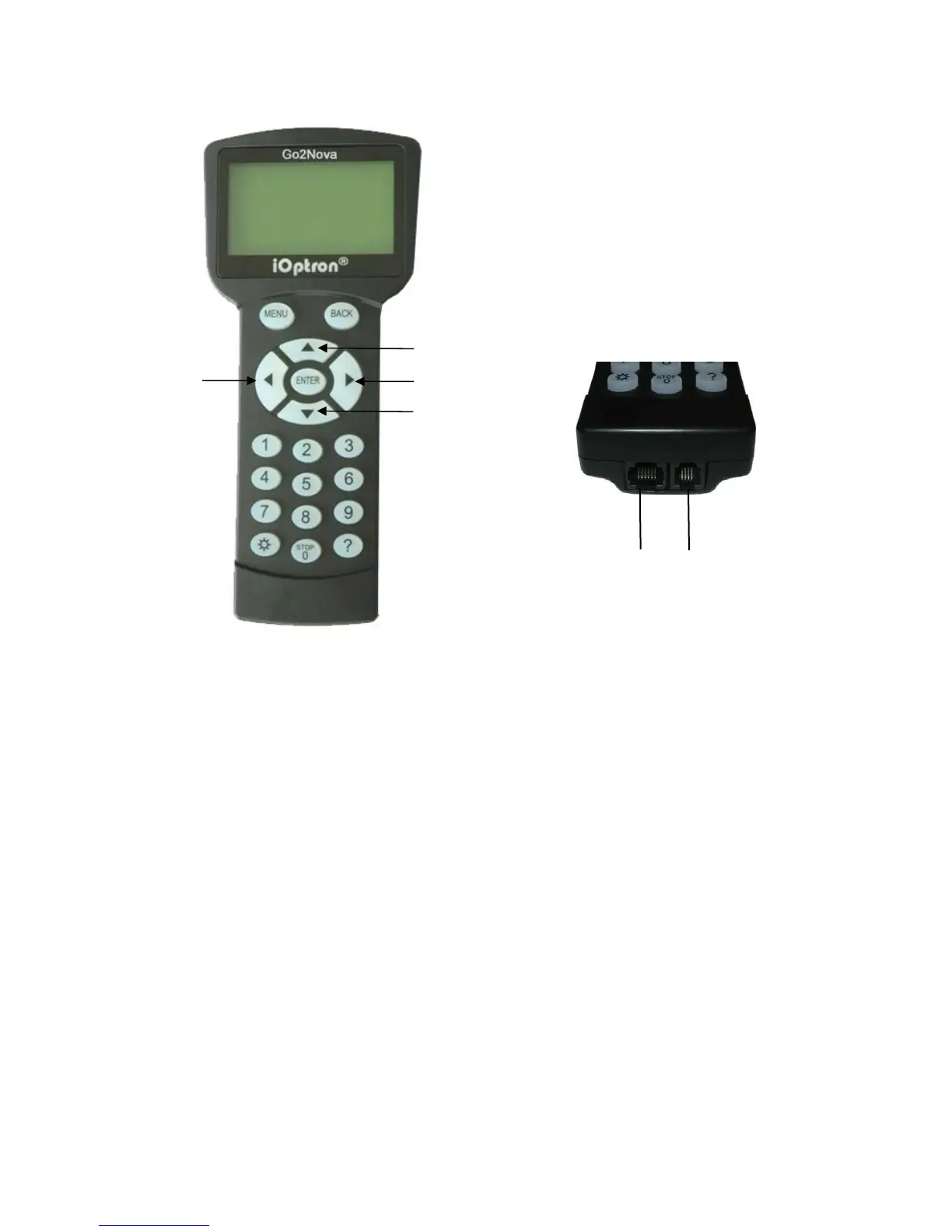
Figure 2. Go2Nova
®
8407 hand controller
The Go2Nova
®
8407 hand controller (HC) shown in Figure 2 is the standard controllers that
used for the AZMP mount. It has an integrated temperature controller that ensures it can be operated
as low as -20ºC (-4ºF). It has a large LCD screen, function, direction and number keys on the front; a
red LED reading light on the back; and a HBX port (6-pin) and a RS232 serial port (4-pin) at the bottom.
2.3.1. Key Description
MENU Key: Press “MENU” to enter the Main Menu.
BACK Key: Move back to the previous screen, or end/cancel current operation, such as
slewing.
ENTER Key: Confirm an input, go to the next menu, select a choice, or slew the telescope to
a selected object.
Arrow (▲▼◄►) Keys: The arrow keys are used to control the movement of DEC and R.A.
axes. Press and hold ▲(DEC+),▼(DEC-) buttons to move a telescope along the DEC
direction, ◄(R.A.+), ►(R.A.-) to move a telescope along the RA direction. They are also used
to browse the menu or move the cursor while in the menu. Press and holding an arrow key for
a fast scrolling.
Number Keys: Input numerical values. Also used to adjust speeds. The speed selections are
1: 1X; 2: 2X; 3: 8X; 4: 16X; 5: 64X; 6: 128X; 7: 256X; 8: 512X; 9: MAX(~10°/sec, 2400X)
Light Key(☼): Turns on/off the red LED reading light on the back of the controller.
Help (?) Key: Identify and display bright stars or objects where the telescope points to.
STOP/0 Key: Stop the mount during GOTO. Also toggling between start and stop tracking.
HBX (Handbox) port: connect the HC to the AZMP mount using a 6P6C RJ11 cable.
HBX
Port
Serial
Port
RA+
RA-
DEC-
DEC+



 To Next Page