9
Serial port (i.e., RS232 port): connect the HC to a Computer for HC firmware upgrade via a
RS232-RJ9 cable.
2.3.2. The LCD Screen
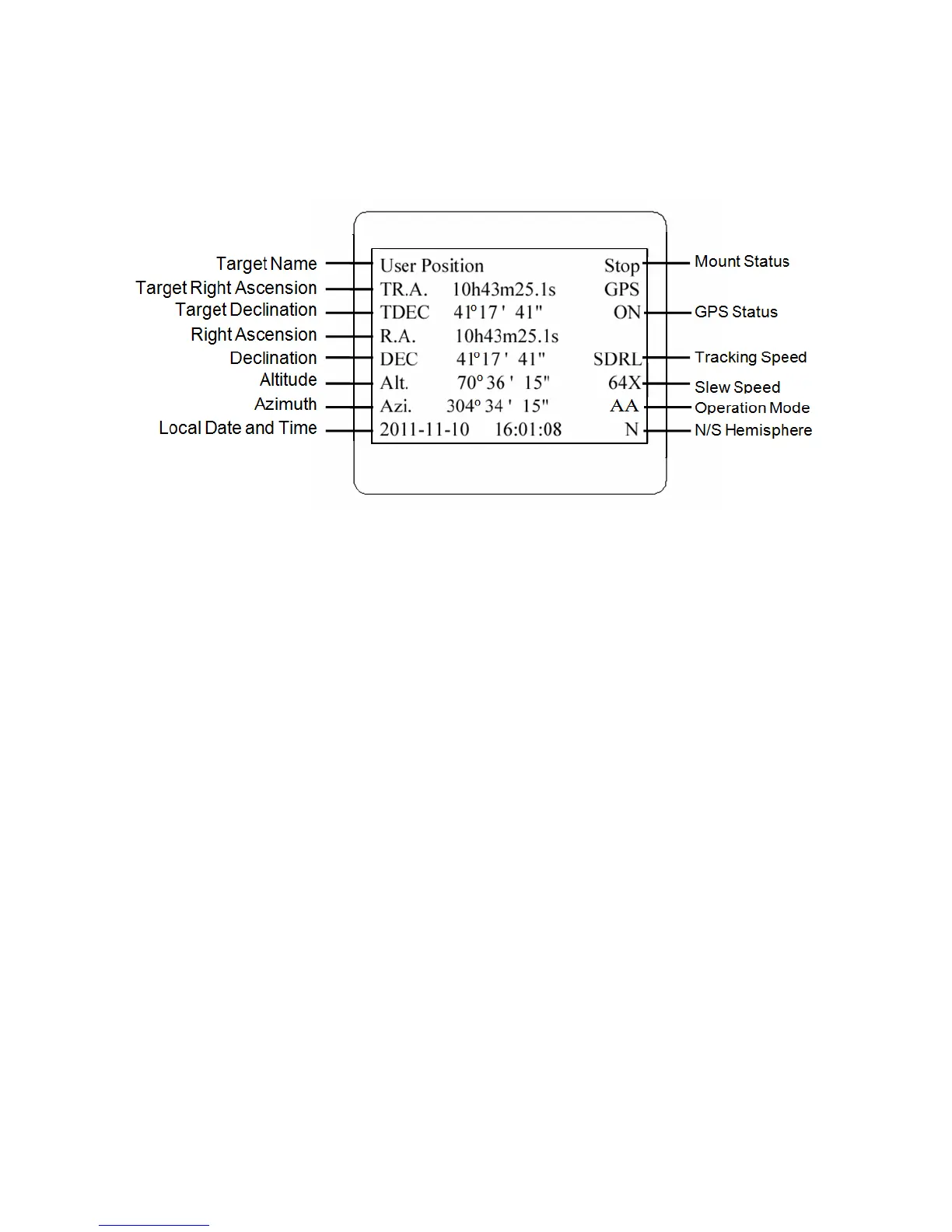
The 8407 HC has a large 8-line, 21-character per line LCD screen, which displays all the
information as shown in Figure 3. The user interface is simple and easy to operate.
Figure 3. 8407+ HC LCD Information Screen
1. Target Name/Mount Position: displays the name of the target that telescope is currently pointed to
or the current mount position.
Zero Position: The reference position for the mount. It will be displayed when moved to Zero
Position using “Goto Zero Position”;
User Position: The mount is point to a user defined position, which could be a particular
celestial object or simply a position determined by pressing an arrow key;
An object name, such as “Mercury” or “Andromeda Galaxy”: Name of the star or celestial
object that the mount is currently slewing to or tracking.
2. Target R.A.: Right Ascension (R.A.) of the target object.
3. Target Declination: Declination (DEC) of the target object.
4. Right Ascension: Current R.A. of the telescope.
5. Declination: Current DEC of the telescope.
6. Altitude: Altitude of the telescope (degrees vertical from the local horizon - zenith is 90º).
7. Azimuth: Azimuth of the telescope (north is 0º, east 90º, south 180º, and west 270º).
8. Local Date and Time: display local time in a format of YYYY-MM-DD HH:MM:SS.
9. Mount Status: Display current operation status of the mount.
Stop: mount is not moving;
Slew: mount is moving with an arrow key is pressed or a GOTO command, such as “Select
and Slew” or “Goto Zero Position”;
Tracking: mount is at a tracking status.
10. GPS status: When the power is turned on, the initial GPS status will be “GPS ON”, which means
that the mount is connected to its GPS receiver and is seeking a satellite signal. When the GPS
receiver finds the satellites and receives the GPS signal, the status will change to “GPS OK”.
11. Tracking speed: Display current tracking rates of the mount



 To Next Page