10
2.3.4. Other Ports on a CEM40-NUC/CEM40EC-NUC Mount
Power Panel on Rear of RA axis
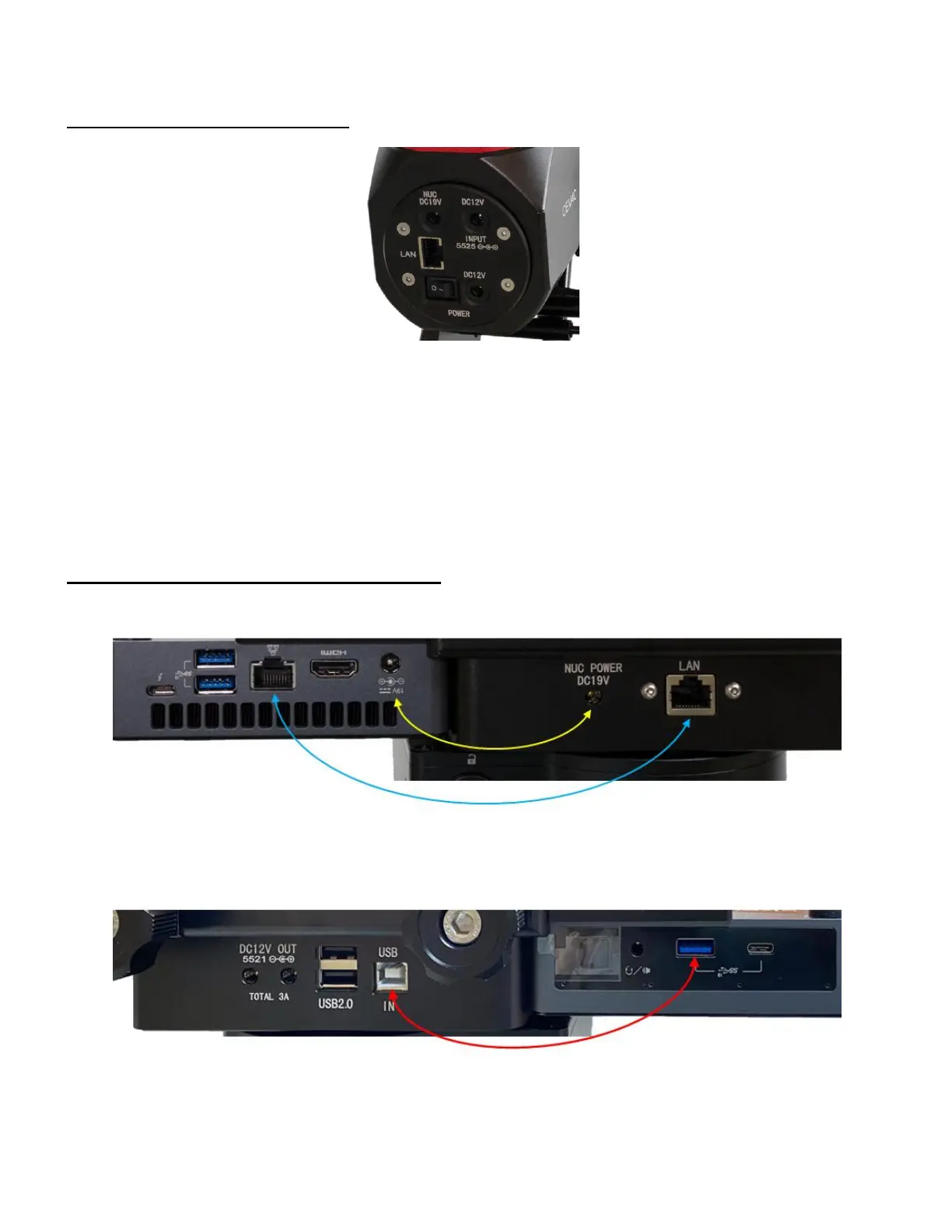
Figure 9. CEM40-NUC Input Panel on Rear of RA axis
NUC DC19V: Pass through for NUC power input. Connect the AC adapter come with NUC, 19V,
or 12V for some later model.
DC12V INPUT 5525: Optional 12V power input, 2.5mm/5.5mm, for the 3X power outlets on the
dovetail saddle. Total current 5A.
LAN: Pass through Ethernet input to LAN port on dovetail saddle
I/O (POWER): Power Switch
DC12V (POWER) : DC power socket to power the mount (2.5mmX5.5mm, center positive)
Cable/Port Connection on Dovetail Saddle
Shown in Figure 10 are cable connection between an Intel NUC and the mount.
NUC POWER DC19V:NUC power to power the NUC minicomputer through the mount cable
management system (Yellow line)
LAN:Ethernet ports (blue line)
DC12V OUT 5521:Power outlets from the mount main power, up to 3A
USB2.0: USB2.0 Hub for other USB devices
USB IN: USB port for mount computer controller, which will be connected to a NUC USB port
(red line)



 To Next Page