such; upon receiving such frames, the link partner will temporarily stop sending
packets to the switch, thus avoiding packets drop and ensuring a reliable network.
Enable/disable the broadcast storm control feature or restrict the max number of
broadcast packets transmitted and received on active port(s). With broadcast storm
control enabled, broadcast traffic exceeds the max value (2000pps), system will drop
the excessive frames to reduce the traffic into a restricted ratio, thus effectively
controlling various storms, avoiding network congestion and ensuring a reliable
network.
Enable/disable the MAC address learning feature on a port. By default, it is enabled.
Displays currently actual link rates and duplex modes on switch ports.
Note:
To update port settings like speed/duplex, priority, flow control, enable/disable a port, broadcast storm control and
MAC address learning, first select a port and then click OK.
You can refresh the webpage to display updated settings on the port.
2. Port Mirroring
1. Port Mirroring Overview
Port mirroring is used on a network switch to send a copy of either inbound or outbound traffic (or both) on single
or multiple mirroring source interfaces to a network monitoring connection on another mirroring destination port.
This is commonly used for network appliances that require monitoring of network traffic, such as an intrusion
detection system. It can be used as a diagnostic tool as well as a debugging feature and also enables switch
performance monitoring.
2. Config Port Mirroring
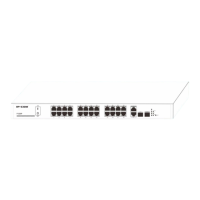
Click Port Management > Port Configuration > Port Mirroring to enter interface below.


 To Next Page