26
802.3at, offers 25.50 W.
Powered device
A powered device (PD) is a device powered by a PSE and thus consumes energy. Examples include wireless access
points, IP Phones, and IP Cameras.
3.4.1 Global Configuration
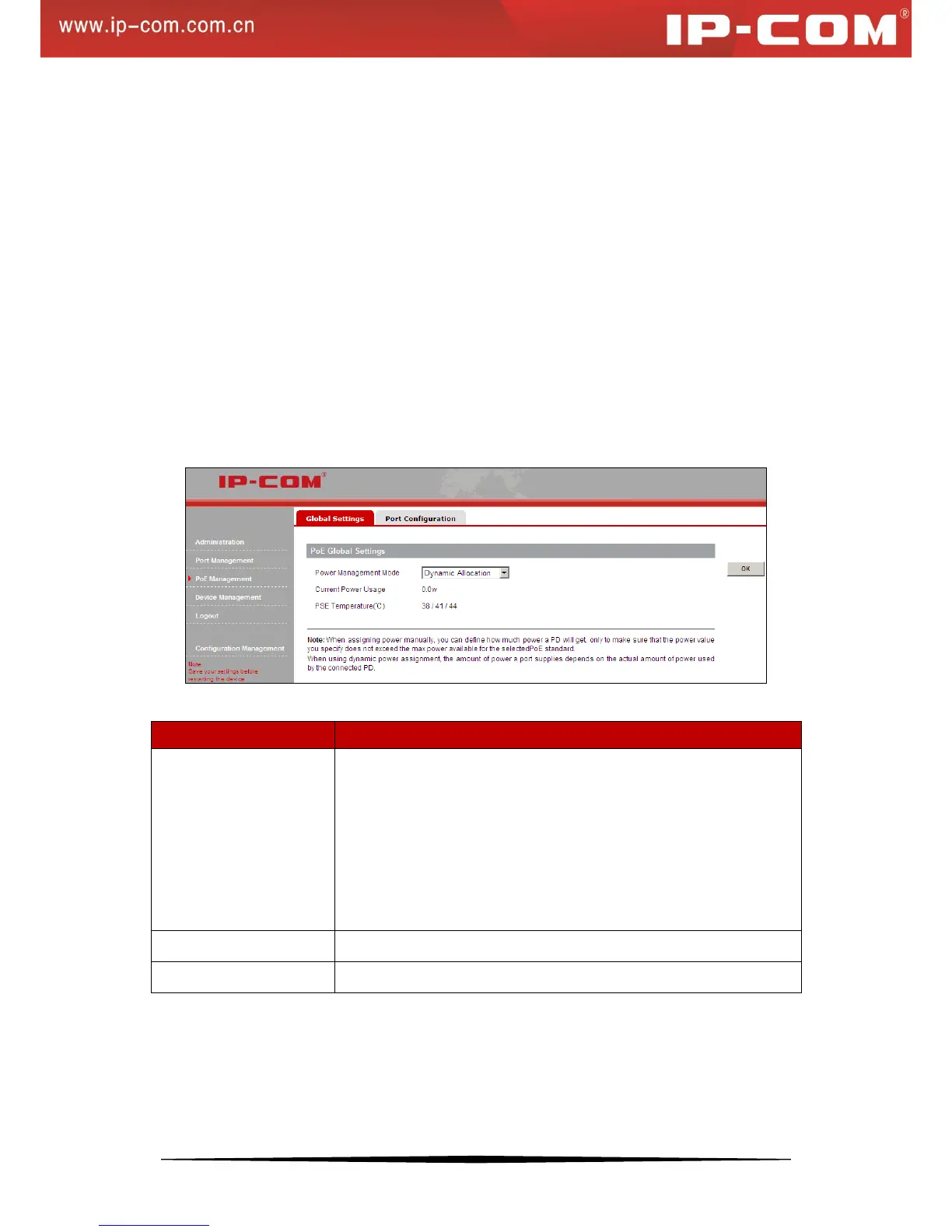
Click PoE Management > Global Settings to enter Global Settings screen and you can
a).Configure power management mode;
b).View Current Power Utilization and PSE Temperature.
The default Power Management Mode is Dynamic Allocation. When assigning power manually, you can define
how much power a PD will get, only to make sure that the power value you specify does not exceed the max power
available for the selected PoE standard. When using dynamic power assignment, the amount of power a port
supplies depends on the actual amount of power used by the connected PD.
Fields on the screen are described below:
Dynamic Allocation: If the power supply is running at 99% usage, ports
prioritized as high are prioritized to receive power over ports prioritized
as low.
Static Allocation: If the power supply is running at 99% usage and new
PDs are connected, priority is not taken in account and is not
configurable, plus, no change is made on original power status.
3.4.2 Port Configuration
Click PoE Management > Port Configuration and you can
a). Configure PoE status, PoE standard, priority and static power allocation;


 To Next Page