38
configure the port 1’s PVID to any existing VLAN ID, for example, 4; however, if the existing VLAN ID 4 is
deleted, port 1’s PVID will be reset to the default value of 1.
3.5.2 MAC Binding
When a unicast MAC address is bound to a specific port on the switch, messages carrying this MAC as a source
MAC address can only be received and forwarded by this bound port and will be directly dropped by other
recipients; messages carrying this MAC as a destination MAC address will only be forwarded by switch to the
specific bound port. A bound MAC address will not age out.
This feature is especially helpful to prevent any unauthorized access to your network.
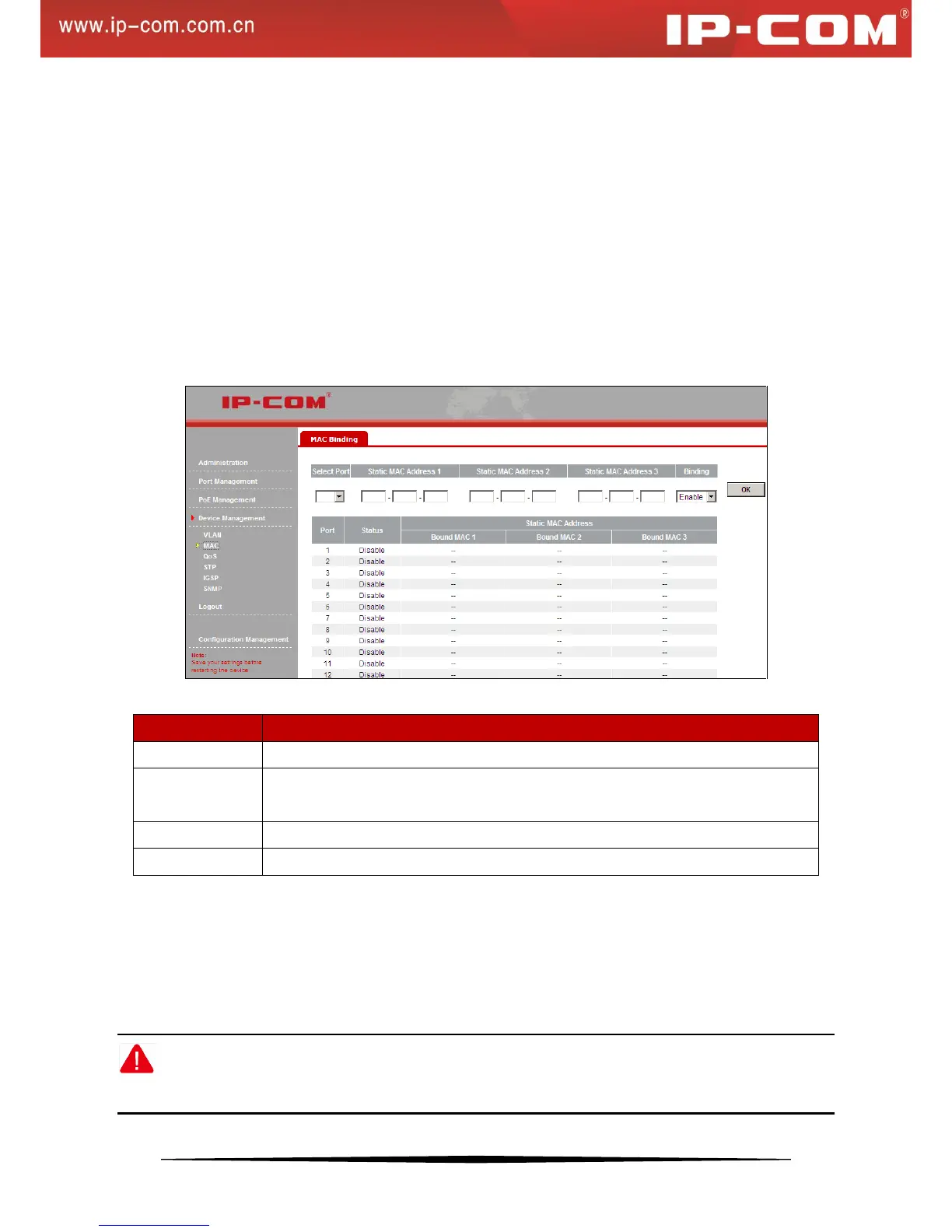
Click Device Management > MAC Binding to enter the screen below:
Fields on the screen are described below:
Select a port number you wish to configure.
Manually enter the MAC address (unicast address only) you wish to bind with the port
on switch. Each port can bind up to 3 addresses.
Enable/disable MAC binding feature. By default, this feature is disabled.
Display current port’s binding status: enabled or disabled.
To enable port-MAC binding feature do as follows:
1) Select the port number you wish to bind, say, 1
2) Manually enter the MAC address (unicast address only) you wish to bind with the selected port, say,
00-B0-4C-00-00-01.
3) Select Enable from the Binding drop-down list.
4) Click OK to complete your configurations.
Note:
Ports that are enabled with MAC address binding will no longer be able to learn MAC addresses.


 To Next Page