42
values of WRR queue-scheduling algorithm to 50, 30, 10 and 10(corresponding to w3, w2, w1, and w0
respectively). Then the queue with the lowest priority can be ensured of, at least, 10 Mbps bandwidth, thus
avoiding the disadvantage of SP queue-scheduling algorithm that packets in low-priority queues may not be served
during a long time. Another advantage of WRR queue-scheduling algorithm is that though the queues are scheduled
in turn, the service time for each queue is not fixed, that is to say, when a queue is emptied, the next queue will be
scheduled immediately. Thus, bandwidth resources are fully utilized.
4. QoS Configurations
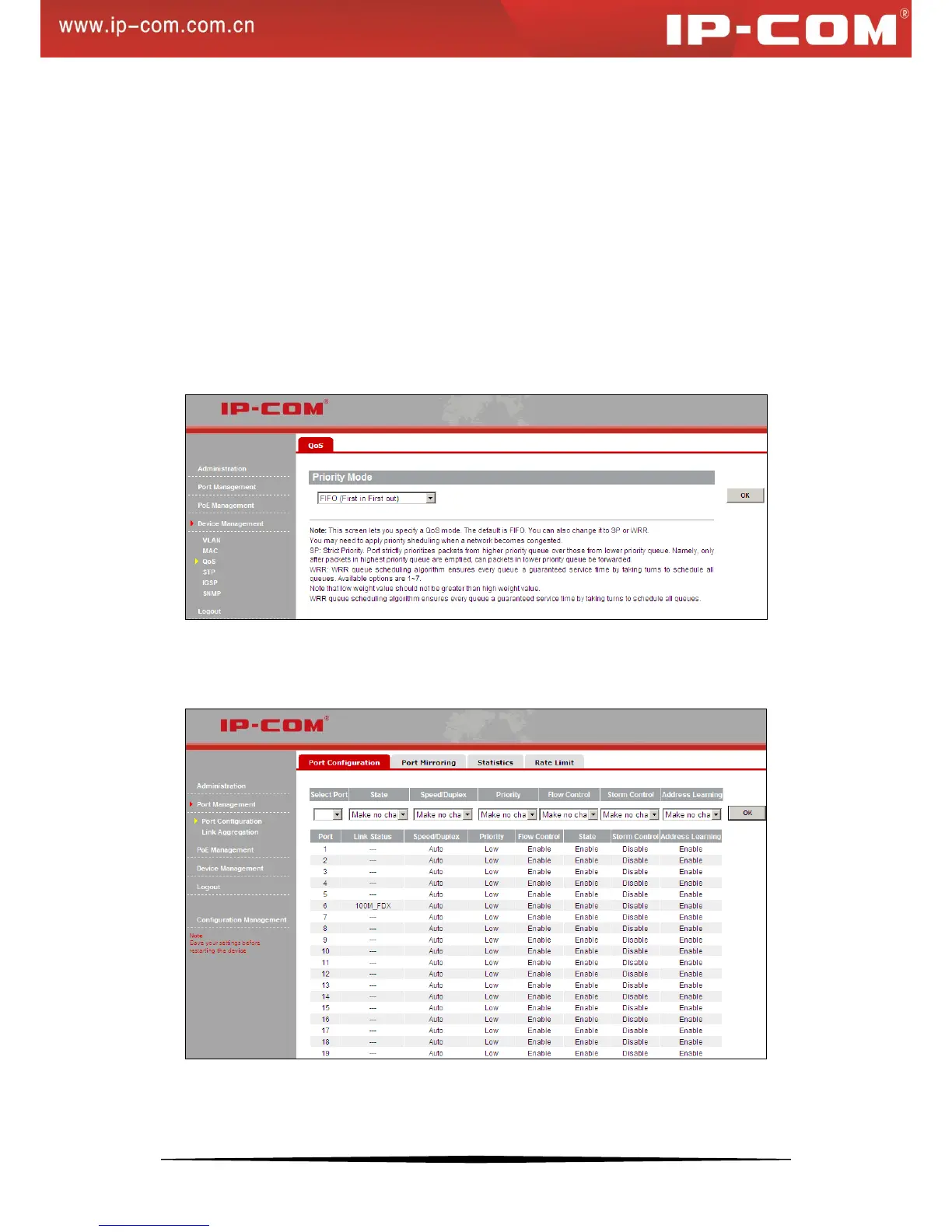
Click Device Management > QoS to enter the screen below. Here you can select strict priority or FIFO (first in
first out). When configuring weight priority values, note that the value indicated by High weight should not be
smaller than that indicated by Low weight. Values available for the weight rage from 1 to 7.
Click OK to complete the QoS configurations.
Click Port Management > Port Configuration to enter the port Configuration screen, select a port number and
select High from the priority drop-down list. The selected port will then be in the high priority queue.
For example: In Strict Priority QoS mode, if you select “high” priority level for port1 and “low” for port2 and the
2 ports transmit packets concurrently to one port, then the receiving port will first forward packets from port1 and


 To Next Page