802.11n lndoor Wireless Access Point
12
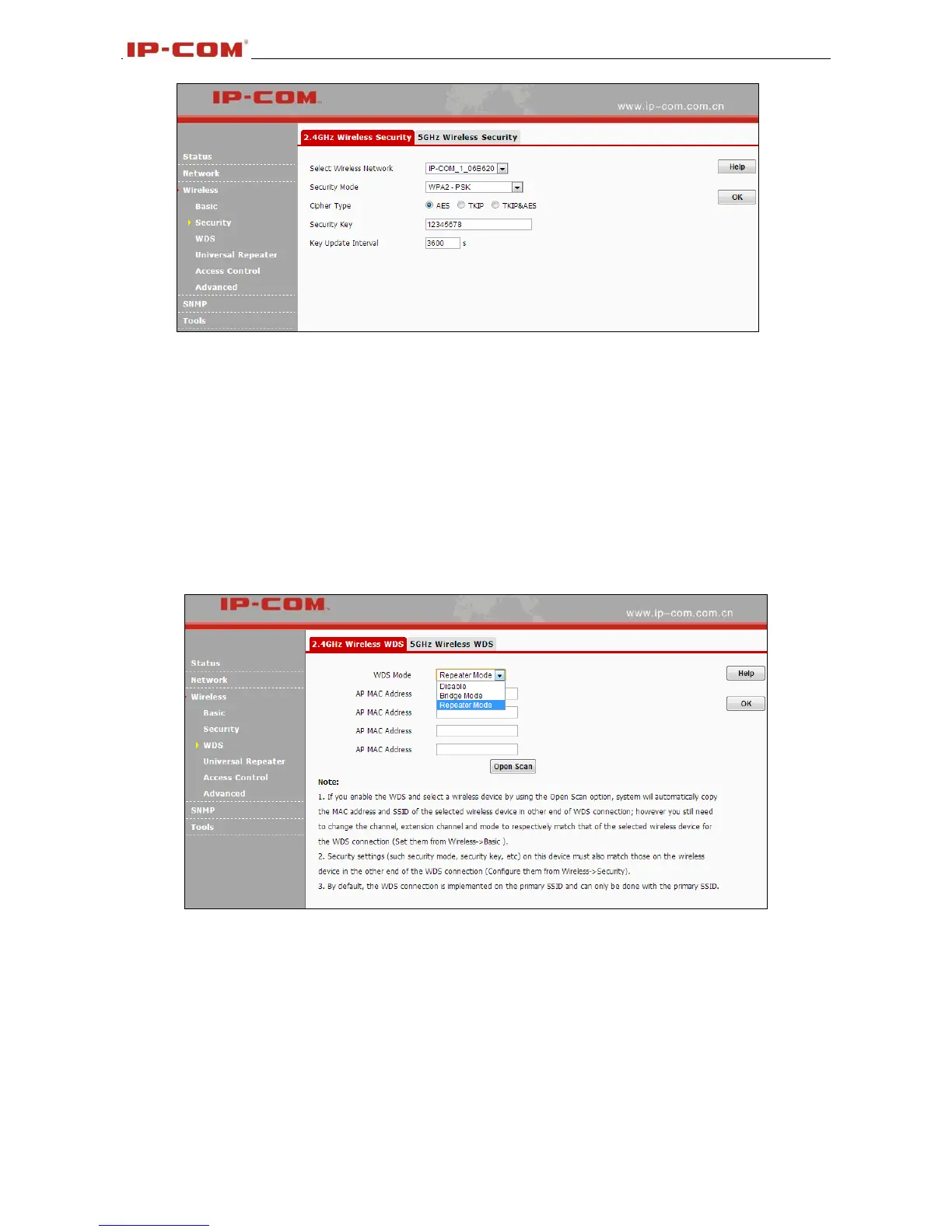
1. Cipher Type: Select AES (advanced encryption standard) or TKIP (temporary key integrity protocol)
&AES.
2. Security Key: Enter a security key, which must be between 8-63 ASCII characters long.
3. Key Update Interval: Enter a valid time period for the key to be changed.
3.4.3 WDS
Wireless distribution system (WDS) is a system enabling the wireless interconnection of access points in
an IEEE 802.11 network. It allows a wireless network to be expanded using multiple access points
without the traditional requirement for a wired backbone to link them. Note: The Access Points you select
must support WDS.
1. WDS Mode: Select Disable, Repeater Mode or Bridge Mode.
2. AP MAC Address: Displays the remote AP’s MAC address.
For Example:
W75AP1 LAN IP: 192.168.0.254
W75AP2 LAN IP: 192.168.0.253
WDS Mode: Repeater Mode
Configure W75AP1:
1. Enter the remote AP’s MAC address and click OK.



 To Next Page