8 LIP-9000 Series User Guide - ST
1.5 LIP-9000 Phone Installation
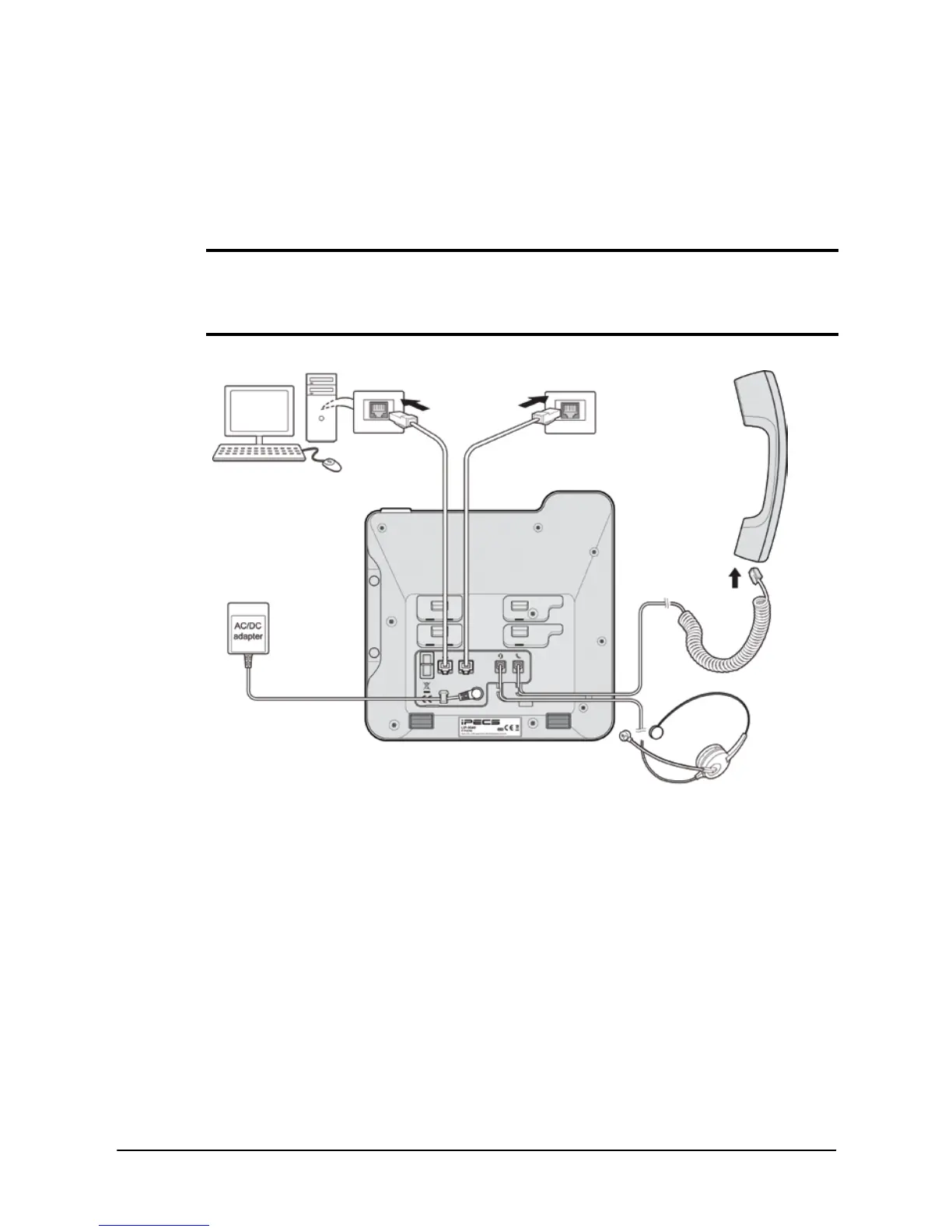
The phone handset is attached as shown (A). The LIP-9000 has 2 RJ-45
and 10/100 Base-T LAN connection ports (shown). One port is for
connecting to the LAN (D), and the other can be connected to a desktop
data device or PC (B), or another LAN interface terminal.
NOTE
Please read "1.5.2 Information about compatibility headset" before
connecting your headset to ensure safe and proper use.
Figure 5: LIP-Phone Connections
1.5.1 Power
All LIP-9000 series phones can be powered by the AC/DC Adapter shown
‘(C)’ in Figure 5 or over the LAN cable using the POE8 or other 802.3af
compliant switch.
If using the AC/DC Adapter, after connecting the Phone to the LAN, the
Adapter’s DC voltage plug is inserted into the power-input jack in the
underside of the Phone.
To use AC power, use only the Ericsson-LG Enterprise Approved AC power
adaptor (P/N: TKTN9019XXX, See Table 1 on page 9 for details), which
you can order separately.
(A)



 To Next Page