3.7.6
Unavailable Features with Keypad
As below features do not work with the keypad:
1)
Dial Plan.
2)
Custom Ring Type
3)
SNTP Server and Time & Date
4)
Update the Firmware or Backup.
4.
WEB User Interface
In addition to the phone user interface, you can also customize your phone via web user interface.
In order to access the web user interface, you need to know the IP address of your new phone. To
obtain the IP address, press the C key on the phone. Enter the IP address (e.g.
HTTP://192.168.0.10 or 192.168.0.10) in the address bar of web browser on your PC. The default
user name is root (case-sensitive) and the password is root (case-sensitive).
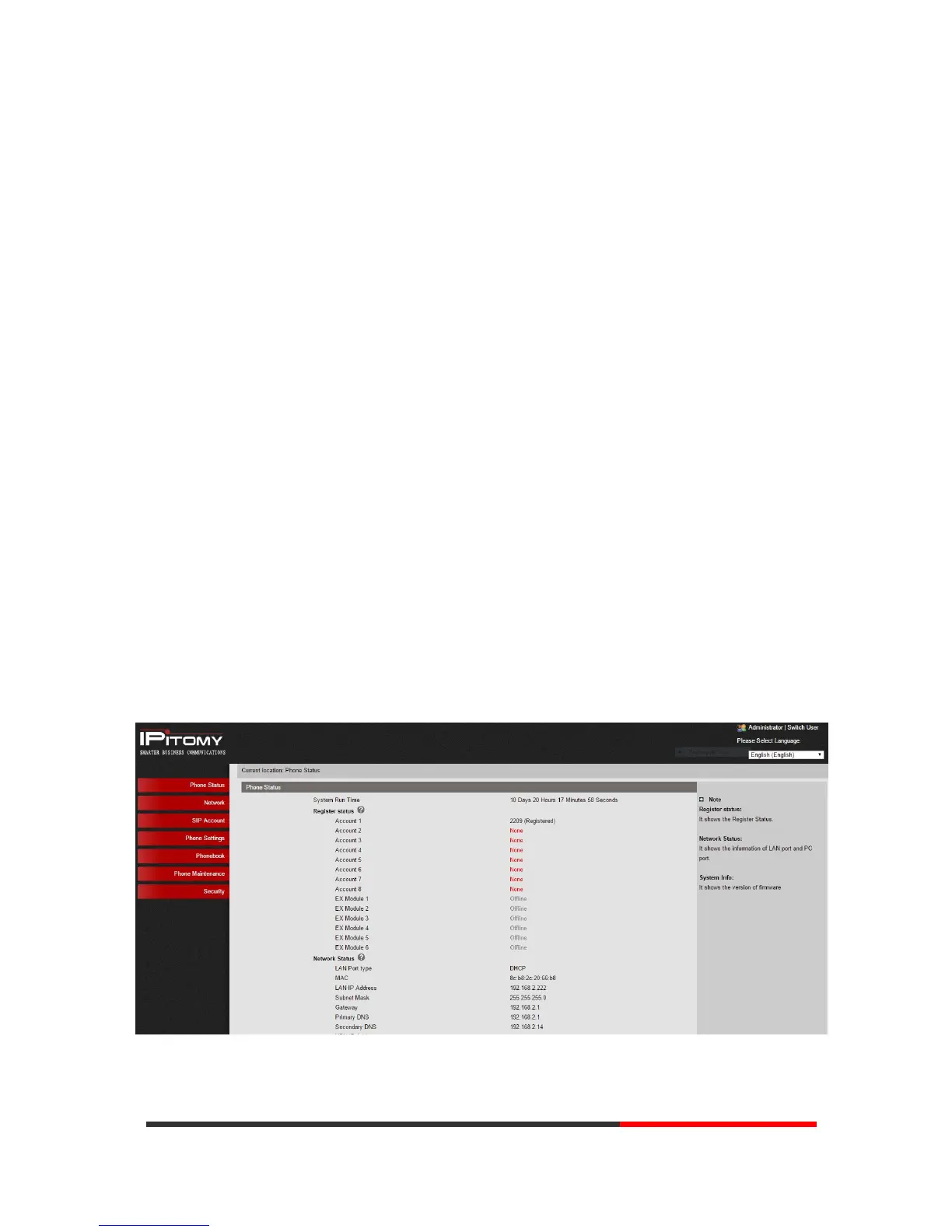
Main Interface-Phone Status
Here you can see below information: System Run Time, Register Status, Network Status,
System Information, etc.


 To Next Page