You can press the configured intercom key to automatically connect with a
remote extension for outgoing intercom calls, and the remote extension will
automatically answer the incoming intercom calls
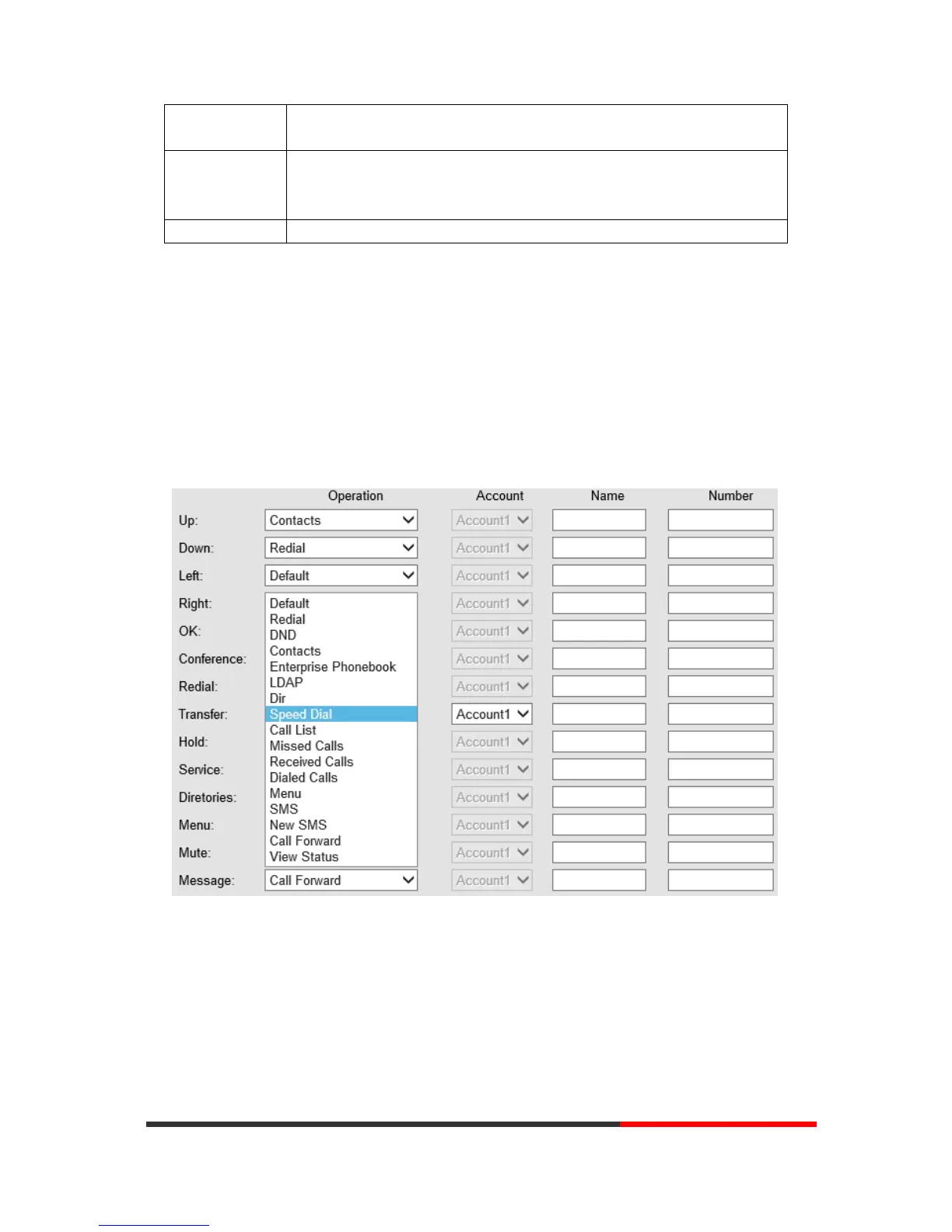
NOTE: ONLY WHEN YOU CHOOSE “SPEED DIAL”, THE RIGHT OF “NAME”,”NUMBER” WILL TAKE
EFFECT.
6.4
Function Keys
Function Keys: If you do not like the default setting with the function keys feature. You can change
to whatever you like.
NOTE: IF THE PHONE WITHOUT THE KEY, YOU CAN IGNORE IT.
6.5
Soft Key
Soft Keys: Soft key is the key with below display in the LCD. You can change it for your needs to the
other features for many types of status. Per example, when are you dialing with someone, the LCD
display soft key is Send \Del \Empty\End, Empty means nothing in it.


 To Next Page