4.1.2
PC Port
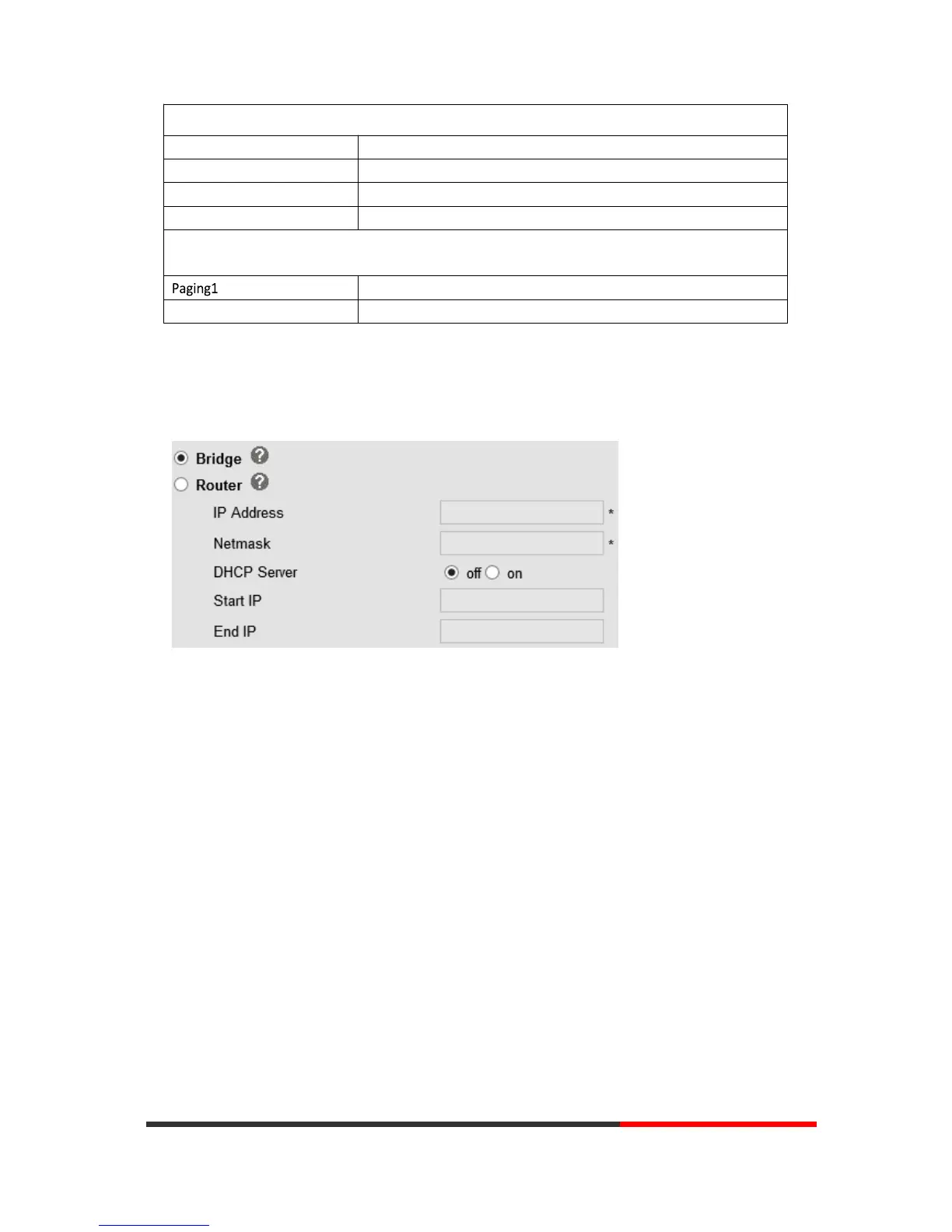
Normally choose Bridge, if you choose Router, you need to input router IP address, net mask.
Bridge
Normally, you should choose “bridge” feature, it means that pc port and LAN port will share the
same network.
Router
Router feature is for the phone PC Port. You must input IP address (it’s equivalent to a gateway)
and Net mask. If you want to use DHCP function, please turn it on, input start IP and end IP.
Enable /Disable Socket5 Proxy Server.
Socket5Proxy Server IP address.
Socket5 Proxy Server port, default is 1080.
EEnable/Disable Socket5 Proxy Server login username.
Paging Setting (NOTE: This feature priority is followed the serial number, In other
words, "paging 1" is the highest priority)
nEnable/Disable Paging feature.
Group IP and Port with Paging.


 To Next Page