1*Quick Setup Guide
1*Manufacturer Certification
b)
Phone Installation:
This section introduces how to install the phone with the components in the packing list:
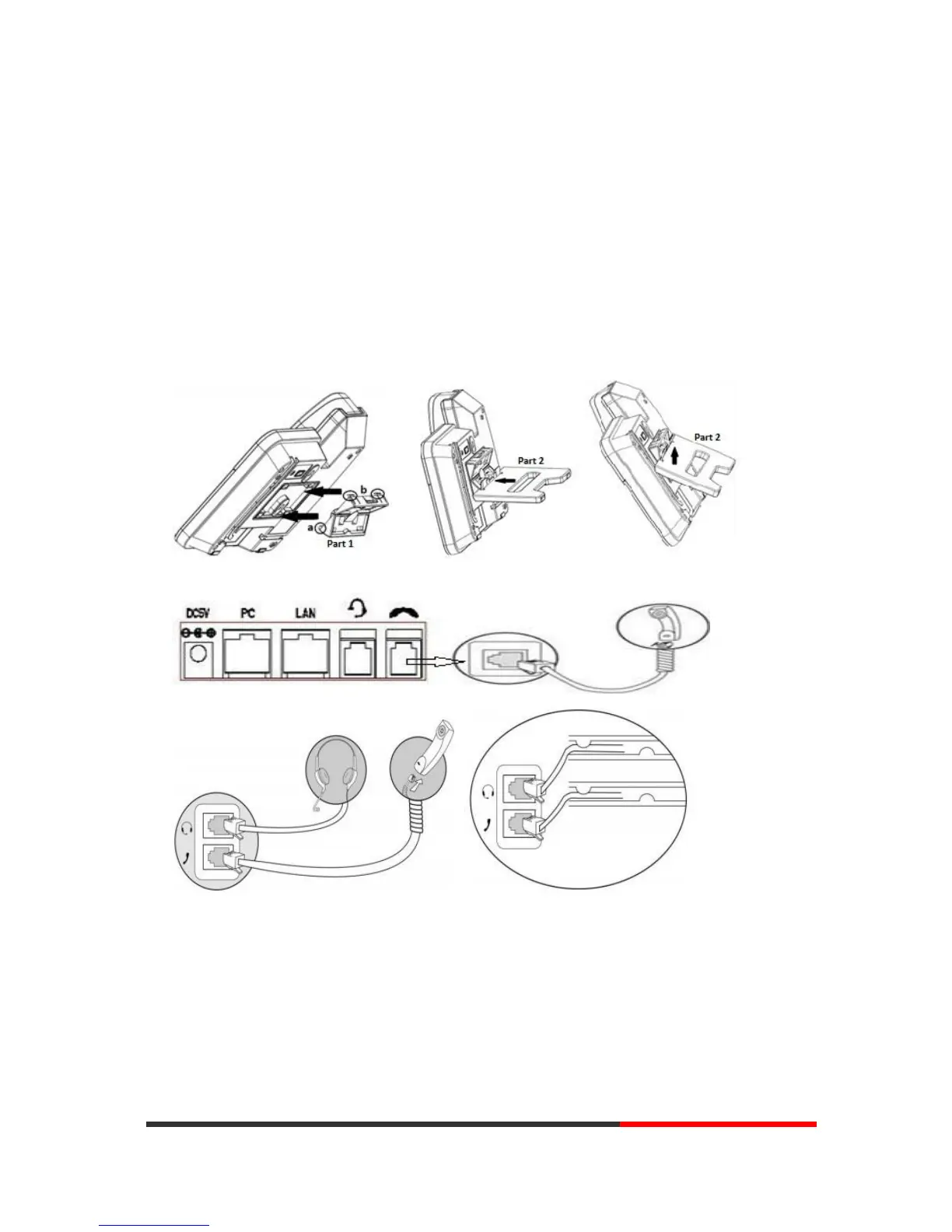
Attach the Bracket
Connect the Handset and optional Headset
Connect the Network and Power
Attach the Bracket
Please follow the following steps "a" to "b", first let the part 1 of the bracket join to the phone,
and then let the part 2 of the bracket join to the lower holder.
Connect the Handset and optional Headset
Connect the Network and Power
You have two options for power supply. Your system administrator will advise you which one to
use.
AC power adapter
POE(Power over Ethernet) IEEE802.3af
NOTES: Please make sure your phone support POE feature. You can check the label on
the back of the phone, for example "Model: IP290 Rev:2.1.0", the P means it supports
POE feature.


 To Next Page