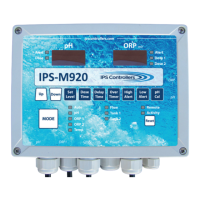
M920 & M920W pH/Dual ORP Controller Owner’s Manual
17
III. Operaon
A. Overview
The IPS-M920 compares the readings received from the Ph and ORP
sensors to the Set Levels entered for Ph, ORP1, and ORP2. If the readings
are too low or too high, the controller will turn on the feed devices for
the Dose Time entered during set up. Other sengs are used to ne
tune the delivery of chemical, as well as prevent over and under dosing.
B. Startup and Shutdown
1. Startup
a. Provide power to the M920 using either Method 1 or 2 as
discussed in step 5d or 5e on page 13.
b. Turn on the lter pump and verify the water ow through
the ow cell by opening the sample port valve (center) and
observing a steady stream of water. The right side valve may
need to be parally closed to produce a steady stream. Note:
Water should pass over the pH and ORP sensors for a minimum
of5minutestoallowforaccurate,stablereadingsofpHand
ORPlevelsfromthepoolorspa.ORPreadingsmaytakelonger
to stabilize.
c. Check for leaks and repair if necessary.
d. Manually adjust and balance the pool or spa water to acceptable
ranges using a test kit. Note(s):1.UseaDPDbasedtestkitto
checkthechlorinelevel.2.CyanuricAcid(Condioner)levels
shouldnotexceed30ppmforbestresults.
e. Verify that the green Flow LED is illuminated. Both the pH and
ORP dose outputs are disabled if there is no water ow.
f. Press the Mode pushbuon momentarily to place the
controller into the pH standby mode. The green pH standby
LED will illuminate. Select the desired pH set level and dose
me (connuous or med). Please call us at 877-693-6903 for
assistance with inial sengs.


 To Next Page