DO NOT APPLY POWER TO YOUR RASPBERRY PI VIA THE PI’s MICRO USB SOCKET.
The Pi/DAC+/AMP+ combination MUST be powered via the Pi-AMP+, not the Raspberry Pi. Once
you are happy with that the Raspberry Pi / DAC+ and AMP+ are connected correctly you are ready to
apply power.
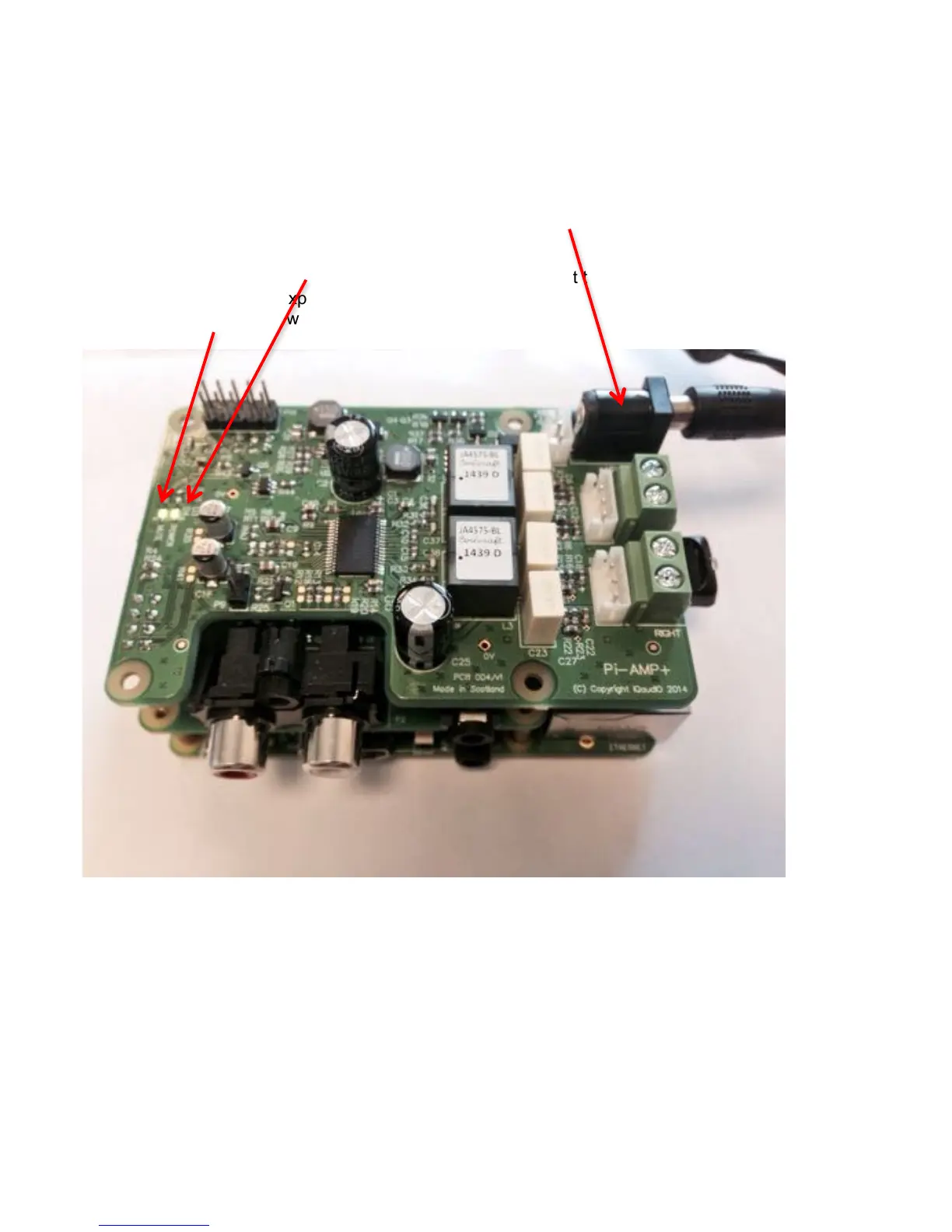
The Pi-AMP+ combination is designed to be powered by the recommended XP Power DC supply.
The Power supply’s output connector should be inserted into the Pi-AMP+’s DC input terminal
(marked “+15V power”). Only then should the Power supply’s AC input be plugged into the mains.
Once power is applied via the Pi-AMP+ you should see that the Raspberry Pi the Pi-DAC+ and the
Pi-AMP+ have their power LEDs illuminated – this indicates that the power is successfully being
applied to each board as expected.
The Pi-AMP+’s Mute LED will also be lit.
!
You can now remove power and reconnect any necessary peripherals you may need, including
speakers.
NOTE: ALWAYS remove power BEFORE connecting speaker cable to the Pi-AMP+


 To Next Page