4.15
Iridium Openport Terminal I 4 Installation
Exactly how you congure the network clients on the vessel will vary
depending on the operating system. Refer to your operating system
manual or technical support organization to obtain the exact details to
achieve this. You should normally use the ISU DHCP server to
automatically congure the correct client settings. If you use this option
the clients must be setup to obtain their settings automatically. This is
the easiest way to setup a network.
If you use a static conguration you must ensure that the ISU is the
default gateway, that the ISU is on the same subnet as all devices and
each network address is unique.
Windows PC Set-up for Static Conguration
Depending on the needs of your computer network, it may be necessary
to statically assign an IP address to the computer directly connected to
the Iridium OpenPort unit. The following steps cover a Windows XP
conguration however they can generally be applied to all Windows
setups. For additional assistance in conguring your desktop computer
for a static connection please contact your local computer administrator.
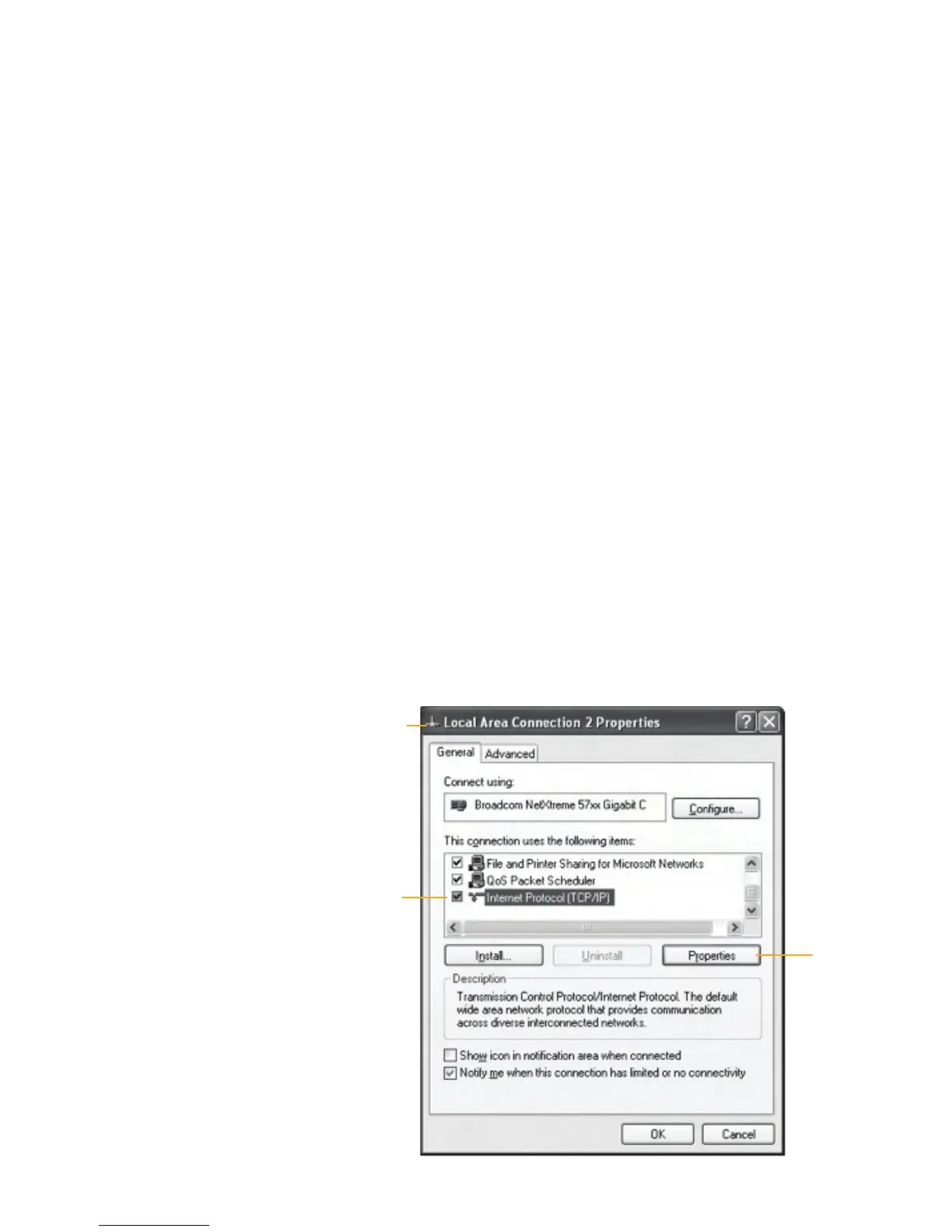
1 Open Network Connections located in the Control Panel.
2 Locate the icon for the Local Area Connection connected to the
OpenPort unit and right-click Properties.
3 From the list of connections used, highlight Internet Protocol (TCP/IP)
and click Properties
TCP/IP
Properties
Figure 4 I 9
Local Area
Connection
Properties
window


 To Next Page