4.16
Iridium Openport Terminal I 4 Installation
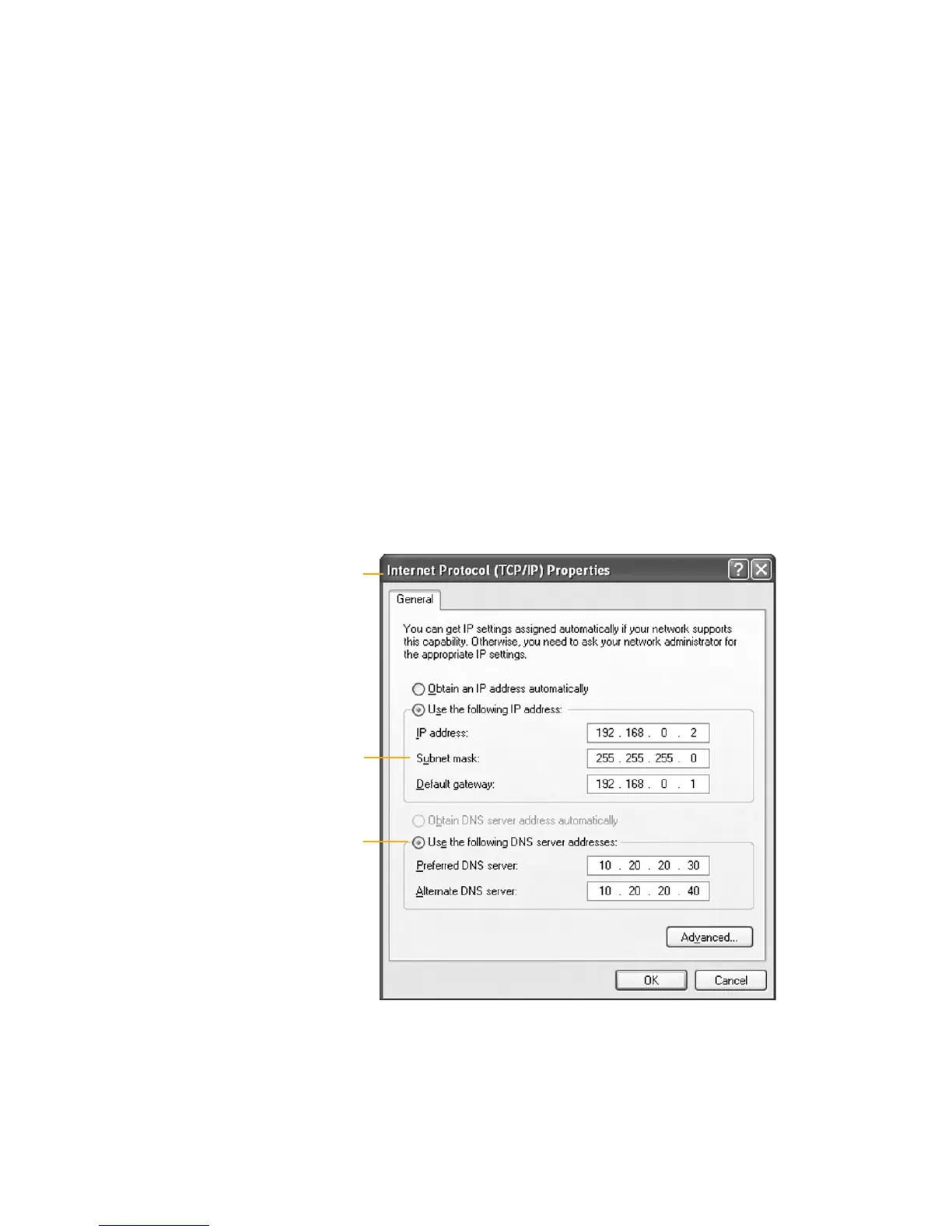
4 On the Internet Protocol (TCP/IP) Properties page, click the radio
button Use the following IP address: and enter an IP address to be
used by this computer.
Note: This IP address should be different from the OpenPort unit while
still being in the same IP range. For example, if the OpenPort unit is
congured as 192.168.0.1 (default), then a computer connected to the ISU
must be congured within the IP range 192.168.0.x where x is anything
between 2 and 254.
5 Next, set the Subnet mask: to 255.255.255.0
6 Enter the IP address of the OpenPort unit for the eld marked Default
gateway.
7 Lastly, check the radio button for Use the following DNS server
addresses: and enter the DNS server address provided by your Service
Provider for the Preferred DNS server address. If an address is not
provided use the IP address as shown below.
8 Click OK to close any open properties pages.
Figure 4 I 10
Subnet mask
Radio button
As long as your data port is provisioned and the proper physical
connections made, access the Internet simply by starting your web
browser. The ISU allows you complete functionality to upload and
download data, web pages, and email. Note: Large les or graphic intense
web pages will take longer to transfer or display.
Accessing the
Web
Internet
Protocol
Properties
window


 To Next Page