EasyManua.ls Logo

IRiver T10 - Chapter 1 I Getting Started; Components; Locating the Controls; Product

IRiver T10
35 pages
Print Icon
To Next Page IconTo Next Page
To Previous Page IconTo Previous Page
Loading...
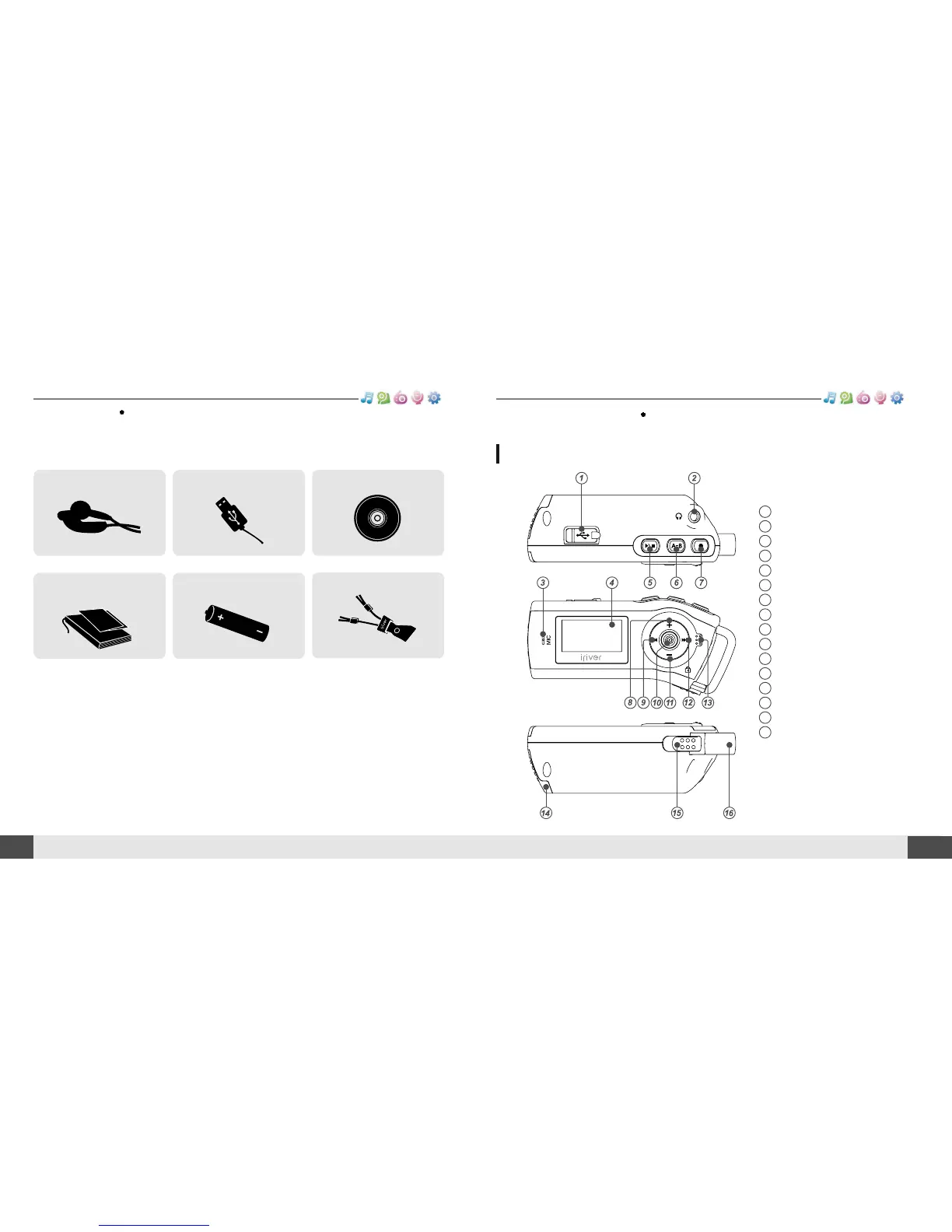
Components
09
Getting started
MUSIC
BROWSER
FM RADIO
RECORDING
FM RADIO
10
Locating the controls
Getting started
MUSIC
BROWSER
FM RADIO
RECORDING
FM RADIO
1
2
3
4
5
6
7
8
9
10
11
12
13
14
15
16
USB connection port
Earphone Jack
Microphone
LCD Screen
Play/Stop button
A-B (Interval repeat) button
Recording button
Volume + button
Previous/Fast Reverse button
NAVI/MENU button
Volume - button
Next/Fast forward button
Hold Switch
Battery cover
Neck Strap Locker
Neck Strap
Neck strap for carrying
Earphone Installation CDUSB cable
User Manual/ Warranty
card/Quick Start Guide
Battery(AA Type, 1EA)
Accessories subject to change without notice and may vary from image shown.
Product
Your player may differ sightly from that shown in the illustrations.

Table of Contents

Other manuals for IRiver T10

Related product manuals