26
MUSIC
Basic operation
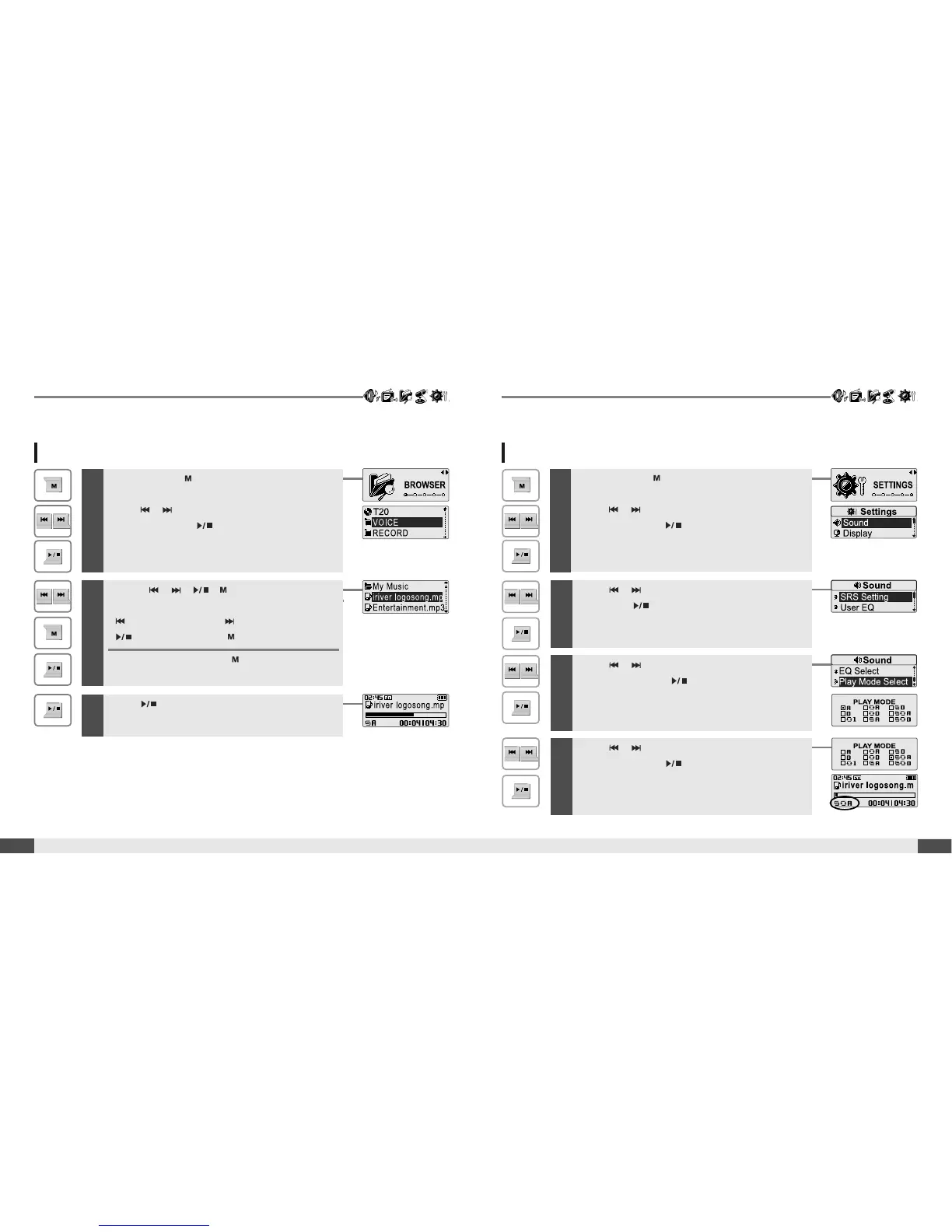
Selecting a music file
MUSIC
25
Basic operation
2
Use the , , , buttons to, select a
music file.
: to move up : to move down
: to enter the folder : to exit the folder
To exit file list screen, press button.
1
Press and hold button to display the function
mode screen.
Press , button to select [BROWSER]
mode, then press button to enter.
The music file list screen will be displayed.
3
Press button to start playback.
Playback Mode can be changed in the [SETTINGS - Sound - Play
Mode Select]. (Refer to page 47)
Changing playback mode
1
Press and hold button to display the function
mode screen.
Press , button to select [SETTINGS]
mode, then press button to enter.
The [SETTINGS] screen will be displayed.
2
Press , button to choose the [SOUND],
then press button.
The [SOUND] sub-menu screen will be displayed.
3
Press , button to choose the [Play Mode
Select], then press button.
The [Play Mode Select] screen will be displayed.
4
Press , button to select desired playback
mode, then press button.
The playback mode is changed to the selected
mode.



 To Next Page