Basic operation
Basic operation
38
37
*FMRADIO
* Only for models including FM Radio function
RECORDING
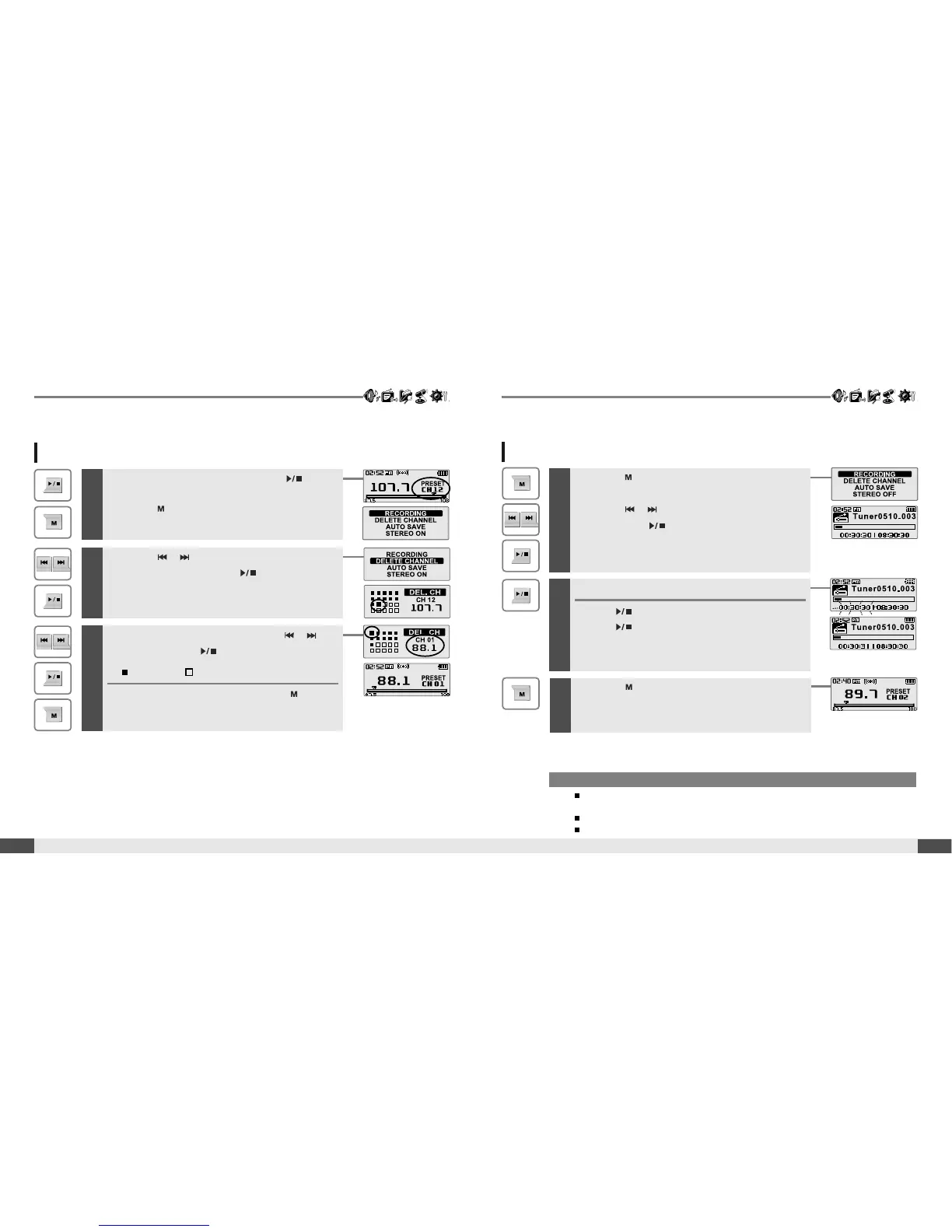
Deleting a channel
1
If PRESET is not displayed, first press the button
to enter PRESET mode.
Press the button to display FM Radio
function Selection screen.
3
Select channel number by using the ,
button, then press button to delete.
:saved :notused
To exit the DEL. CH screen, press the
button.
2
Press the , button to select [DELETE
CHANNEL], then press the button.
The DEL. CH screen is displayed.
Press the button to display FM Radio function
Selection screen.
Press the , button to select [RECORDING],
then press the button.
The station will be recorded.
1
2
Pausing station recording
Press button to pause the recording process.
Press button again to restart recording.
3
Press the button again to stop recording.
The recorded file is saved.
To record *FM station
Note
The recorded file is saved as TUNERMMDD_XXX.MP3 in the RECORD folder.
(MM : Month, DD : day, XXX : sequential number)
Volume can not be controlled while recording.
You can adjust recording quality at the SETTINGS-RECORDING-FM SETTING. (Refer to page 53)
* Only for models including FM Radio function



 To Next Page