36
Basic operation
35
Basic operation
*FMRADIO
* Only for models including FM Radio function
*FMRADIO
* Only for models including FM Radio function
Note
Up to 20 stations can be saved.
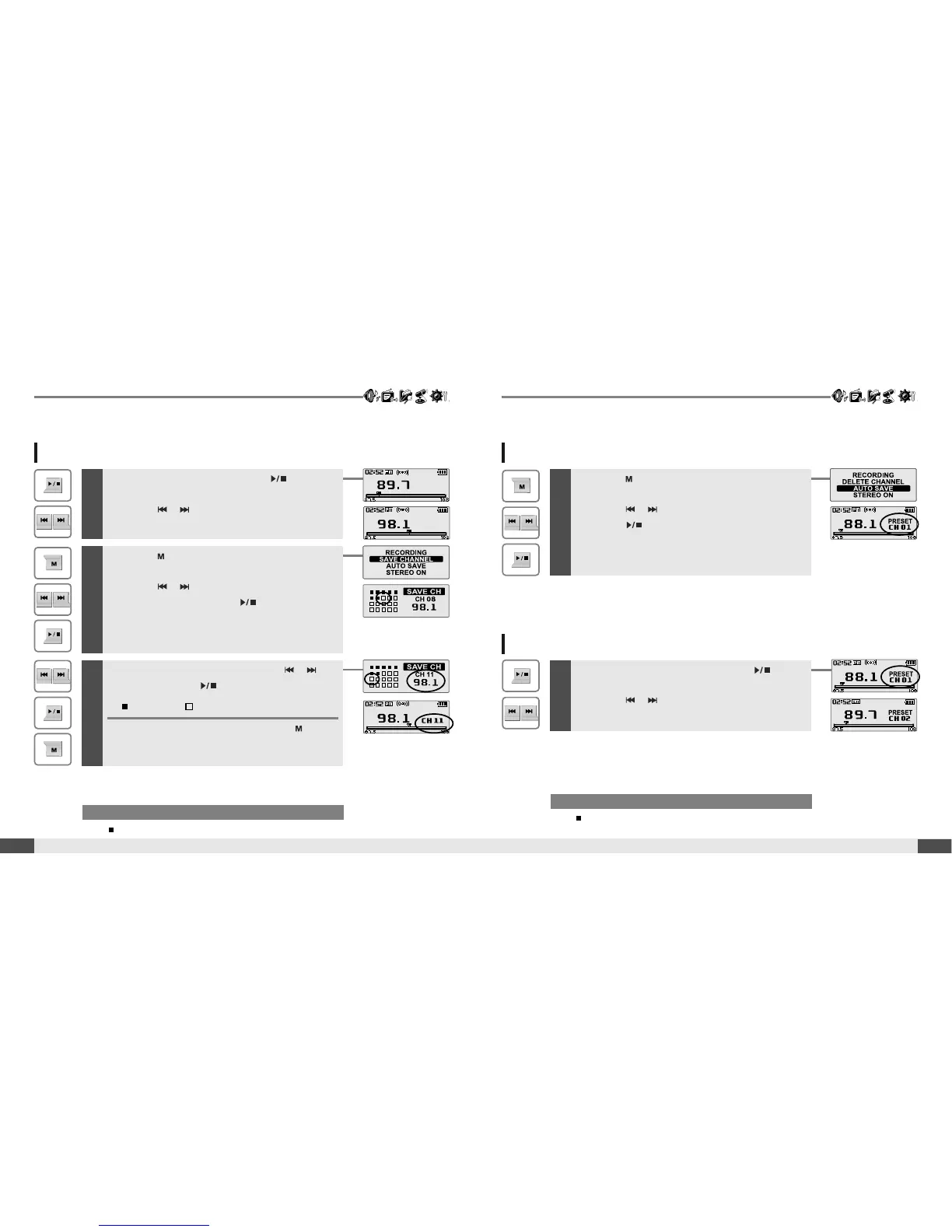
Saving an FM Radio frequency - Manually
1
If PRESET is displayed, first press the button to
exit PRESET mode.
Press the , button to select your desired
station.
3
Select channel number by using the ,
button, then press button to save.
:saved :notused
To exit the SAVE CH screen, press the
button.
2
Press the button to display FM Radio function
Selection screen.
Press the , button to select [SAVE
CHANNEL], then press the button.
The SAVE CH screen is displayed.
Saving an FM Radio frequency - Automatically
Note
When the player does not have any preset stations, EMPTY will be
displayed at Preset mode, then fade out.
1
Press the button to display FM Radio function
Selection screen.
Press the , button to select [AUTO SAVE].
Press the button to to automatically select
stations and save them in sequential order.
Selecting preset memory
1
If PRESET is not displayed, first press the button
to enter PRESET mode.
Press the , button to select your desired
channel.



 To Next Page