44
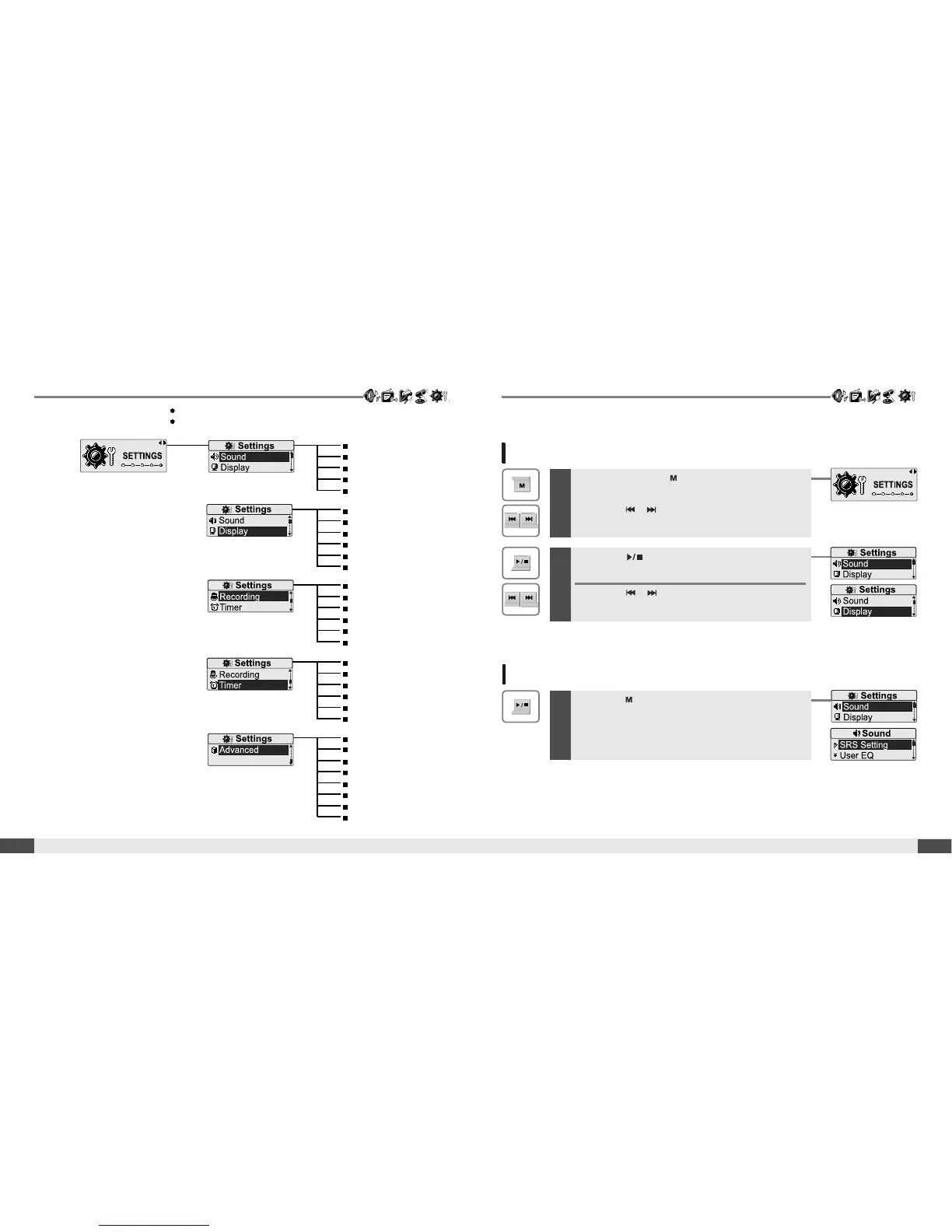
EnterSettingsMenu
Menu operation
Useful features
Menu configuration
43
Useful features
Enter Sub Menu
1
Press and hold the button to display the
Mode screen.
Press the , button to select [SETTINGS]
mode.
2
Press the button to display the Settings
screen.
Press the , button to move the Settings
menu.
1
Press the button to enter the sub menu
screen.
SRS Setting
User EQ
EQ Select
Play Mode Select
Rec. Play Mode
Power Off Timer
Sleep Timer
Date & Time
Alarm/*FM Rec.
Set Alarm
*FM Rec. Reserve
Resume
System Info.
Scan Speed
Playback Speed
Study Mode
Delete File
Load Default
Format
*FM Setting
Voice Setting
Voice Detect
Line-In Setting
Line-In Volume
Track Separation
Backlight Timer
Scroll Speed
Tag Info.
Language
Name
LCD Contrast
Functions are subject to change with different firmware versions.
Users can configure their own settings.
* Only for models including FM Radio function



 To Next Page