38. SETTING
Setting
Blackbox Settings
CAMERA
Front camera
Resolution
Brightness
Night Vision
Security LED
1920 x 1080
Normal
ON
ON
Rear camera
Resolution
Reverse Rear View
1920 x 1080
OFF
ADAS
ADAS Use
FCWS
LDWS
FVDW
OFF
OFF
OFF
LDWS sensitivity
FCWS sensitivity
ADAS Volume
60Km/h
60Km/h
Medium
Time
Date/Time
Timezone
Auto Reboot
Time Reboot
ON
AM
3시
05-06-2020
12:07:58
(GMT +09:00)
Event
Parking Recording
Parking Impact
Parking Motion
ON
ON
Timer
Time-lapse
Hyper-lapse
OFF
OFF
OFF
Driving Impact
Parking Impact
Motion Detection
Medium
Medium
Medium
System
LBP
Battery Saving Mode
Power Off
High Temp Shutdown
ON
ON
12 / 24V
OFF
Sound
Volume
Audio Recording
Voice Guidance
Event Buzzer
Medium
ON
ON
ON
Memory
Normal
Event
Format Free
90%
10%
ON
Information
Model
Firmware Version
PC Viewer Version
TR10
1.000
1.0.0
CancelSaveDefalut
User Settings
Vehicle Information
1
2
3
5
7
8
9
4
6
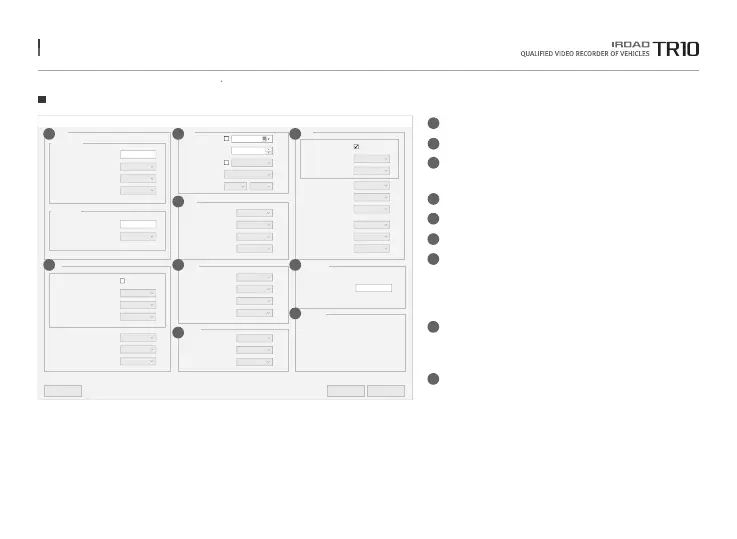
Camera Setting - Set up Front / Rear camera
ADAS - ADAS ON / OFF
Time Setting - Set up Date / Time
Rebooting function for using stably
Sound - Volume, Recording, and Notification On / Off
System - Set up Voltage / High Temp Shutdown
Memory - Set up Normal / Event Recording Rate
Event - Set up Parking Mode Recording (Imapct / Motion)
Set up Impact / Motion Sensitivity
Auto Off and Timer and Hyper Lapse (1fps)
Set up Timelapse (1fps) during parking
User Settings - users can check vehicle information.
It must contain up to 20 characters including letter,
numbers and special characters ( _ ,
-
).
Information - check the information of the dash cam and PC Viewer.
1
2
3
4
5
6
7
8
9
The function is able to be changed for firmware upgrade or product enhancement without prior notice, please visit website regularly.



 To Next Page