27
USE AND MAINTENANCE MANUAL
EN
428000467237 MILLENNIUM
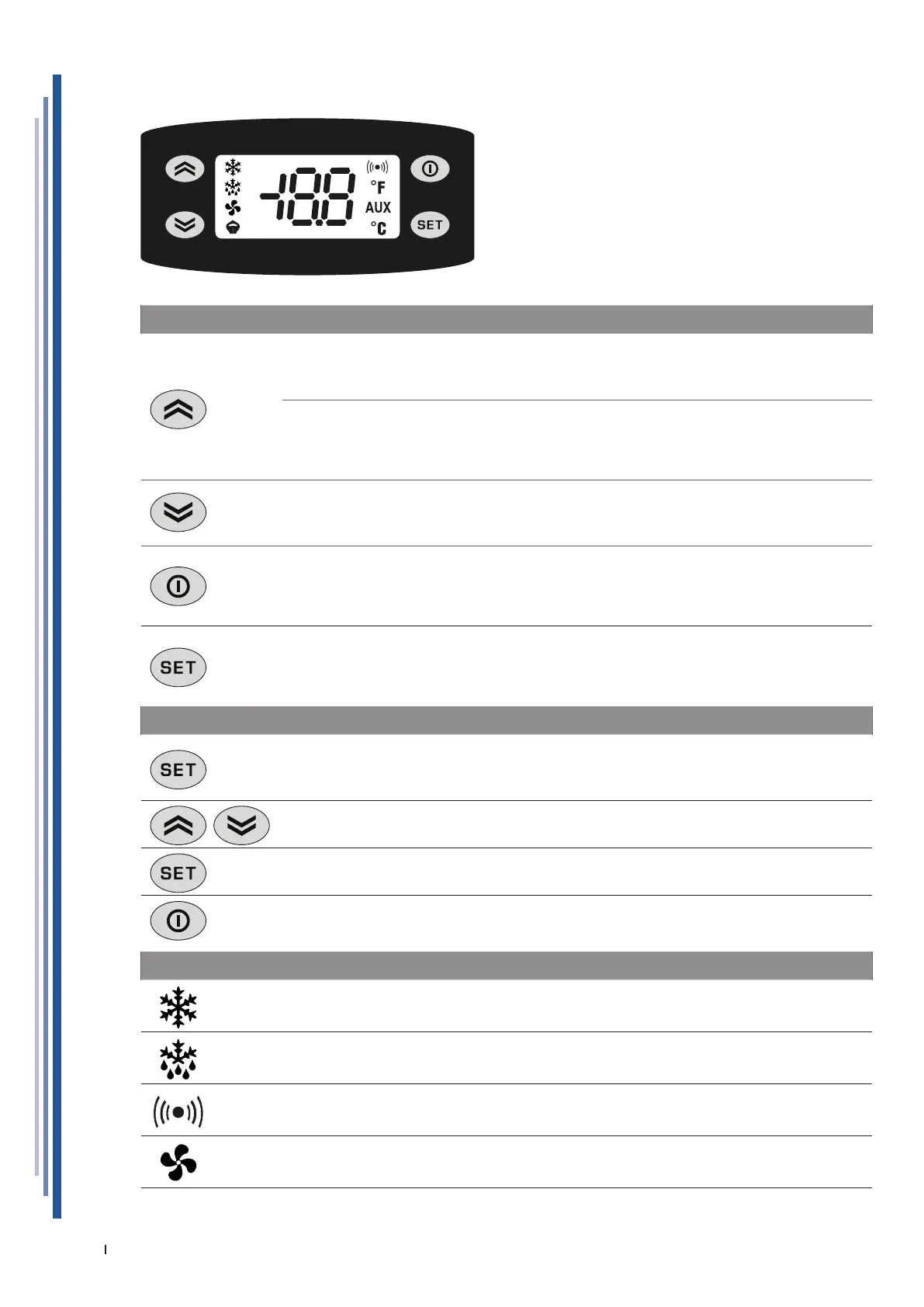
12.1 USER INTERFACE EW974 LVD
KEYS
UP
Scrolls menu options.
Increases the values.
Activates manual defrosting.
MANUAL ACTIVATION OF THE DEFROSTING CYCLE
To manually activate the defrosting cycle, press and hold the UP key for 5 seconds.
If the conditions for defrosting are not present (e.g. the temperature of the evaporator probe
is higher than the defrosting end temperature), the display will ash three (3) times to indicate
that the operation will not be carried out.
DOWN
Scrolls menu options.
Decreases the values.
STAND-BY (ESC)
Goes back up one level with respect to current menu.
Conrms parameter value.
Activates the Stand-by function.
ON / OFF the equipment.
SET (ENTER)
Accesses the Set-point.
Accesses the programming menu.
Conrms the inputs.
Display alarms (if any).
SETTING SET POINT
Press the button and release immediately.
The “Set” label will appear.
To view the Set point value, press the SET (ENTER) button again.
The Set-point value will appear on the display.
To change the Set point value, press the UP and DOWN buttons within 15 seconds.
To conrm the new Set-point value set, press the SET (ENTER) key again.
By not operating on the keyboard for more than 15 seconds (time-out)or pressing the STAND-
BY (ESC) key once, the last value displayed is conrmed and you go back to the previous
display.
LED
COMPRESSOR or RELAY 1
ON for compressor on.
Flashing for delay, protection or blocked activation.
DEFROSTING
ON for defrosting in progress.
Flashing for manual activation.
ALARM
ON for active alarm.
Flashing for silenced alarm.
FANS
ON for operating fans.


 To Next Page