This document describes the operation manual for the ITC T-B60DTB/B120DTB/B240DTB/B350DTB/B500DTB/B650DTB Mixer Amplifier with Audio Sources, which include MP3, Tuner, and Bluetooth functionalities. This manual is crucial for obtaining optimal results from the unit and should be kept handy for future reference.
The mixer amplifier is designed with a 1U chassis, integrating a high-performance switching power supply and a digital power amplifier. This design contributes to its high efficiency, light weight, and delicate appearance.
Function Description
The device serves as a versatile mixer amplifier, capable of handling multiple audio inputs and providing amplified output. It features an MP3 module that can read MP3 files from a USB flash disk or TF card, offering convenient audio playback. The MP3 module also includes a remote control for ease of use, a power-off memory function, and a MIC recording function.
For audio input, the amplifier supports one channel of EMC input, two channels of AUX input, and four channels of MIC input. Each input channel is equipped with independent volume, treble, and bass controls, allowing for precise audio adjustment. The unit also includes a master volume control for overall output level management.
A key feature of this mixer amplifier is its channel priority function, which ensures that critical audio signals are prioritized. The hierarchy is established as EMC > MIC1 > MIC2/MIC3/MIC4 > AUX1/AUX2/MP3. This means that EMC input takes precedence over all other audio inputs, and MIC1 has priority over other microphone and line inputs. The mute function further enhances control, with microphone input having priority over line input, and MIC1 having priority over other audio inputs when muted.
The amplifier utilizes an advanced and high-efficiency power amplify circuit, providing speaker outputs at 100V or 4 ohms. It is available in various rated output powers, including 60W, 120W, 240W, 350W, 500W, and 650W, catering to different audio system requirements. The AC power input supports various power supplies ranging from 120W to 850W depending on the model.
Usage Features
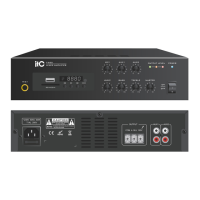
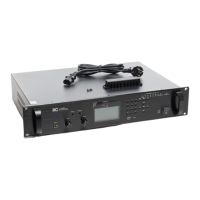
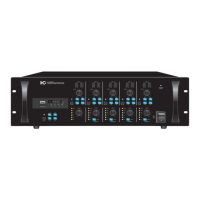
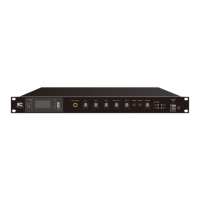
The front panel of the unit provides a comprehensive set of controls and indicators. These include buttons for recording, MP3 loop playback, play/pause, next song/volume reduction, and mode selection. A USB interface and TF card slot are available for media playback. Individual volume control knobs are present for MIC1, MIC2, MIC3, MIC4/AUX1, and AUX2 inputs. Treble and bass adjustment potentiometers allow for tone shaping. Status indicators for PROT (protection), 100V, 4-16Ω, CLIP (clipping), and SIG (signal) provide visual feedback on the amplifier's operational status. A power switch and power indicator are also located on the front panel, along with an LCD display for information.
The device comes with a remote control for convenient operation from a distance. The remote control includes buttons for power, mode, previous/next track, volume increase/decrease, number selection (0-9), play/pause, sound effect control, mute, cycle play, and pause. The normal usage distance for the remote control is up to 8 meters, with an angle tolerance of ±35 degrees horizontally and ±15 degrees vertically.
Connecting speakers to the amplifier requires careful attention to the selector switch settings. Users can choose between 100V or 4-16Ω output positions based on their speaker type (constant pressure or fixed resistance). It is crucial to ensure the equipment is powered off before connecting speakers to avoid electric shock. The total rated input power of connected speakers must be less than the rated power of the amplifier.
Connecting external devices such as CD players or MP3 players also requires the equipment to be powered off initially. Once connected with appropriate cables, the volume knob should be set to minimum before powering on the connected equipment and then the amplifier.
Microphone usage involves connecting the microphone to the input interface, adjusting the volume knob to the right, and speaking loudly while gradually increasing the volume until the desired output without distortion is achieved. If the input is high but the output is low, the volume knob should be increased. Conversely, if the speaker volume is too high, it should be reduced.
The built-in MP3 player supports MP3, WAV, WMA, AEC, and FLAC formats from USB disks (up to 32G) and TF cards (up to 32G). The MODE button allows selection between FM, USB, and Bluetooth modes. In FM mode, a long press of the PLAY/PAUSE button initiates automatic radio station reception. In Bluetooth mode, the device can connect to mobile phones within a 10-meter barrier-free range, with the default Bluetooth name "BP10_BT". MP3 song loop playback offers options like Repeat One, Repeat ALL, Random, and Repeat Folder. The functional memory feature allows the unit to remember the last selected function mode after being turned off by the remote control or a long press of the MODE button. However, if the power cable is unplugged and reconnected, the default mode will be Bluetooth. Volume can be quickly adjusted by long-pressing the Previous Song button (increase) or Next Song button (decrease).
Maintenance Features
Safety precautions are paramount for the proper functioning and longevity of the device, as well as user safety. The manual emphasizes reading all instructions, observing safety symbols and messages, and keeping the manual for future reference.
To prevent fire or electric shock, the unit should not be exposed to rain, water splashes, or other liquids. It must only be used with the specified voltage. The power supply cord should not be cut, kinked, damaged, or modified, and heavy objects should not be placed on it. The unit's terminal cover must be replaced after connections are complete to avoid electric shock from high voltage speaker terminals. Proper grounding to the safety ground (earth) terminal is essential.
Installation in unstable locations, such as rickety tables or slanted surfaces, should be avoided to prevent the unit from falling and causing injury or damage. In case of any irregularity during use, such as smoke, strange smells, water/metallic object ingress, falls, case breakage, power cord damage, or malfunction (no tone), the power should be immediately switched off, the power supply plug disconnected, and the nearest ITC dealer contacted. Users should not attempt to operate the unit in such conditions or open the unit case due to high voltage components.
Cups, bowls, or other liquid containers or metallic objects should not be placed on top of the unit to prevent spills and potential fire or electric shock. Metallic objects or flammable materials should not be inserted into the ventilation slots.
When installing, users should avoid plugging/unplugging the power supply with wet hands. When unplugging, the power supply plug should be grasped, not the cord. The unit's power supply cord should be removed from the wall outlet before moving the unit. Ventilation slots must not be blocked to prevent heat buildup and fire. The unit should not be installed in humid, dusty, or direct sunlight-exposed locations, or near heaters or sources of sooty smoke/steam.
For cleaning, users should contact their ITC dealer. Accumulation of dust on the unit or power supply plug can lead to fire or damage, so periodic cleaning is recommended, and the plug should be securely inserted into the wall outlet. If the unit is to be unused for 10 days or more, the power should be switched off, and the power supply plug unplugged for safety.
The manual also notes that an all-pole mains switch with a contact separation of at least 3 mm in each pole must be incorporated into the building's electrical installation.
For shutdown, the volume knob should be turned to the minimum position, and the panel power switch of the amplifier should be turned off, followed by processor and audio source equipment. A waiting period of about 5 seconds before turning the power on again is advised to prevent equipment failure. Even when off, a small current may still be present, so for long periods of disuse, the power cord should be unplugged from the AC socket.
The unit is equipped with level indication, overload, and protection indicators, and has good protection mechanisms for short circuit, overload, and overheat situations. It features forced air-cooling from front to rear, with the fan rotating at a constant speed upon startup and increasing speed as temperature rises, allowing for prolonged operation.
To ensure proper cooling and prevent internal temperature rise, all sides of the unit should be kept at least 10 cm away from any obstructing objects.


 To Next Page
 General