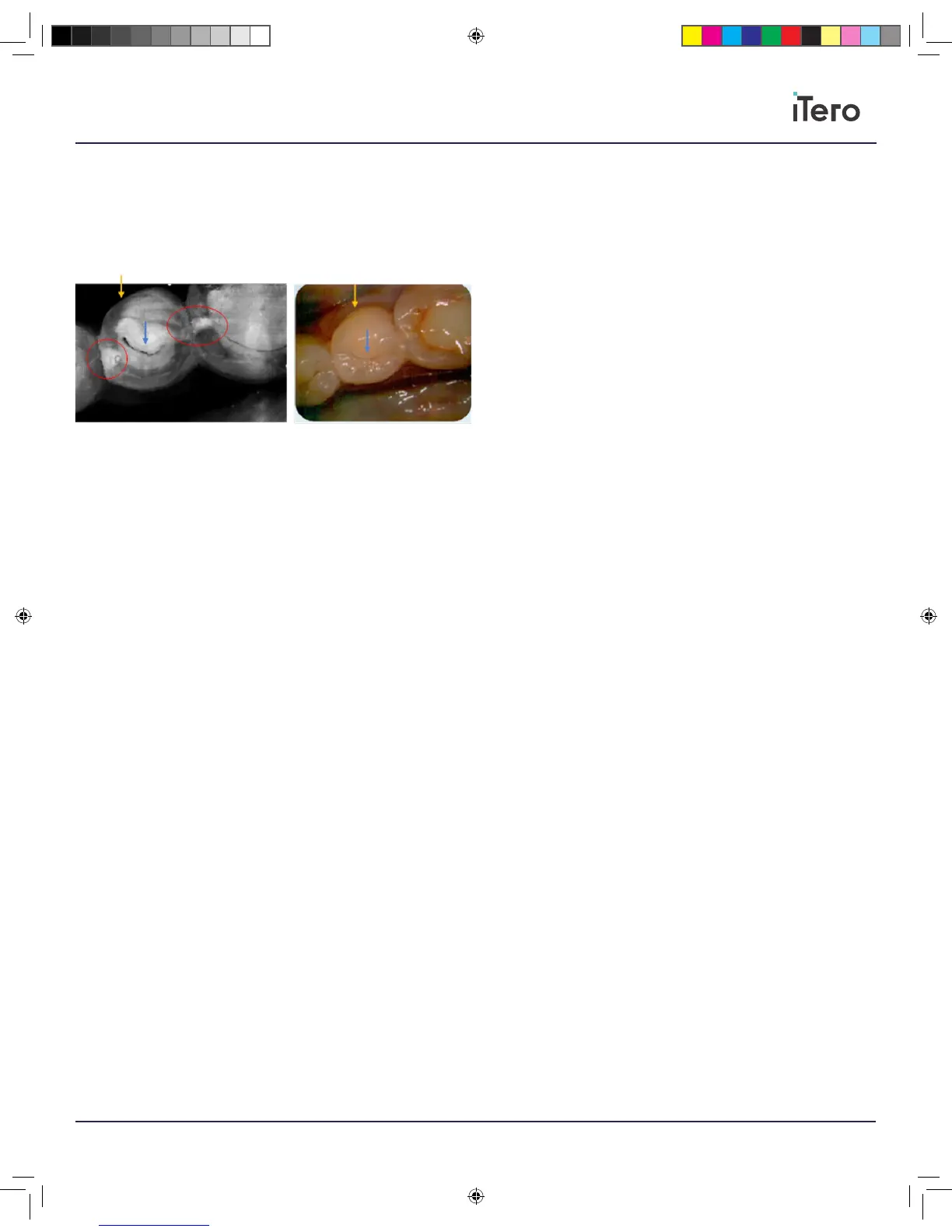
Changing viewing angle around such area may provide more information
regarding its depth, while using the color image may help dierentiate the
diagnosis as well as the lesions severity.
In addition to the NIRI, the color images are also provided to give more
information regarding the tooth’s health, and help with the diagnosis.
The NIRI above demonstrates two proximal lesions circled in red,
reaching all the way to the dentin, while the color image helps determine
that the lesions are proximal and not occlusal, as no white/brown spots
appear in the correlating areas of the occlusal surface in the color image.
The dark lines marked by the blue arrows indicate occlusal fissures.
Note: Highly opaque teeth will have low translucency of the enamel
making it appear brighter, this may cause diculty in understanding
internal tooth’s structures, and dierentiating between enamel and
dentin, thus aecting the ability to detect proximal caries. In addition,
several dental restorations such as amalgam fillings are not translucent
for the NIRI, meaning they may mask lesions underneath them.
NIRI along with the color images can assist in the detection of
proximal caries.
206721RevC_iTeroElement5D_IFU.indd 19 1/9/19 3:12 PM



 To Next Page