19
6-1.
Preparation for install
driver cards
Holeprocessingonframesorcontrolpanel
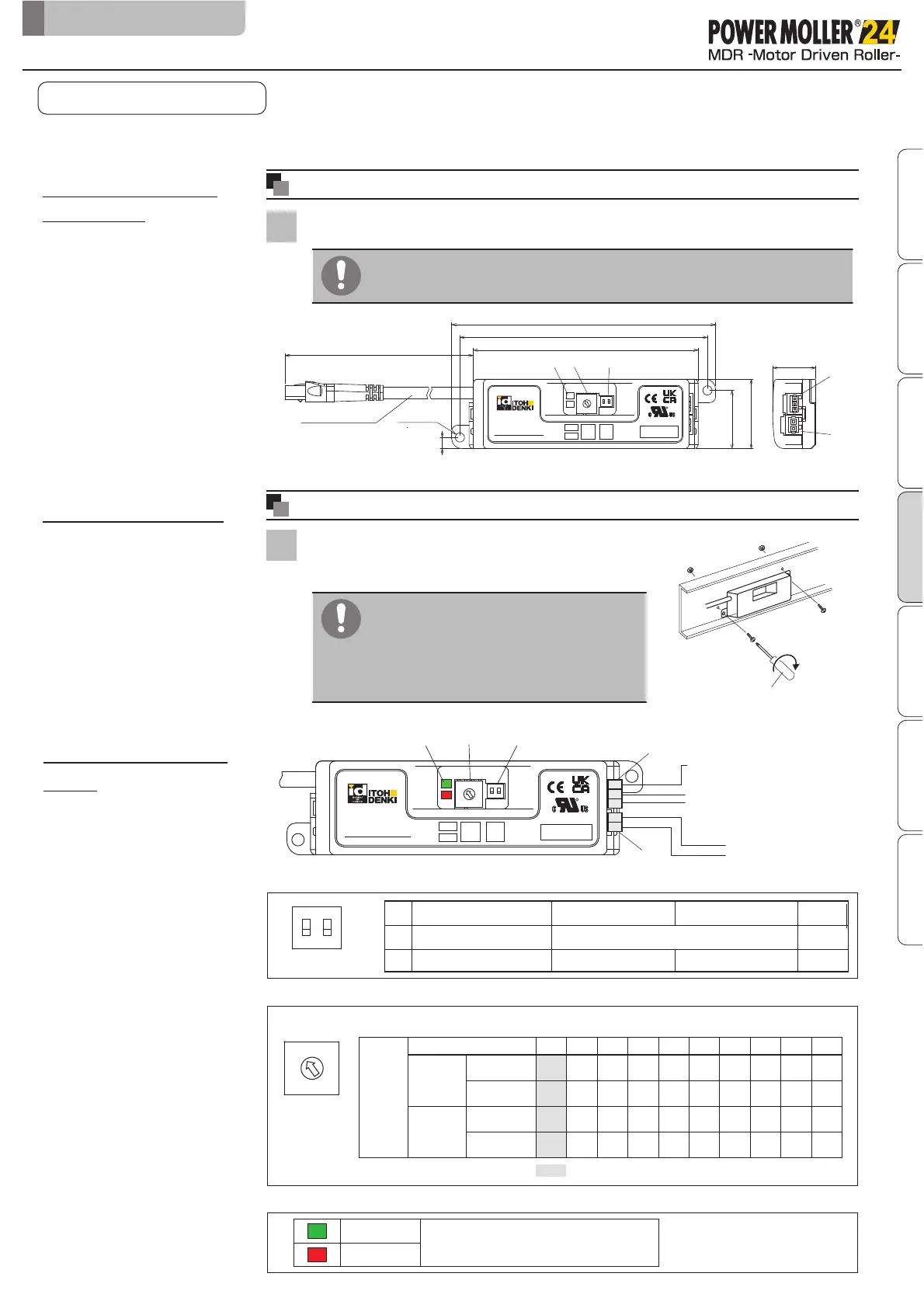
Makes mounting holes on the frames or control panel by reference to the
mounting holes for driver cards.
1
■
Mount driver cards on a flat surface where heat can be released easily.
■
Prevent chips generated during processing from entering driver cards.
Phillips head screwdriver
Mountingdrivercards
1
■
Use the included screws and nuts to mount
driver cards on the conveyor frames or
control panel.
6-2.
Mounting driver cards
Recommendedtighteningtorque
1.5〜1.9N・m
6. Installation/Wiring
6-3.
CB-402 Functions list /
Wiring
Factory
setting
①SW1(DIP switch)
③LED
I
nstall driver cards
Motor cable length
Motor cable
1.5〜1.9
N
・
m
PWR(Green)
ERR(Red)
■
Since the driver card has the degree of
protection of IP20, use a protective
case in areas subject to water, or install
in other locations.
Safety precautions
Advance preparation
Check ProductInstallation/Wiring
Maintenance/Inspection
Specifications Control/Operation
CBV30UserManual
②SW2(Rotary switch)
:Factory setting
Nominal
speed 17
Nominal
speed 60
Nominal
speed 17
Nominal
speed 60
No. Description
ON OFF
1
1
OFF
ON
OFF
ON
2
2
Short circuit brake
Switching brake type
OFF
OFF
Rotating direction Refer to P.23
Power status and error types are indicated.
( )
OUT
CBV30-UL-N(NPN):0V
CBV30-UL-P(PNP):24V
( )
CBV30-UL-N(NPN):0V
CBV30-UL-P(PNP):24V
0V
DC24V
}
IN
4
3
2
1
0
9
8
7
6
5
Internal speed setting
SW2
Specified
speed
9
PM380VS
PM427VS
17.4
19.5
8
14.5
16.3
7
11.6
13.0
6
8.7
9.8
5
7.2
8.1
4
5.8
6.5
(m/min)
60.0 50.0 40.0 30.0 25.0 20.0
67.4 56.2 45.0 33.7 28.1 22.5
3
4.3
4.9
15.0
16.9
2
2.9
3.3
10.0
11.2
1
2.3
2.6
8.0
9.0
0
1.5
1.6
5.0
5.6
CBV30-UL-N
5
6
7
8
9
0
1
2
3
4
SW2
SW1
CN2
CN1
PWR
ERR
SPEED
2.BRK
1.DIR
LED
R
INPUT:24V,1.6A
OUTPUT:24Vp-p,1.4A
3∅,194Hz(0Hz〜199Hz)
100
21
34
28.5
5.5
121
128.9
110
2-∅4.5
CBV30-UL-N
5
6
7
8
9
0
1
2
3
4
②SW2
①SW1
PWR
ERR
SPEED
2.BRK
1.DIR
③LED
R
INPUT:24V,1.6A
OUTPUT:24Vp-p,1.4A
3∅,194Hz(0Hz〜199Hz)
CN2
CN1
12 123
Servo brake


 To Next Page