EasyManua.ls Logo

IVIEW HD-104 - 4-8.4 Spot Setup

IVIEW HD-104
79 pages
Print Icon
To Next Page IconTo Next Page
To Previous Page IconTo Previous Page
Loading...
HD-104 User Manual
35
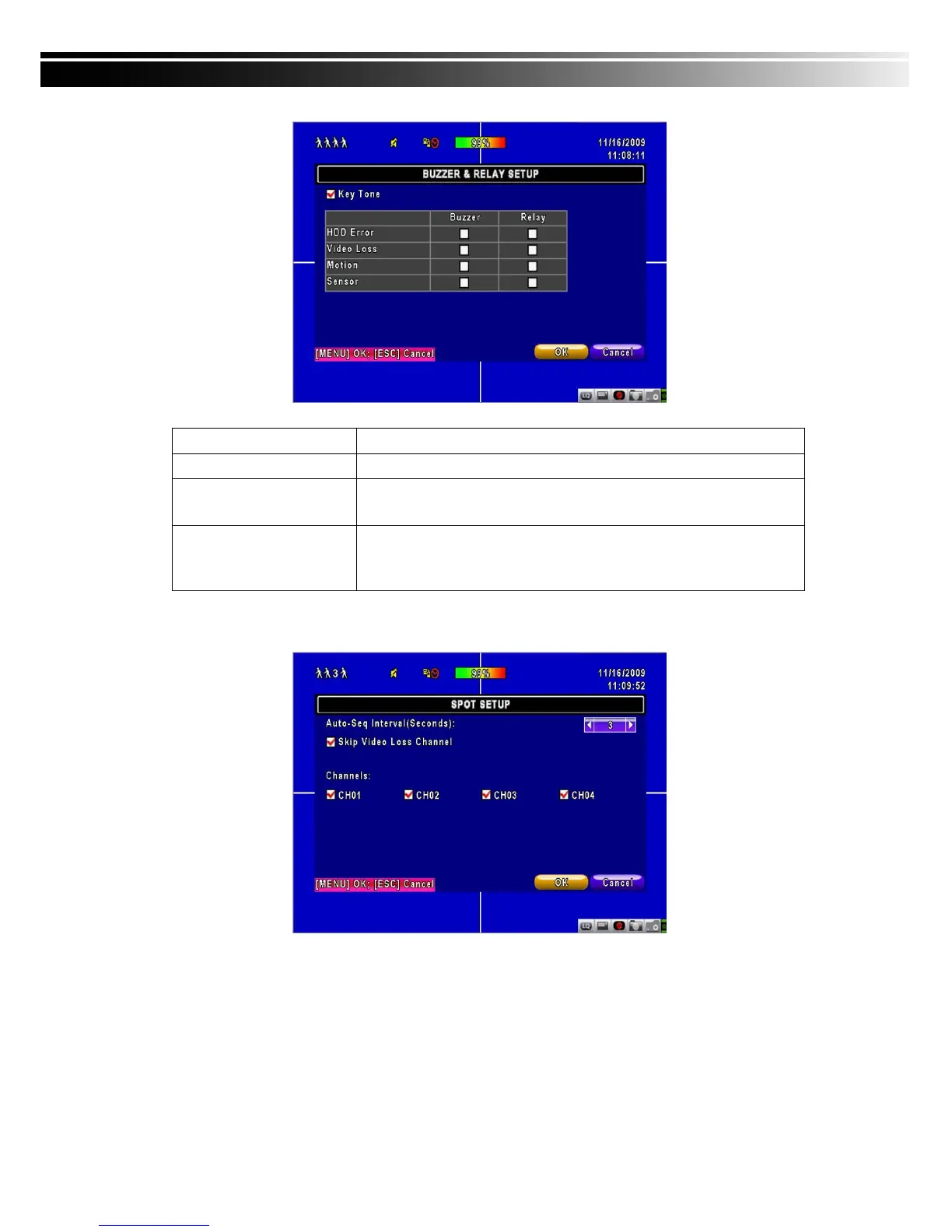
Item
Description
Key Tone
Enable/Disable keystrokes.
Buzzer
Enable/Disable buzzer operation when the alarm is triggered for
HDD Error, Video Loss, Motion and Sensor.
Relay
Enable/Disable the signal to be sent to the RELAY OUT blocks
when the alarm is triggered for HDD Error, Video Loss, Motion and
Sensor.
4-8.4 SPOT SETUP
The DVR has two modes of video output; one is main video output, the other is spot video
output. SPOT setup is for controlling the order of channels the system cycles through in SPOT
mode. User can monitor every channel in the SPOT mode.

Table of Contents

Other manuals for IVIEW HD-104

Related product manuals