CHAPTER 2 PANEL LOCATION
2-1 FRONT PANEL CONTROLS
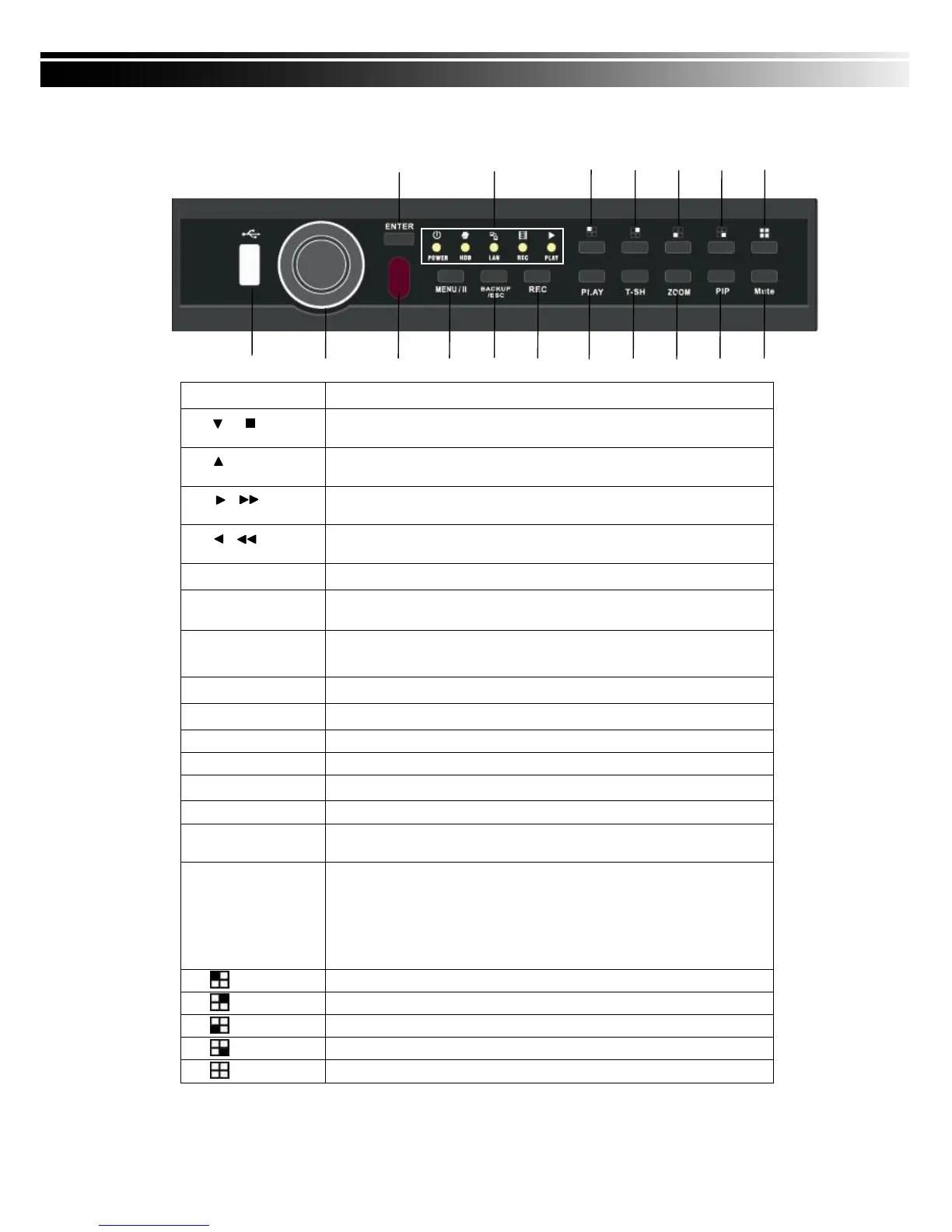
⑫ ⑬ ⑭ ⑮ ⑯ ⑰ ⑱
① ② ③ ④ ⑤ ⑥ ⑦ ⑧ ⑨ ⑩ ⑪
Port for USB external devices.
In SETUP mode, press to move cursor down. In PLAYBACK mode,
press to stop playing back.
In SETUP mode, press to move cursor up. In PLAYBACK mode,
press to slow down.
In SETUP mode, press to increase value. In PLAYBACK mode
press to play forwards.
In SETUP mode, press to reduce value. In PLAYBACK mode,
press to play rewind.
Input sensor for the remote control.
In LIVE mode, press to display menu. In PLAYBACK mode, press
to pause playback.
In LIVE mode, press to display the BACKUP menu. In SETUP
mode, press to return to previous page.
Play back in normal speed.
In LIVE or PLAYBACK mode, enlarge the display of a channel.
In LIVE mode, display with picture in picture format.
Enable / Disable Key Tone.
In SETUP mode, press to enter values. In PLAYBACK mode,
switch between full, quad, 9-channel, 16-channel display in order.
⑬ LED Display
(From left to right)
Power: Power is on.
HDD: Hard disk is in use.
LAN: Connected to the internet (in red): Remote user logged in.
REC: Recording.
PLAY: Playing back.
In LIVE or PLAYBACK mode, switch to CH1。
In LIVE or PLAYBACK mode, switch to CH2。
In LIVE or PLAYBACK mode, switch to CH3。
In LIVE or PLAYBACK mode, switch to CH4。
In LIVE or PLAYBACK mode, switch to 4-channel display。


 To Next Page