EasyManua.ls Logo

IVIEW HD-104 - 9-5.3 PTZ Control

IVIEW HD-104
79 pages
Print Icon
To Next Page IconTo Next Page
To Previous Page IconTo Previous Page
Loading...
HD-104 User Manual
65
9-5.3 PTZ Control
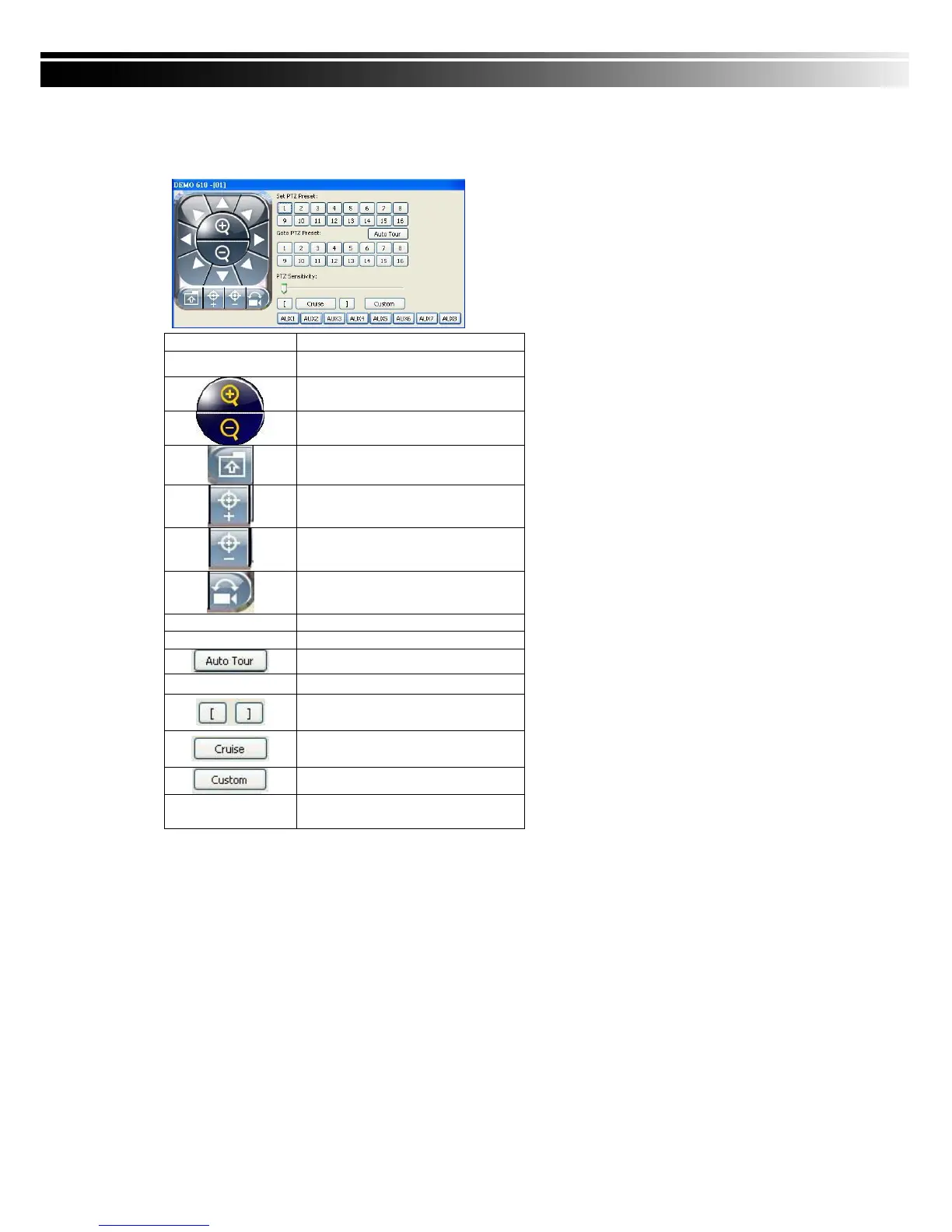
In the main display, right click on the channel will bring up PTZ control panel as below.
PTZ communication protocols from different brands arent compatible 100% sometimes.
Therefore, some of these functions may be unavailable.
Icon
Description
8 direction key
Rotate the PTZ
ZOOM+Zoom in
ZOOM : Zoom out
Setup the PTZ spot as pre-set
N.
FOCUS+ : Focus in
FOCUS-Focus out
Move to pre-set N.
Set PTZ Preset
Setup 16 pre-set N.
Goto PTZ Preset
Move to specific pre-set N.
Activate auto pre-set tour
PTZ Sensitivity
Setup PTZ sensitivity
Setup the start and end of
liner scan.
Activate the liner scan cruise.
Customization function
AUX 1~8 ( For
customization)
AUTO+1 ~ AUTO+8

Table of Contents

Other manuals for IVIEW HD-104

Related product manuals