6-2 How to do remote monitoring through IE
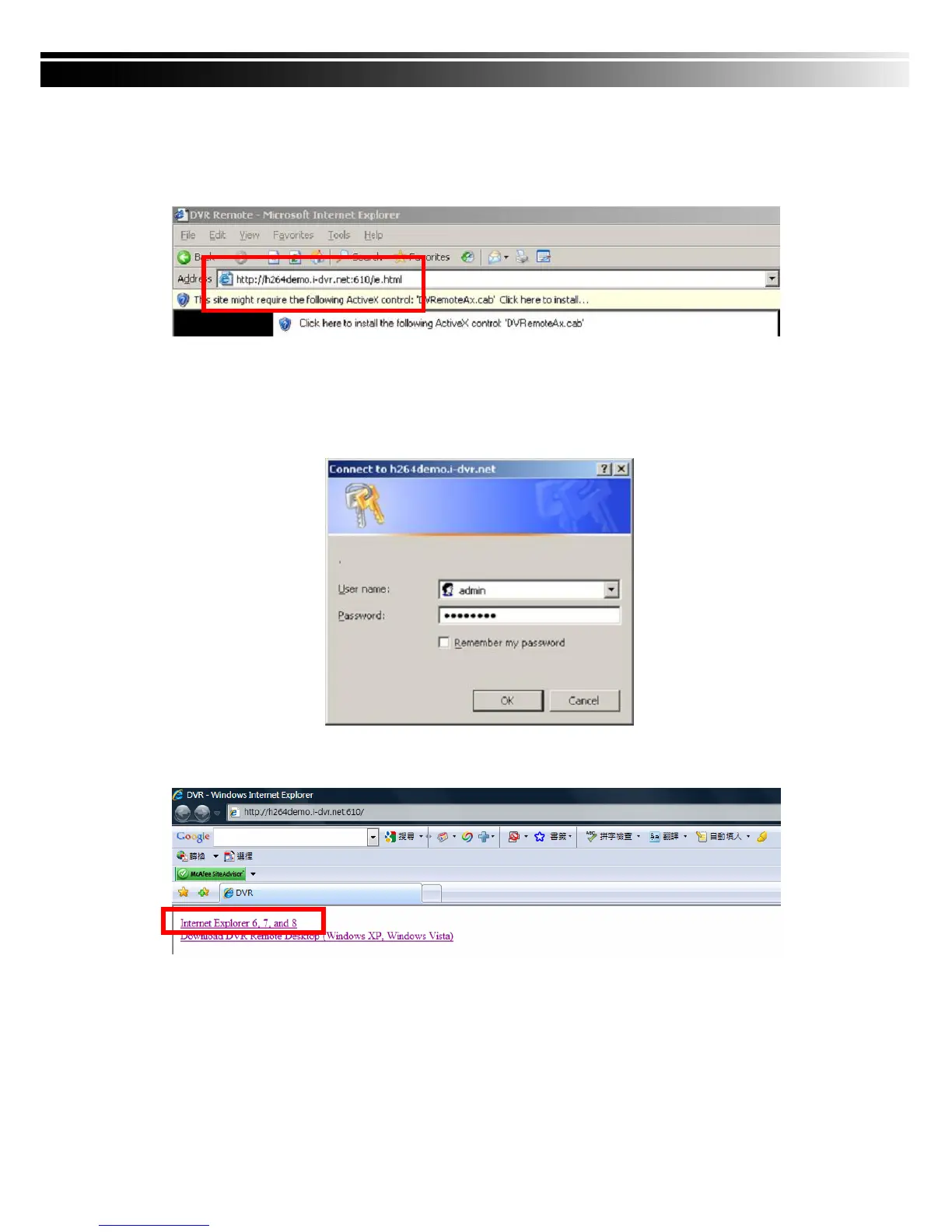
Step One:Enter the IP address of DVR in IE browser. The address appeared in this image is
only for demonstration. Actual address is depending on the setup of on-site DVR.
Step Two: Windows as below will show up. Please enter the user name and password. Default
user name and password is admin/123456. Other related setup about user account
and password, please check “4-5 Account Setup. “ The user name and password
appeared in this image is only for demonstration. Actual user name and password
depend on the setup of on-site DVR.
Step Three: Click on “Internet Explorer 6, 7, and 8”to start downloading the AP software. ( The
first option is for IE view, please refer to next chapter for more information)
p.s. There will be IE connection security issue when clicking this link for the first time.
Please refer to index II for Remote Monitoring IE ActiveX Control Installation Instruction.


 To Next Page