74
8. What If ...
8.4 Repair
Repairs may only be carried out by a certified Ivoclar Vivadent Service Centre. Please refer to the addresses on
the last page of these Operating Instructions.
If repairs during the warranty period are not carried out by a certified Ivoclar Vivadent Service Centre, the warranty will
expire immediately. Please also refer to the corresponding warranty regulations.
8.5 Reset to factory settings
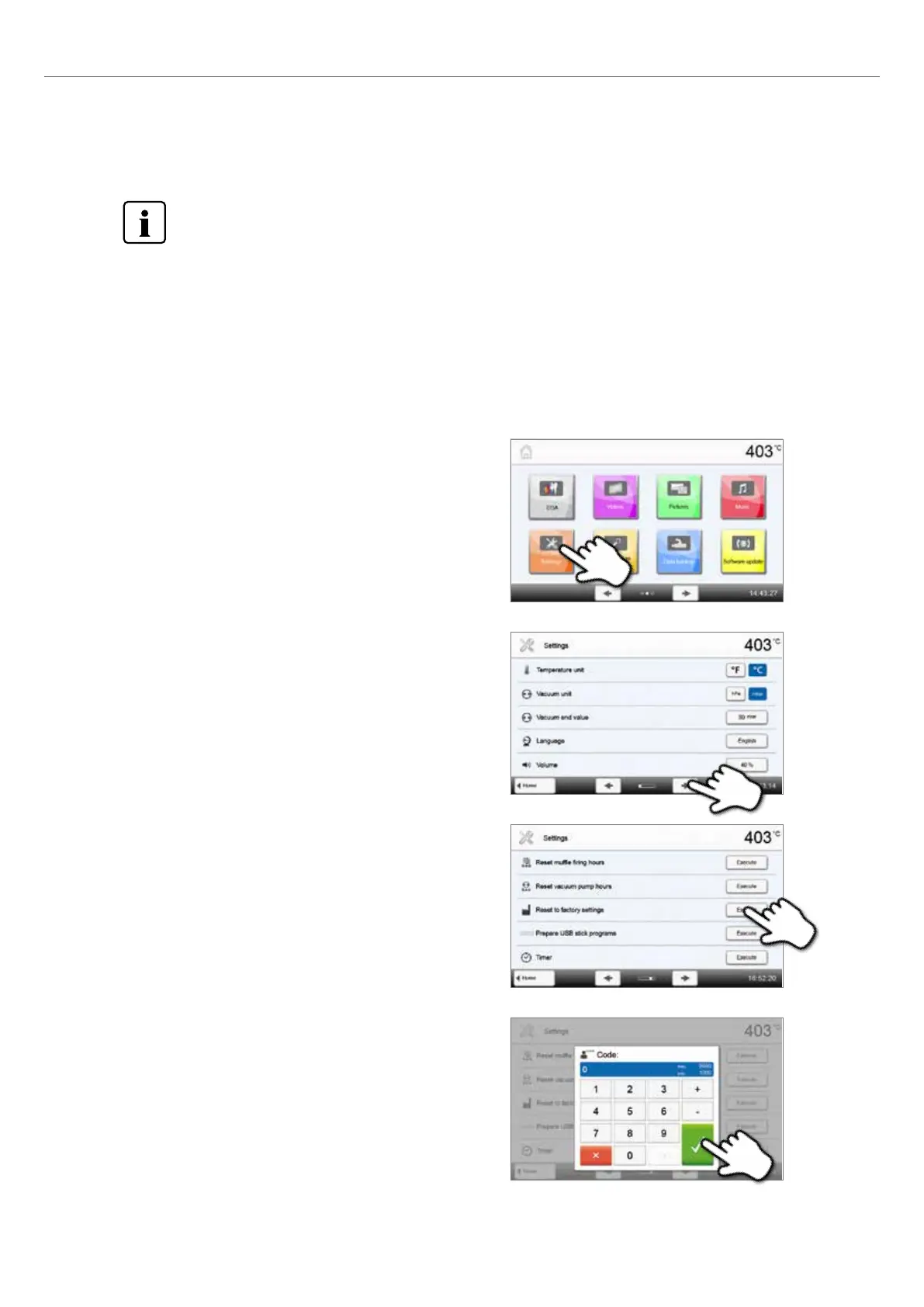
The furnace can be reset to the original settings, by resetting to factory settings. In this process, all programs, melodies,
screens, images and volume adjustments are irrevocably reset to the factory settings.
For that purpose, proceed as follows:
1. Open Settings
Scroll to page 2 in the home screen and press the [Settings] button.
4. Enter the user code
Enter the user code (e.g. 1234) and confirm the entry with the green
button or cancel the entry with the red button.
2. Open “Reset to factory settings”
The [Arrow] button is used to scroll through the Settings menu.
Press the button until the setting “Reset to factory settings” appears
in the display.
3. Reset to factory settings
Press the [Execute] button in “Reset to factory settings”.















 To Next Page