Home
J5create
Docking Station
JUD500
Page 232 (操作功能: Wormhole)
J5create JUD500 - 操作功能: Wormhole
244 pages
Manual
Save Page as PDF
To Next Page
To Next Page
To Previous Page
To Previous Page
Loading...
ULTRA STATION
使用手冊
29
F8
鍵
:
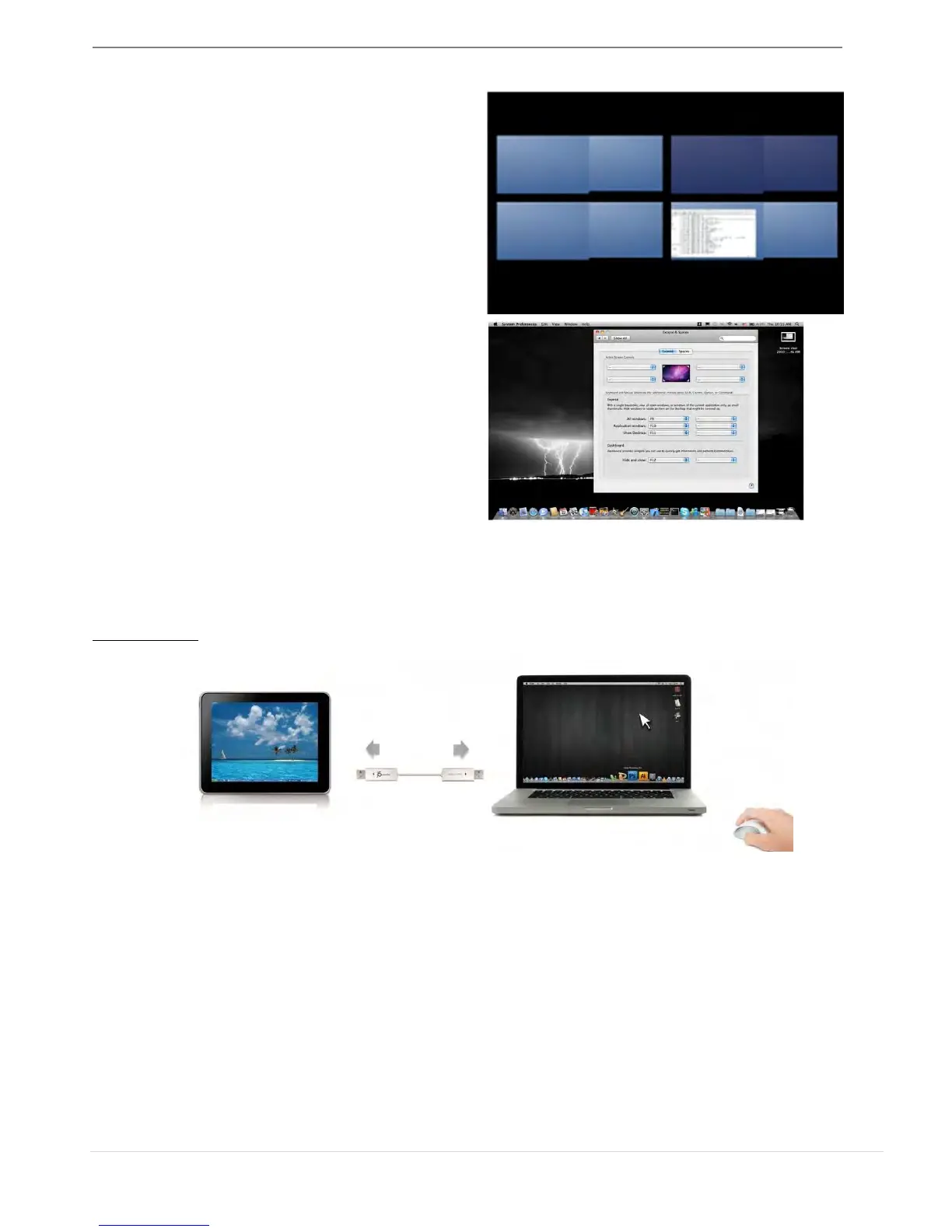
這是快速鍵,隨時可以看到目前任何視窗
下直行的程式,並可以直接拖拉視窗至指定
space
空間,並且可以選擇需要的桌面空間。
Exposé
可以以縮圖方式來檢視所有開啟的視窗。
F9 :
檢視所有視窗
F10
:
檢視應用程式視窗
F11
:
顯示桌面
*
有關更多視窗調整的運用功能,可以參照蘋果電
腦的使用手冊。
操作功能
:
WORMHOLE
鍵盤滑鼠分享
o
使用滑鼠移動或關閉螢幕
邊界的畫面
:
在喜愛設定裡選擇"
使用滑鼠游標移出螢幕邊界
>
在這台電腦的左邊"
滑鼠游標將移出本電腦
的螢幕左邊邊界,您可以設定另一台電腦在本電腦的位置,來決定當移出螢幕邊界時,滑鼠游
標出現在你所決定的另一台電腦螢幕的邊界,讓您可以更直覺的使用滑鼠游標來進行切換
o
滑鼠中鍵
:
設定是否使用滑鼠中鍵
,
來切換您的鍵盤與滑鼠游標
,
從這一台主機到另外一台主機
o
熱鍵
您可以設定熱鍵
,
來切換控制的主機端
.
預設值為
(Alt+S)
231
233
Table of Contents
Main Page
English
3
Table of Contents
3
Getting Started
6
Installation for Windows
7
Device Driver Installation
7
Verify Device Driver Installation
9
Setup the Sound
10
Device Driver Un-Installation
12
Installation for Mac
13
Device Driver Installation
13
Setup the Sound
16
Verify Device Driver Installation
17
Device Driver Un-Installation
17
Installation for Wormhole
18
Getting Started-Mac
18
GETTING STARTED-Windows
19
Functions Instructions: Windows 7
20
Functions Instructions: Windows Xp
24
Functions Instrutions: Mac
29
Functions Instrutions: Wormhole
31
Technical Support
40
WARRANTY of J5 Create
40
Français
44
Environnements Requis
45
Mise en Route
47
Installation Pour Windows
48
Installation du Pilote
48
Vé Rification de L'installation du Pilote
51
Ré Gler Le Son
52
Dé Sinstallation du Pilote
54
Installation Pour Mac
54
Installation du Pilote
54
Ré Gler Le Son
57
Vé Rification de L'installation du Pilote
57
Dé Sinstallation du Pilote
58
Installation Pour Wormhole
58
Instructions Sur Les Fonctions: Windows Xp
65
Instructions Sur Les Fonctions: Mac
69
Instructions Sur Les Fonctions: Wormhole
71
Depannage
79
GARANTIE de J5 Create
81
Support Technique
81
Deutsch
84
Erste Schritte
87
Installieren bei Windows
88
Installieren des Gerä Tetreibers
88
Prüfen der Gerä Tetreiberinstallation
91
Einrichten des Klangs
92
Deinstallieren des Gerä Tetreibers
94
Installieren bei Mac
95
Installieren des Gerä Tetreibers
95
Einrichten des Klangs
97
Prüfen der Gerä Tetreiberinstallation
98
Deinstallieren des Gerä Tetreibers
99
Installieren bei Wormhole
100
Erste Schritte-Mac
100
ERSTE SCHRITTE -Windows
101
Instructions Sur Les Fonctions: Windows 7
102
Instructions Sur Les Fonctions: Windows Xp
106
Instructions Sur Les Fonctions: Mac
110
Instructions Sur Les Fonctions: Wormhole
112
Fehlerbehebung
120
GARANTIE von J5 Create
122
Technische Hilfe
122
Español
125
Instalació N para Windows
130
Instalació N del Controlador del Dispositivo
130
Verificar la Instalació N del Controlador del Dispositivo
132
Ajustar el Sonido
133
Desinstalació N del Controlador de Dispositivo
135
Instalació N para Mac
135
Instalació N del Controlador del Dispositivo
135
Ajustar el Sonido
138
Verificar la Instalació N del Controlador del Dispositivo
139
Desinstalació N del Controlador de Dispositivo
139
Instalació N para Wormhole
140
Primeros Pasos -Mac
140
PRIMEROS PASOS -Windows
141
Instrucciones de las Funciones: Windows 7
142
Instrucciones de las Funciones: Windows Xp
146
Instrucciones de las Funciones: Mac
151
Instrucciones de las Funciones: Wormhole
153
Solució N de Problemas
162
GARANTÍ a de J5 Create
163
日本語
167
使ってみましょう
170
Windows のインストール
171
デバイス ドライバーのインストール
171
デバイス ドライバーのインストール点検
173
サウンドの設定
174
デバイス ドライバーのアンインストール
176
Macのインストール
177
デバイス ドライバーのインストール
177
ドライ をクリックして先へ進んでください
179
サウンドの設定
180
デバイス ドライバーのインストール点検
181
Wormhole のインストール
182
機能説明: Windows 7
185
機能説明:Windows XP
189
機能説明:Mac
193
機能説明: Wormhole
195
トラブルシューティング
202
漢語
205
Getting Started
209
Windows 安裝
210
安裝流程
210
確認安裝狀態
212
設定音效
213
移除流程
215
Mac 安裝流程
215
安裝流程
215
設定音效
218
確認安裝狀態
219
移除流程
219
Wormhole 安裝流程
220
入門-Mac
220
入門-Windows
221
功能操作: Windows 7
222
功能操作: Windows Xp
226
操作功能: Mac
230
操作功能: Wormhole
232
簡易疑難排除與安裝提醒
240
J5 Create 產品保固
242
技術支援
242
Other manuals for J5create JUD500
Quick Installation Guide
16 pages
Related product manuals
J5create JCD381
6 pages
J5create JCD543P
2 pages
J5create Ultra Station
41 pages



 To Next Page