EasyManua.ls Logo

J5create JUD500 - Getting Started

J5create JUD500
244 pages
Print Icon
To Next Page IconTo Next Page
To Previous Page IconTo Previous Page
Loading...
ULTRA STATION USER MANUAL
5
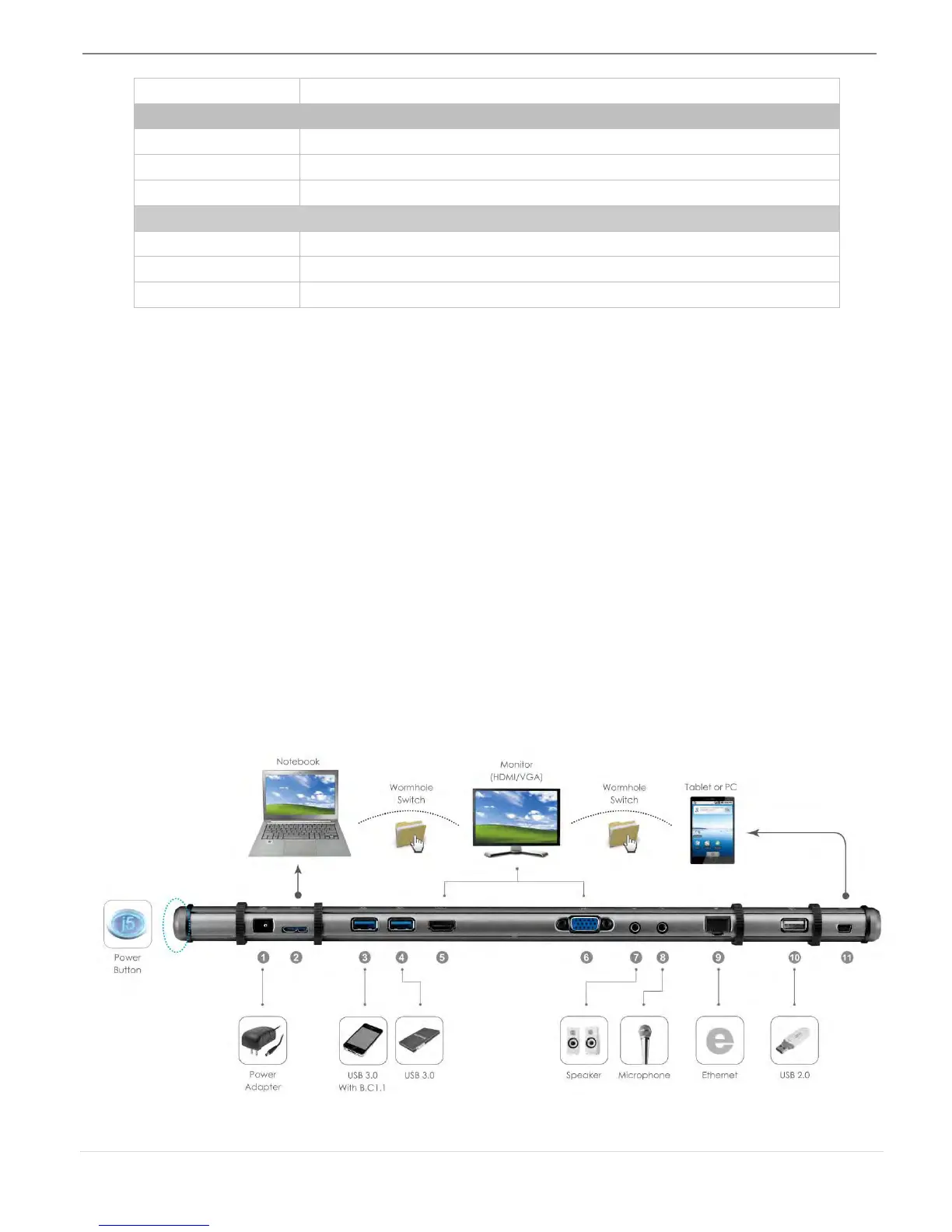
Speaker(7)
3.5 mm stereo audio out
Wormhole Switch(11)
Wormhole port
USB 2.0 mini B Female connector
Cable
USB 2.0, mini B to Type-A (2 meter)
Transfer Rate
Up to 20 Mbps, transfer rate
Physical Specification
Housing Material
Aluminum
Dimensions
Main body: 386.4(W)x 28.5(H)x22(D) mm
Weight
138g
Package Contents
Ultra Station (JUD500)
USB 2.0 cable
USB 3.0 cable
Power Adapter (5V/4A)
Driver CD with E-manual
Quick Installation Guide
GETTING STARTED
Notes for Before Installation
Install the driver completely before inserting the USB cable into your computer
Run the setup program as an administrator to avoid errors in installation
Connect the VGA or HDMI Cable of Display to the VGA or HDMI port of Ultra Station
first before connecting the USB cable to the computer
Un-install the previous driver first before installing the latest driver


Table of Contents

Other manuals for J5create JUD500

Related product manuals