8
PROGRAMMING
INSTRUCTIONS
FOR CHEMICAL
FEEDER PUMPS
(INSTALLATION
TECHNICIAN ONLY)
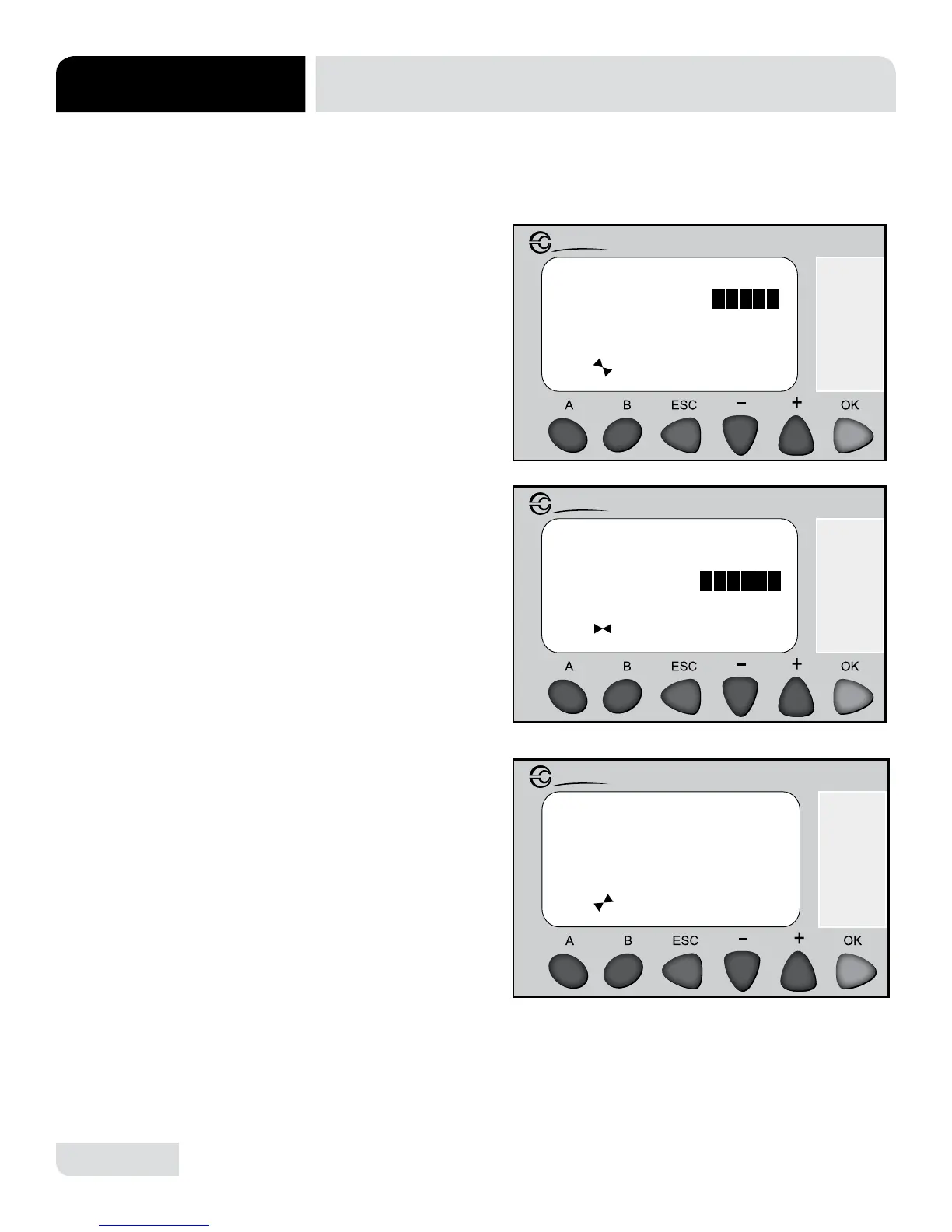
The chemical feeder pump timers are located on screens 3, 4 & 5. To access the
programming mode follow the process detailed below.
INSTRUCTIONS
INSTALLATION
1. Press “A” to cycle
through screens until
reaching the "Fill Cycle
Timers" screen (#3).
2. Press “+” or “-” to
highlight the timer in need
of adjustment and press
“OK” to enter edit mode
for that timer.
3. Press “+” or “-” to make
needed adjustments and
press “OK” to conrm.
4. Press “A” and continue
to the “Wash Cycle Timers”
screen (#4). Follow steps
2 & 3 to conrm any
adjustments.
5. Press “A” and continue
to the “Wash Cycle Timers”
screen (#5). Follow steps
2 & 3 to conrm any
adjustments.
6. Press “A” & “B”
simultaneously to return
to the home screen (#1).
Run the machine through
several cycles to
verify changes.
Fill CYCLE TIMERS:
Fill Timer: s
Det Timer:
R/A Timer: 0012.0s
s
Millenium 3
Crouzet
0010.0
WASH CYCLE TIMERS:
Det Timer:
R/A Timer: 00008s
San Time:
s
Millenium 3
Crouzet
0005.0
s
00008
WASH CYCLE TIMERS:
Wash Time: 00075s
Rinse Time:
Drain Time: 00008s
s
Millenium 3
Crouzet




 To Next Page