
 Need help?
Do you have a question about the Jandy ePump and is the answer not in the manual?
Warning regarding suction fittings and proper flow rate matching.
Risks associated with prolonged immersion in hot water and symptoms.
Guidelines for safe spa water temperature and usage practices.
Covers introduction, panel description, and components.
Instructions for mounting the backplate to electrical boxes or walls.
Steps for connecting the interface to the pump and setting DIP switches.
Details on connecting and operating via remote contacts.
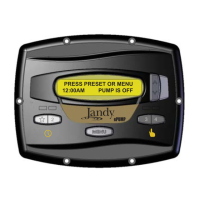
Description of the controller display when the pump is not running.
Display status when the pump is running, showing speed and status.
How to manually start and stop the pump using preset buttons.
Creating and managing timed pump programs for specific speeds.
Procedure to access the installer-specific setup menu.
Defining the allowable range for pump speed adjustments.
Configuration of pump priming speed and how long it runs.
Setting the dedicated energy-efficient filtration speed.
Enabling and configuring the pump's operation to prevent freezing.
Procedure to access the user-configurable setup menu.
Adjusting the current time displayed on the interface.
Customizing names for the pump speed presets.
Options for managing the backlight of the user interface display.
Choosing the display language for the user interface.
Programming run duration for presets 3 and 4.
Diagram illustrating user-selectable operation modes and presets.
Diagram showing paths for configuring user settings.
Diagram detailing installer-accessible configuration options.
 General
| Brand | Jandy |
|---|---|
| Model | ePump |
| Category | Water Pump |
| Language | English |


 To Next Page