19
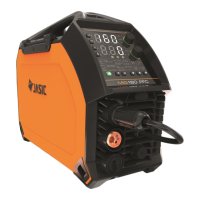
CONTROL PANEL - JASIC MIG EM-160C and EM-200C
1. Remote control selecon: Pressing this buon will set current control from the panel to a remote
device such as a foot pedal, TIG torch remote potenometer or a remote control device for MMA.
When in remote mode the LED indictor will also light up.
2. Synergic selector buon: Turns synergic mode on or o. When in synergic mode the LED indictor will
also light up.
3. Wire inch switch: When pressing this buon, the feed motor will acvate and feed the welding wire
through the liner torch unl it comes through the welding p. When the wire is inching the LED
indictor will also light up.
4. Gas purge switch: When the gas-check buon is pressed, the gas will ow. When the key is pressed
again gas ow will cease. When the gas is purging the LED indictor will also light up.
5. Welding process selecon area and selector switch: Allows user to select MIG, MMA or Li TIG.
6. Material and gas selecon area, pressing either the up or down buons will scroll you though the
preset material and gas combinaons type selector buon (preset according to material selected).
7. Top digital display with rotary encoder for carrying out parameter adjustments including wire feed
speed, current control and material thickness depending on welding process mode.
8. Boom digital display with rotary encoder for carrying out parameter adjustments including voltage,
inductance/arc force and burn back me depending on welding process mode.
9. Warning indicators:
a. The yellow warning LED will light up if the machine overheats.
b. The red warning LED will illuminate if the machine experiences an input mains under or over
voltage situaon.
c. The VRD indicator The VRD (Voltage Reducon Device) LED will be lit when the machine is in
MMA mode and the VRD funcon is enabled.
10. Standard MIG gun or Spool Gun switch: This selector buon allows the use of a spool gun to be used
in MIG Mode, the selected LED indictor will also light up.
11. Torch trigger mode selecon area: Use this selector buon to choose between 2T or 4T mode for
MIG torch nger switch control, the selected LED indictor will also light up.
12. MIG wire size selecon area: Here you can choose between various MIG wire sizes, pressing the
buon will scroll you through the size opons and is highlighted by the LED indicator lighng up.


 To Next Page
 Loading...