Description and Operation
DELTA Configuration
Establishing a USB Cable Connection
20 www.javad.com
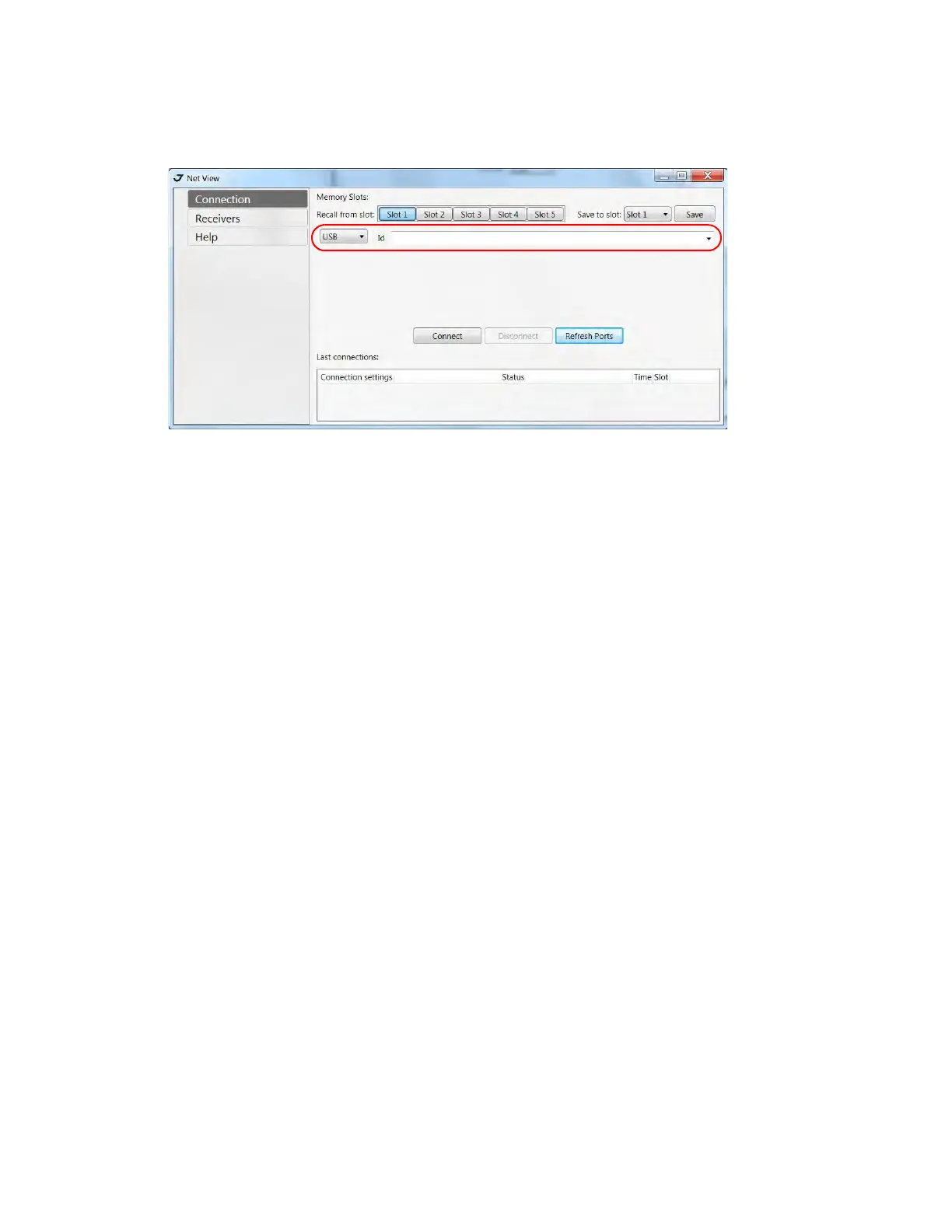
3. Start NetView and select USB as type of connection mode and select USB port ID from the list.
Figure 1-6. NetView - Connection via USB port
1.5. DELTA Configuration
DELTA receiver can be configured according the desired survey type, for RTK or for post-processing:
• A static Base station collects measurement information and saves this data to its internal memory.
• An RTK Base station collects measurement information, determines differential corrections, and
transmits them to the RTK Rover(s).
• A static Rover collects observation data from the same satellites during the same time interval as
the static Base station.
• An RTK Rover collects measurement information and accepts corrections from the RTK Base
station to compute its relative position.
• A Rover acting as a repeater to re-transmit RTK Base station measurements to other rover
receivers, extending the range of a GPS system.
Note: Refer to the NetView Software Manual for full software description.
1. Connect the receiver and computer as described in “Connecting the Receiver and a Computer” on
page 19. Start NetView. Select the connection type and connect the receiver and PC.
2. Click ReceiverParameters on the left panel.
Note: Click Apply every time after the parameter was changed, otherwise the receiver won’t save the changes.
Click Refresh, to ensure the changed parameters and new configuration are saved.


 To Next Page