Description and Operation
DELTA Configuration
Establishing a USB Cable Connection
21www.javad.com
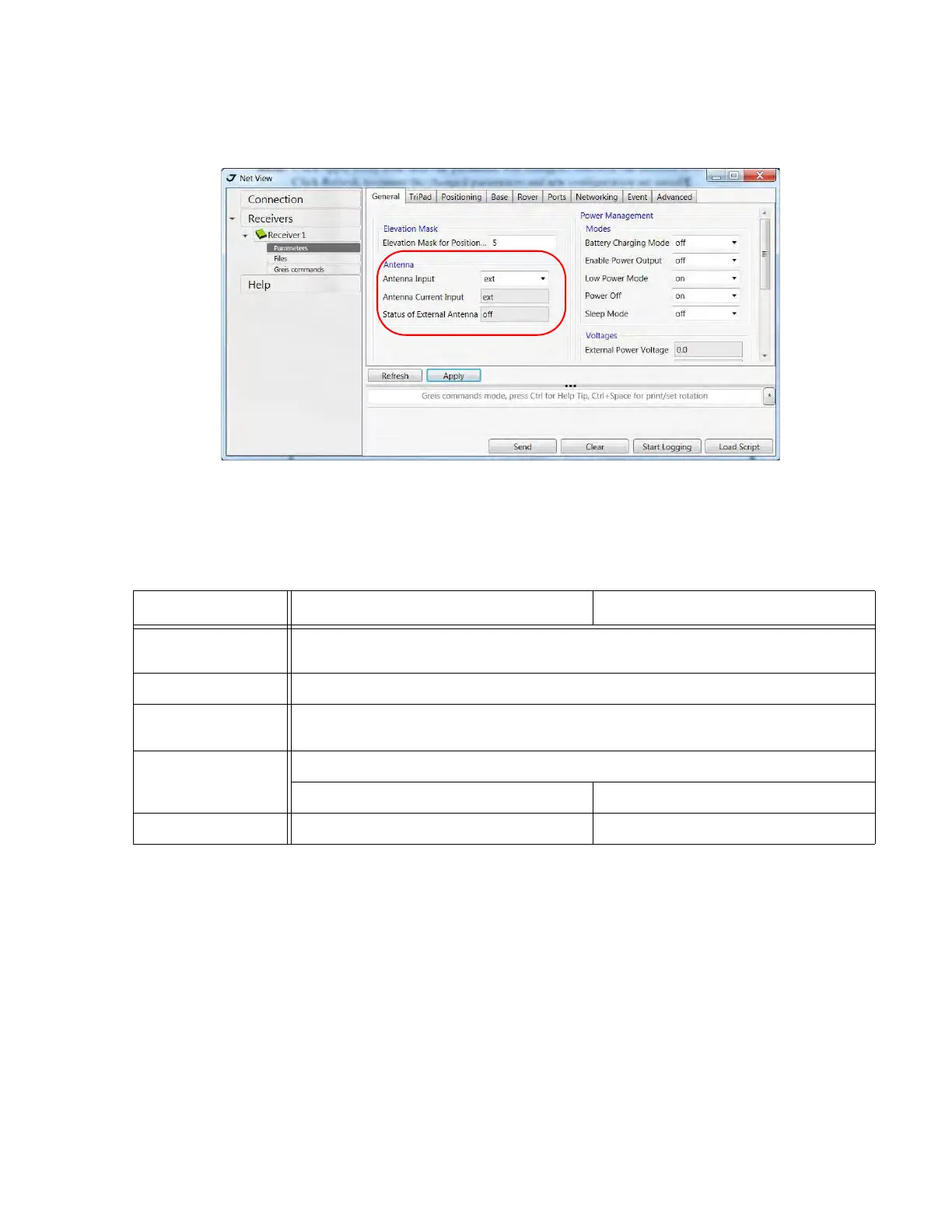
3. In the General tab set the parameter Antenna Input to External (Figure 1-7).
Figure 1-7. General tab
4. Open the TriPad tab and set the following parameters (Table 1-1), click Apply (Figure 1-8 on
page 22).
Table 1-1. TriPad Settings
Parameter Base Rover
Implicit Message
Output Period
15 seconds
Elevation mask angle 15 degrees
File name prefix Enter a unique ID, such as the last 3 digits of receiver’s serial number. By deafault the
prefix is
log
FN key mode (starts/stops the data recording when FN button is used)
Select LED blink mode switch for Static data Select Occupation mode switch (for RTK)
Initial dynamic mode - Select Dynamic (for trajectory survey)


 To Next Page