- 88 - UD - 319472KFR EN DE
électronique
ATTENTION
Lors des nettoyages, des charges
électr ost atiqu es pe uv ent se s toc ker e n sur face
des mat ières plast iques de l’ant enne ou d u
boitier émetteur, le nettoyage de ces surfaces
doit-être effectué avec un chiffon humide
VERIFIEZ ! La batter ie doit êt re BLEUE
élec troniq ue
ATTENTION
Lors des netto yage s, des char ges
électros ta tiq ues p euv ent se s tocke r e n s urface
des matièr es plasti ques de l ’antenn e ou d u
boitier ém ette ur, le ne ttoyage de ces surface s
doit-être effect ué avec un chiffo n hum ide
VERIFIEZ ! La batterie doit êtr e BLEUE
4.2- Radio remote control start up
NB : If during this procedure, both UDE transmitter indicator light begin flashing, please
contact the technical person in charge of the installation.
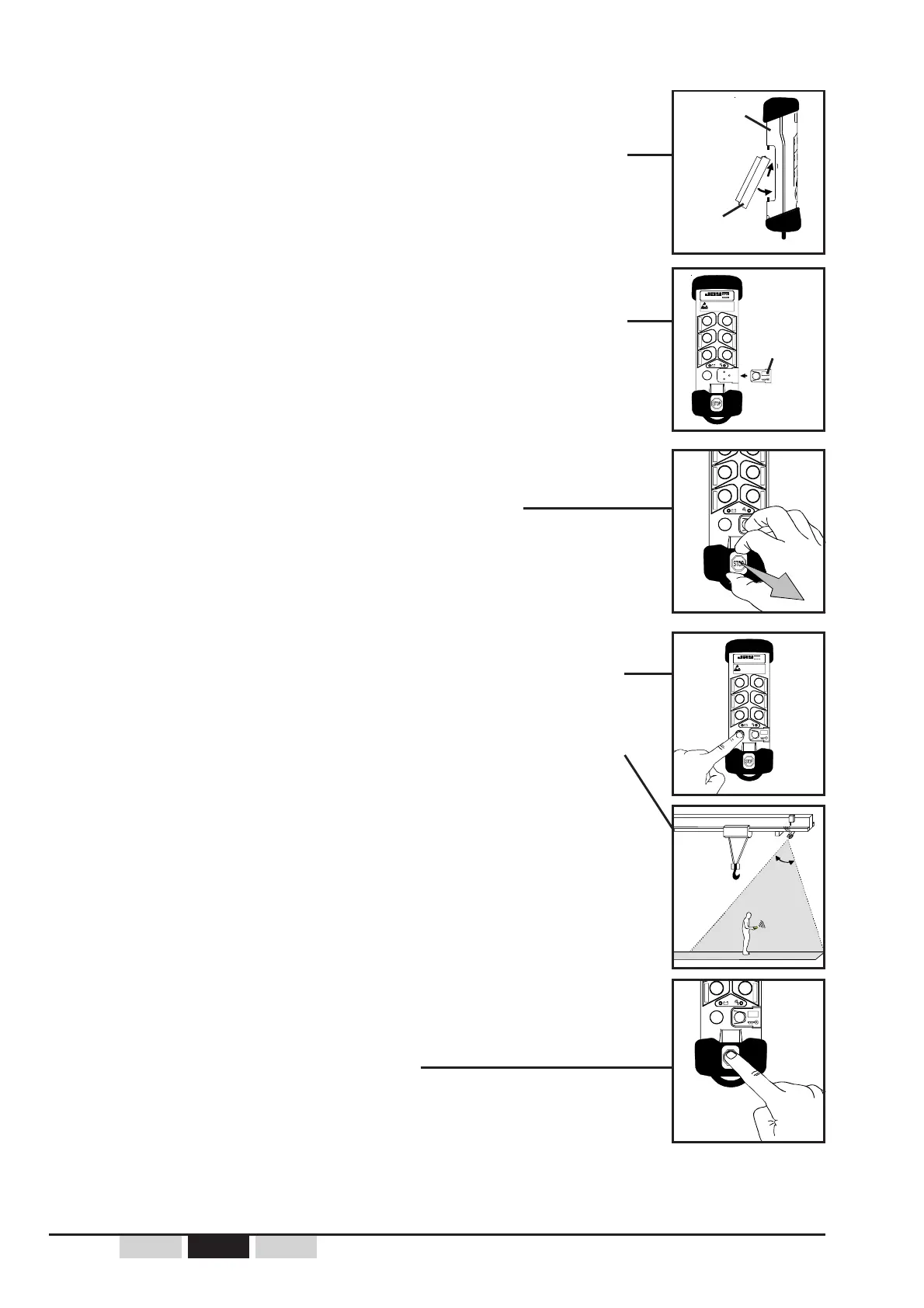
1- Switch ON the UDR receiver.
2- Take care that UDB2 battery pack is loaded and is well
connected to UDE transmitter back.
3- Install the electronic key on the transmitter or take care of
its presence on UDE transmitter.
4- Unlock the transmitter stop palmswitch button.
5- Press the «On/Horn» button until the receiver is started up.
If the UD radio remote control is equipped with the
option «start up by infrared validation» : with the
transmitter, aim at the infrared UDF module bounding the
zone of starting up while pressing on the green "On / Horn"
button.
6- Use the radio remote control to control the equipment.
To stop the radio remote control :
press the UDE transmitter stop palmswitch button.
UDE
transmitter
UDB2
battery pack
electronic key
60°

 To Next Page
 Loading...