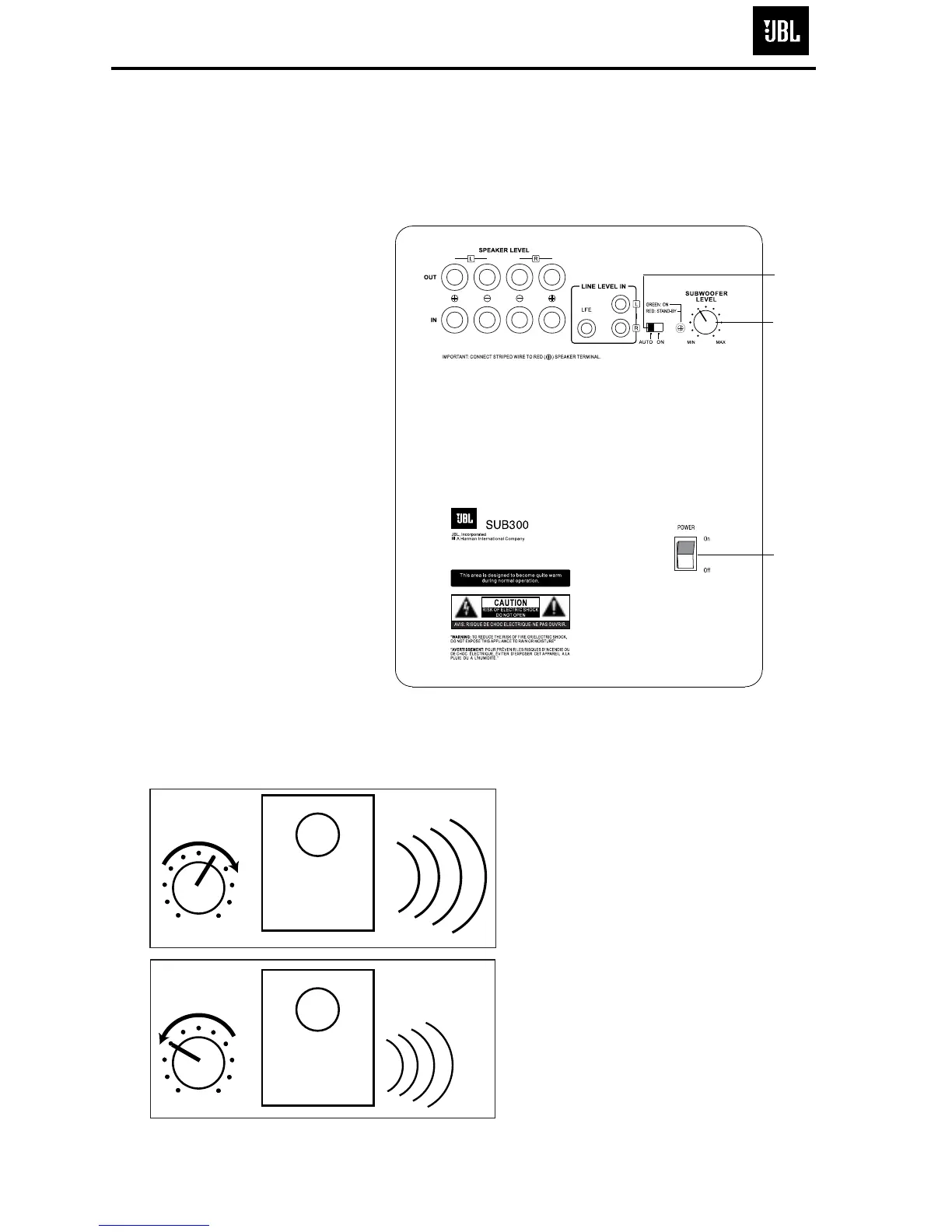
Move the Master Power switch
(marked “Power”
å) to the “
•
”
(On) position to use the sub-
woofer. The SUB300 subwoofer
will automatically turn on or go
into standby (sleep) mode
when left in the auto mode
(“Auto/On” switch
ç in the
“Auto” position). When your
receiver or amplifier is off, or is
not sending program material
to the subwoofer, the sub-
woofer will be in standby mode
(LED will be red). When the
sub
woofer senses an audio sig-
nal,
it will automatically turn on
(LED will be green). If the sub-
woofer does not sense a signal
after
approximately 20 minutes,
it will automatically go into
standby mode.
When the “Auto/On” switch
ç
is switched to the “On” posi-
tion, the subwoofer will remain
on, whether or not program
material is playing.
If you will be away from home
for an extended period of time,
or if the subwoofer will not be
used, switch the Master Power
switch
å to the Off position.
VOLUME



 To Next Page