5 - 6
Section 3 Routine Maintenance
9803/6020
Section 3
5 - 6
Issue 1
Hydraulics (continued)
Changing the Nephron Filter
1 Prepare the Machine
Position the machine on level ground. Stop the
engine.
Remove the starter key.
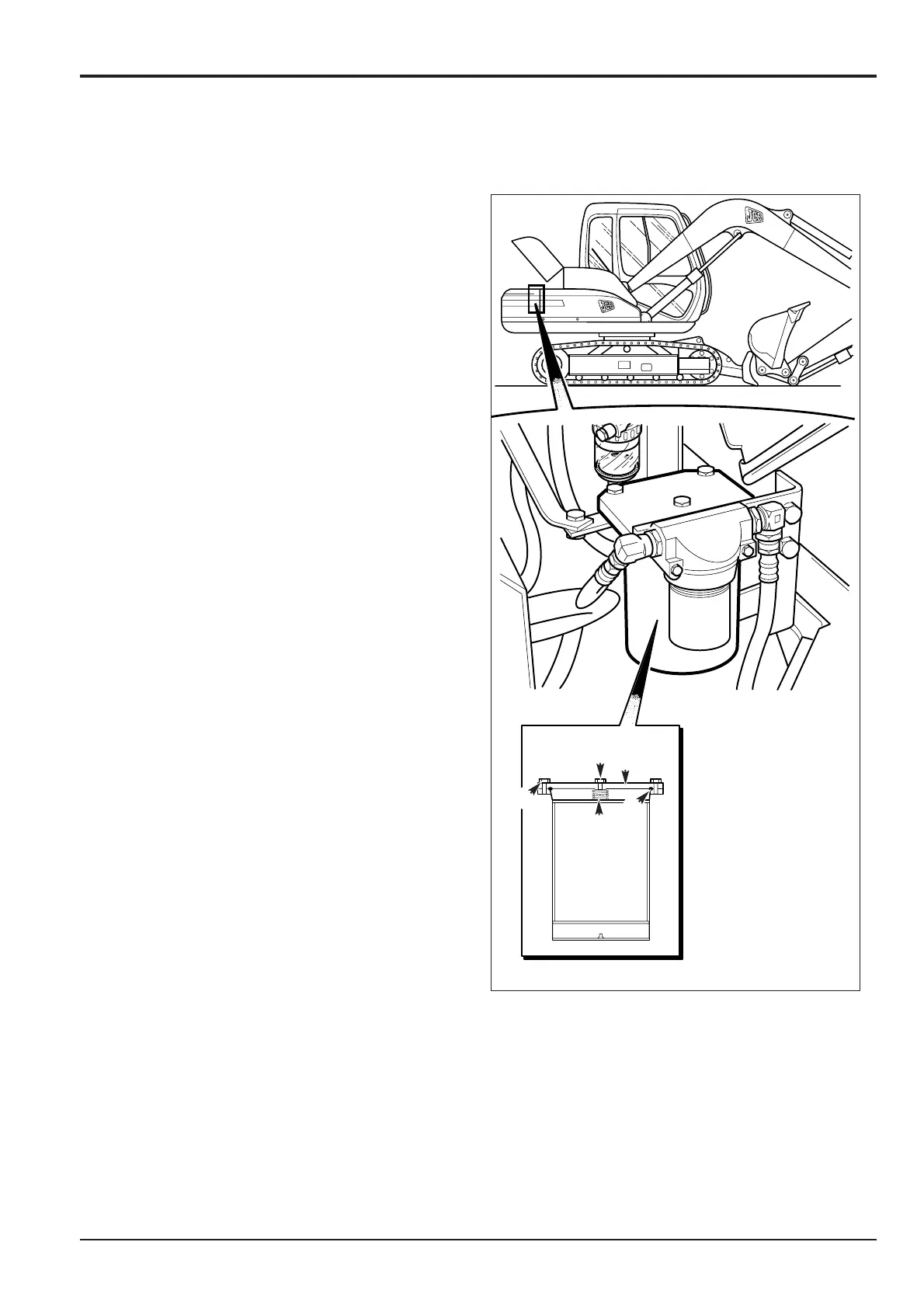
2 Locate Nephron Filter A
Refer to Component Location Diagrams.
3 Release Tank Pressure
(See Releasing Tank Pressure).
4 Remove the Nephron Filter
a Remove bolts B, cover C and remove the O-ring D
and spring E.
b Lift up the Nephron filter element F carefully and
remove. Take care not to drop any sediment.
5 Fit a New Element
a Peel off the 4 foil seals of the new Nephron filter
element F (one on the lower side, two on the sides
and one on the upper side).
Note: If the foil is not removed, the filter will not function.
b Slowly insert Nephron filter element F. Install
spring E, O-ring D, cover C and bolts B.
6 Prime the Nephron Filter
Start the engine and set at low idling. Loosen plug G
and then re-tighten when hydraulic oil flows out.
7 Stop the engine. Check the hydraulic oil level (see
Checking the Fluid Level) and, if necessary, top-up
(see Topping-up Fluid Level).



 To Next Page